Compare Claude Code and Cursor: 6 Tools for Large Repos

A shared-package refactor is a useful way to compare Claude Code and Cursor: can the assistant find callers, preserve their assumptions, and check the change across packages? Both products can work beyond a single file. The decision is how you want to direct that work and review the result.
Claude Code offers a full CLI alongside IDE, desktop, and web surfaces. Cursor combines an editor-centered workflow with its own CLI and cloud agents. Choose Claude Code if you want to drive the investigation through terminal commands and repository instructions; choose Cursor if you want planning, edits, and review close to your editor. Neither choice removes the need to inspect dependencies and run relevant tests.
The six options below cover different ways to work on a large repository. Their order follows this shortlist, rather than a benchmark ranking. Start with the Claude Code and Cursor tradeoffs, then use the alternatives to check whether your team needs a different workflow.
The product cards summarize editorial judgments about workflow fit, repository context, validation, and review controls. Their scores are not measured task-success rates or a hands-on benchmark; small score differences do not establish a performance advantage. Use the documented tradeoffs below to choose a pair for your own evaluation.
1. Aider

Pros
- Terminal-first, git-friendly workflow
- Maps the whole codebase
- Works with cloud or local models
- Runs linting and tests inline
- Auto-commits with sensible messages
Cons
- Architecture awareness still has limits
- Less polished IDE experience
- Best for terminal-comfortable teams
Aider makes sense when your team already lives in the terminal and doesn't want an AI tool to drag everyone into a new editor workflow. If you're trying to compare Claude Code and Cursor, Aider is useful as a control case because it strips away a lot of UI gloss and forces the real question: does the assistant actually understand the repo, or is it just good at talking?
Aider describes itself as AI pair programming in your terminal, and that framing is accurate. It works with cloud and local models, supports more than 100 languages, and makes a map of the entire codebase so it can operate with more than file-level context. That matters in larger repositories where a clean edit in one folder can quietly break three others.
A few details matter more than they seem:
- It auto-commits changes with sensible git messages
- It can run linting and tests as part of the loop
- You can feed it web pages and images as context
- It can still fit into IDE use through comments in code
That last point gets overlooked. Teams sometimes treat terminal-first tools as hostile to editor-first work. In practice, the split is more about who drives the session. Aider assumes the developer is steering through git and chat, not waiting for a polished desktop agent to take over.
The tradeoff is pretty plain. A codebase map is useful, but it isn't the same as architecture awareness. In a monorepo, knowing which files exist is only the start. You still need help tracing dependency chains, understanding blast radius, and spotting when the "right" local fix is wrong for the system.
Fast edits are cheap. Correct edits across modules are not.
If your team is comfortable reading diffs, running tests often, and keeping the AI close to normal git habits, Aider is a strong option. If you're hoping the tool will infer your architecture from file access alone, that's where things get shaky.
2. Amazon Q Developer

Pros
- AWS-specific assistance for existing users
- Console and chat experiences remain available
- Can support in-progress AWS work
Cons
- New IDE free-tier accounts unavailable
- New subscriptions unavailable
- IDE support ends April 30, 2027
Amazon Q Developer is a conditional option for existing AWS-centered teams, rather than a general recommendation for a new IDE assistant. Before comparing its coding features, check whether your organization already has access.
AWS stopped new Amazon Q Developer free-tier account creation and new subscription creation on May 15, 2026. Existing Q Developer Pro subscriptions can still add users. Its IDE plugins and paid subscriptions reach end of support on April 30, 2027.
Those IDE restrictions do not mean every Q experience is closing. AWS says Q in the AWS Management Console and first-party experiences, including Slack and Microsoft Teams chat apps, is unaffected by that sunset. Treat cloud assistance and IDE access as separate decisions.
For a team with an existing subscription, Q can still be relevant to an in-progress AWS migration or code transformation. The practical question is whether the work can finish inside the remaining support window, and what will replace the IDE workflow afterward.
For an existing IDE customer with confirmed access, these selection criteria still apply:
- If your large repo problems are tightly tied to AWS systems, Q deserves serious testing.
- If your main issue is codebase understanding across modules, services, and internal dependencies, AWS awareness doesn't solve that by itself.
- If you're making a long platform bet, the announced end-of-support timeline for IDE plugins in 2027 should be part of the decision.
A tool that fits your infrastructure can still be the wrong new dependency if its access path is closing. Existing AWS customers should evaluate continuity and migration effort alongside the coding features.
For a new large-repository workflow, compare the currently accessible assistants below first. Revisit Q when you have confirmed access and a specific AWS task that benefits from it.
3. Cursor

Pros
- Strong planning before edits
- Parallel cloud agents save time
- Multiple models in one workspace
- Smooth editor and CLI workflow
- All repos view aids navigation
Cons
- Autonomy can scale bad edits
- Context may thin across modules
- Needs careful validation on refactors
Cursor is usually where this comparison starts, because it looks powerful right away. Desktop app, CLI, model choice, planning support, cloud agents that can run for hours or days, and an all repos view. If your team wants an editor-first agent, Cursor is one of the first tools they'll test.
And that's fair.
Cursor markets itself as a coding agent for ambitious software, which is a more honest framing than "autocomplete with extra steps." The point is handoff. You ask it to plan or build, reference files with @ commands, and let it work through larger tasks while you stay focused on decisions.
The useful distinction is where you review the work: an editor-centered workspace can keep the plan, changed files, and diffs close together. Whether that saves supervision depends on the task and your team's review habits.
Where Cursor feels strong
Its appeal in large engineering workflows comes from orchestration:
- planning before edits
- parallel cloud agents on multiple tasks
- one environment for model switching
- a smoother editor experience than terminal-first tools
That's the good part. The risky part is almost the same thing.
Autonomy increases the amount of work an assistant can attempt before review. For a cross-package change, ask Cursor to identify consumers and the affected tests before it edits. Its Plan Mode gives you a reviewable implementation plan; that plan still needs to match the repository.
A lot of teams miss that on evaluation. They test one polished feature build, not the ugly change where a shared interface shifts, tests fail in a downstream package, and the agent has to recover instead of restart.
Choose Cursor when an editor-centered plan and review loop fits your team. Its cloud agents can run independently in isolated development environments, so agree on setup, test commands, and review boundaries before delegating a change.
4. GitHub Copilot

Pros
- Fits GitHub-native team workflows
- Strong PR and review integration
- Broad IDE and surface support
- Helpful for planning and coordination
- Supports MCP and custom agents
Cons
- GitHub context does not prove dependency coverage
- Cross-module changes still require source review
- Large monorepos need relevant validation
GitHub Copilot is strongest when GitHub itself is the center of gravity. If your team lives in issues, pull requests, reviews, branch protections, and repository automation, Copilot fits naturally because it meets you inside the workflow you already trust.
That sounds boring compared to agent demos. It's not boring in practice. It's efficient.
Copilot now stretches well beyond inline completion. It helps with codebase exploration, project planning, review, workflow automation, merge conflict resolution, and agent mode. It works across a wide range of IDEs and also shows up in terminal, desktop, web, mobile, and Slack. It supports MCP servers, custom instructions, and custom agents.
That stack matters for teams that don't want another separate work surface to manage.
Where Copilot usually wins
Copilot is often the better choice when the bottleneck isn't writing code. It's coordination.
You can feel that in day-to-day work:
- issues already hold intent
- PRs already hold review logic
- repo history already holds useful context
- automation already sits in the GitHub loop
Compared with Cursor, Copilot puts more of the buying decision around the GitHub workflow you already use. That is a difference in integration fit, not evidence that one assistant is universally more autonomous or more accurate.
The limitation is simple. GitHub context is not architecture context. A strong PR workflow doesn't mean the assistant understands dependencies, dead code, or which "unused" module is actually hit through a side path in production.
That's where large-repo teams often get disappointed. The assistant looks informed because it knows the workflow. Then it proposes a change that makes local sense and system-level trouble.
5. Claude Code

Pros
- Follows imports across the repo
- Handles multi-hour refactors well
- Runs tests during execution
- Works across terminal and IDEs
- Keeps developers in control
Cons
- Needs strong architectural context
- Best when scope is known
- Less polished than editor-first tools
Claude Code offers a full terminal workflow alongside IDE extensions, desktop, and web access. The official overview describes an agent that reads code, edits files, and runs commands. It is a natural candidate when your investigation already revolves around shell tools and repository-specific checks.
For large repositories, make that workflow concrete: ask for the relevant imports and callers, review the proposed scope, then run the tests that exercise those callers. Command execution makes this possible; it does not prove that the assistant has found every dependency.
Why teams lean toward it
When you're doing refactors, migrations, or test-heavy maintenance, the workflow matters more than the interface polish. Claude Code is built around that reality.
It fits teams that need:
- multi-hour refactors
- repo-wide import tracing
- test loops during execution
- developer steering instead of blind handoff
To compare Claude Code with Cursor fairly, give both the same checkout, task, acceptance criteria, and test commands. Record missed callers, failing checks, and reviewer corrections instead of judging the quality of the first explanation.
Choose Claude Code when you prefer directing that investigation through the terminal and your existing tooling. Cursor also has a CLI, and Claude Code also has graphical surfaces, so treat this as workflow fit rather than a strict terminal-versus-editor split.
This is where we think the market still undershoots the real problem. Most teams don't need a flashier agent. They need clearer codebase context before the agent edits anything.
Pharaoh is one way to add structural context through an MCP-connected codebase graph. Use that context to identify dependencies and possible change impact, then check the findings against the source and tests. A graph supplies evidence for the investigation, rather than a guarantee that a change is safe.
6. Cline

Pros
- Shows changes before applying edits
- Strong approval gates and checkpoints
- Planning separated from execution
- MCP integrations expand workflow reach
Cons
- Slower than more autonomous tools
- Extra oversight can add friction
- Best value needs active supervision
Cline is for teams that want a coding agent in the editor, but don't want silent behavior. It keeps the human in the loop on purpose. In a large repo, that can feel slower at first. It can also save you from the kind of bad edit that burns half a sprint.
Cline runs as a chat sidebar in the editor. It reads files, runs tools, edits code, and shows changes before they land. It separates planning from acting, supports @ mentions for files and diffs, creates checkpoints for every tool call, and lets you undo. It also connects to MCP servers, supports hooks and reusable skills, and can run terminal commands or drive a browser.
That mix is unusually practical.
Approval gates are not red tape when the blast radius is unclear.
Cline makes planning, approvals, and checkpoints prominent in its editor workflow. That is useful if you want frequent opportunities to inspect actions. Cursor and Claude Code also offer controls over agent behavior, so compare the actual settings rather than assuming one product always acts silently.
There's a cost, of course. All that control can slow teams that already trust the assistant and just want it to move. So the question isn't whether Cline is "better." It's whether your team needs auditability more than speed.
For regulated environments, critical shared services, or monorepos with a lot of hidden coupling, that answer is often yes.
How to Choose the Right Tool for a Large Repo
Most teams start in the wrong place. They start with demos. You should start with workflow shape.
A terminal-centered team may start with Aider or Claude Code. A team that prefers an editor-centered plan and review loop may start with Cursor or Cline. Copilot belongs on the shortlist when GitHub integration is central. Treat Amazon Q Developer separately: confirm existing access and the remaining support window before planning an IDE evaluation.
| Tool | Workflow | Decision boundary |
|---|---|---|
| Aider | Terminal and git-centered pairing | Good fit when you want to steer edits through chat, commits, linting, and tests. |
| Amazon Q Developer | Existing AWS IDE customers; separate console and chat surfaces | Confirm access first. New IDE free-tier accounts and new subscriptions closed May 15, 2026; IDE support ends April 30, 2027. |
| Cursor | Editor-centered planning and review, plus CLI and cloud agents | Useful when you want the plan, edits, and review close together; cloud work needs a configured development environment. |
| GitHub Copilot | GitHub and IDE-integrated assistance | Useful when issues, pull requests, and repository workflows shape how your team works. |
| Claude Code | Full terminal workflow, plus IDE, desktop, and web surfaces | Useful when you want to direct repository investigation and checks through existing command-line tools. |
| Cline | Editor sidebar with planning, approvals, and checkpoints | Useful when frequent inspection and rollback are central to your workflow. |
Then check whether each assistant can explain a change across file boundaries and support its proposed test scope with source evidence.
Use this checklist on one real task:
- Can it follow imports or references across the repo?
- Can it plan before editing?
- Can it run tests and recover from failure?
- Can it keep context across multiple modules?
- Can it show changes or checkpoint them clearly?
- Can it fit your current CLI, IDE, review flow, and repo setup?
Don't confuse speed with safety. A fast inline edit is not the same as a reliable multi-module change.
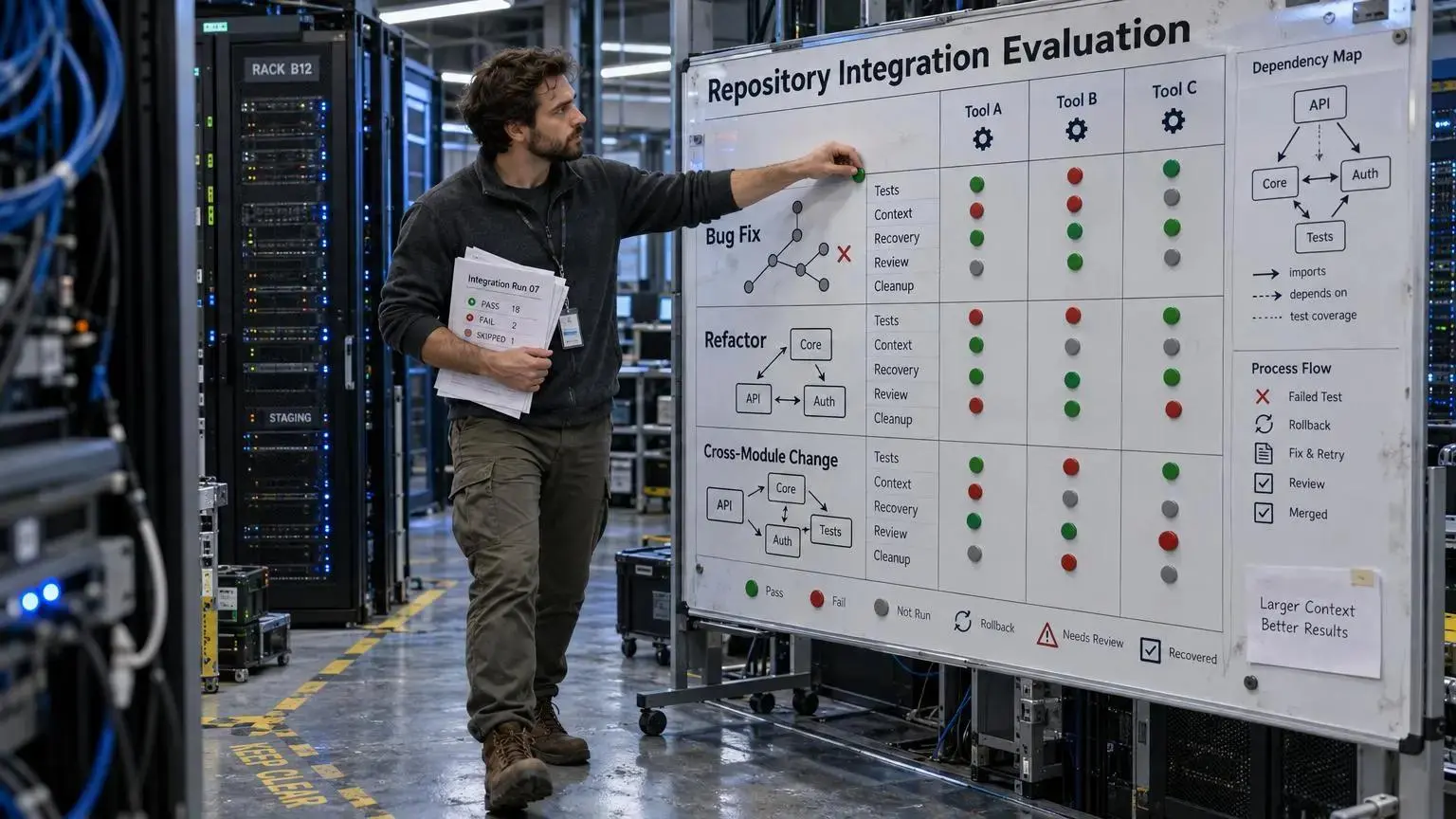
Give each shortlisted tool one bug fix, one refactor, and one cross-module change. Use the same acceptance criteria and track reviewer intervention, missed dependencies, checks run, and cleanup after the first draft. The open source AI Code Quality Framework offers a reference for the linting and testing side.
What Actually Matters More Than Claude Code vs Cursor for Repositories
Most frustration in large codebases doesn't come from weak models. It comes from shallow code awareness.
In a large repository, a plausible local edit can still miss a dependency chain, an established pattern, or a downstream effect. An effective evaluation has to expose those mistakes.
The criteria that matter are pretty consistent:
- dependency navigation
- blast-radius awareness
- pattern recognition across existing modules
- dead code detection
- test and lint validation loops
- approval and rollback control
- cross-repo visibility when the work spans more than one codebase
Ask how each assistant obtains architectural context before it changes code. An editor view, terminal access, or a confident explanation is not evidence that every consumer has been checked.
When an assistant only sees files, it can still sound smart. That's not the same as being safe.
Mapping dependencies before editing can give the assistant a better starting point. If you add a graph through MCP, inspect its scope and validate a known caller before using it to narrow the test plan.
Common Mistakes Teams Make When Comparing AI Coding Assistants
The first mistake is testing on toy tasks. A single-file bug fix tells you almost nothing about repo behavior under stress.
The second is confusing model quality with codebase understanding. Strong output on one prompt doesn't tell you what the assistant knows not to touch. That distinction gets expensive fast.
A few others show up every time:
- ignoring recovery behavior when tests fail or imports break
- underestimating the cost of switching between editor, terminal, PR review, chat, and issue tracking
- evaluating for a solo developer when the real buyer is a team with audit and approval needs
- buying for autonomy before the tool has earned trust on bounded work
Start with bounded repository work and expand the scope only after you understand the assistant's failure and recovery behavior. Keep the same review standard when a task crosses another package or service.
That's where the truth comes out.

Conclusion
If you're trying to compare Claude Code and Cursor for a large repo, the cleanest answer is that both can be useful, but neither should be judged on interface alone.
Aider fits developers who want a git-centered terminal workflow. Existing Amazon Q Developer customers need to weigh AWS-specific value against the IDE sunset. Cursor fits an editor-centered planning and review loop; Copilot fits teams that value GitHub integration. Claude Code suits command-driven investigations, while Cline makes explicit editor approvals and checkpoints central to the workflow.
For large repositories, the better question isn't which tool looks smartest in a demo. It's which one gets the clearest architectural context and the strongest validation loop before it edits your code.
Pick two tools that match your workflow. Then test them on one real cross-module change this week. Track dependency awareness, validation behavior, and cleanup after the first draft. You'll learn more in one afternoon than in ten polished demos.
Article Record
ReferencesPrimary sources used for this article
- Overview
- Claude Code by Anthropic | AI Coding Agent, Terminal, IDE
- Cursor Documentation
- AI Coding Agent for Building Ambitious Software | Cursor
- Aider - AI Pair Programming in Your Terminal
- Usage | aider
- Cline Overview - Cline
- Cline IDE - The Coding Agent for VS Code, JetBrains, Cursor, and Windsurf
- What is Continue? | Continue Docs
- Customization Overview | Continue Docs
- GitHub Copilot documentation
- Overview | Tabnine Docs
Update HistoryMeaningful revisions to this article
- Added Aider’s official project mark and checked logo visibility across all six product cards.
- Added a complete six-tool workflow table and a direct Claude Code–Cursor comparison.
- Clarified Amazon Q Developer access restrictions and support dates.
- Removed an incomplete diagram and explained the limits of editorial scores.