How MCP Servers Work for Developers: No-Fluff Guide

How mcp servers work for developers gets explained way too loosely, and that is where people get burned. Your agent can call tools, sure, but if the server only exposes mushy context or bad queries, you still get duplicate helpers, risky edits, and a lot of wasted tokens.
What matters is boring stuff: what the host can call, what the server returns, and whether those results map to real repo decisions. If you're using Claude Code, Cursor, or Windsurf, watch these first:
- whether the server returns structure, not just more file text
- whether tool inputs are typed enough to stop sloppy calls
- whether the output helps the agent choose a safer next move
Read this and your agent stops feeling blind.
Start With the Problem Developers Actually Have
You’ve probably seen this already. You ask Claude Code or Cursor to make a change in a real repo, and it starts walking files one by one like it’s feeling around in the dark.
It finds a local helper, misses the shared one three directories over, writes a duplicate, then edits a function without seeing the six callers downstream. The diff looks plausible. That’s the dangerous part.
The pain isn’t abstract:
- duplicate code because the agent can’t see the whole system
- risky refactors because blast radius is guessed, not known
- orphaned code because new paths never get wired into production
- wasted tokens because the model burns 40K context reconstructing architecture you already have in the repo
Most teams don’t need more AI magic. They need better plumbing and better context.
That’s where MCP matters. Not as hype, not as another layer to memorize, but as the mechanism that lets tools like Claude Code, Cursor, and Windsurf ask grounded questions instead of guessing. If you want to understand how MCP servers work for developers, start there: they make outside context callable.

What an MCP Server Is in Plain English
An MCP server is just a process or service that exposes tools and data to an AI client in a structured way.
That’s it.
The model doesn’t directly poke around your database, repo, or internal APIs. The client asks the server what’s available, what inputs each tool accepts, and what can be read safely.
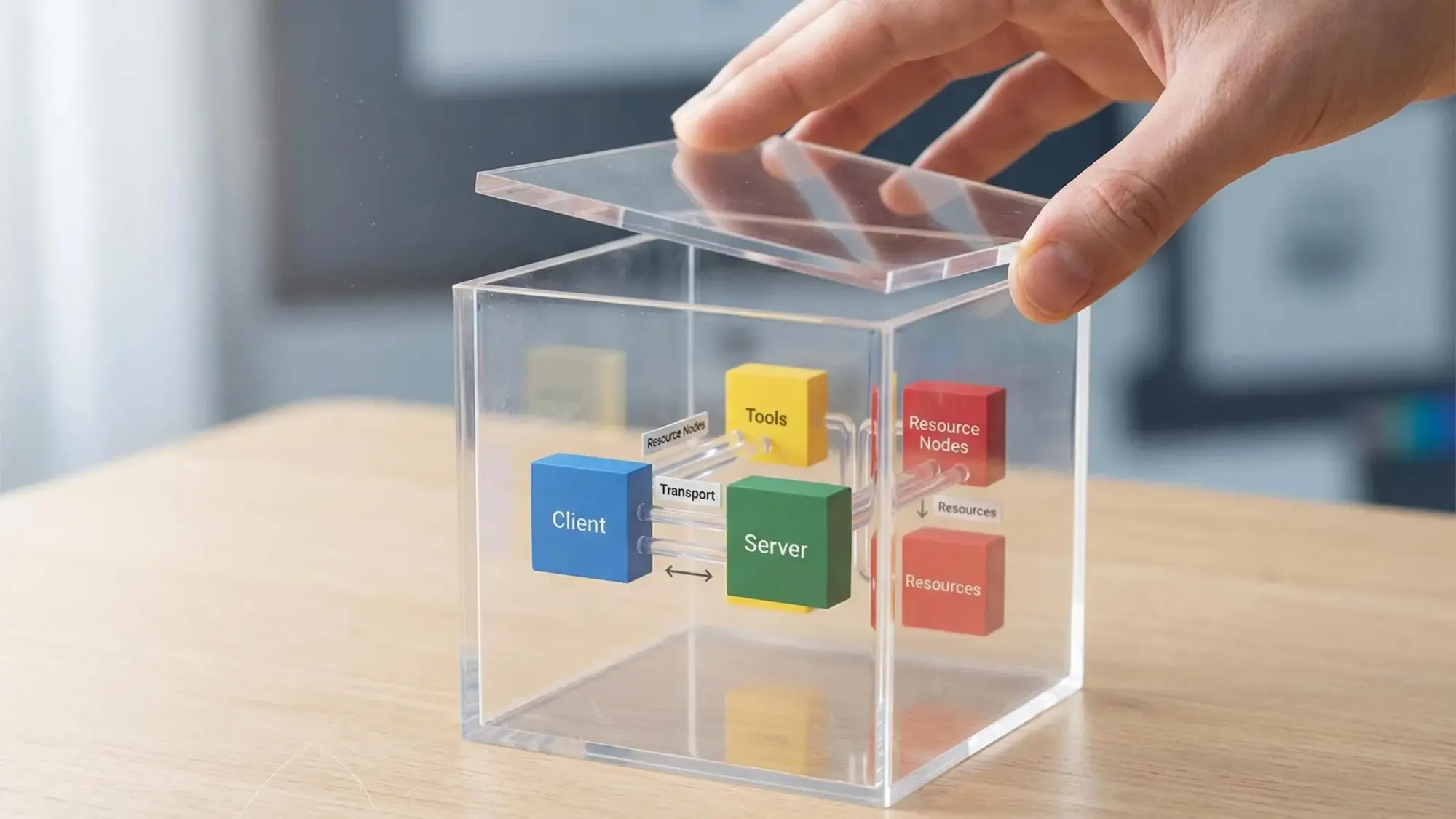
A useful mental model looks like this:
- Client: Claude Code, Cursor, Windsurf, or another host
- Server: the system exposing capabilities
- Tool: a callable function
- Resource: structured data the model can read
- Transport: how messages move between client and server, usually stdio locally, HTTP or SSE remotely
MCP is not a model. It’s not a coding assistant. It doesn’t add reasoning on its own.
It also doesn’t make weak tools better. If the server exposes vague or noisy outputs, the model still has to work with vague or noisy outputs. MCP standardizes connection and discovery. It doesn’t rescue bad design.
That’s the practical answer to how MCP servers work for developers: they give your AI host a clean way to reach deterministic systems without turning every integration into a custom one-off.
How MCP Servers Work for Developers Step by Step
The lifecycle is simpler than most guides make it sound.
- You connect a server to a host
You add an MCP server to Claude Code, Cursor, or another supported client. - The host opens a transport
Local setups often use stdio. Shared services usually use HTTP or SSE. - Client and server negotiate capabilities
The host learns:- what tools exist
- what resources are readable
- what schemas define valid inputs
- The model decides it needs outside context
During a session, the model hits a point where file reads aren’t enough. - The client sends a structured tool call
Not a fuzzy prompt. A typed request. - The server validates inputs before running
This part matters more than people think. Schema validation is one of the few boring things that actually prevents bad calls. - The server executes the query or action
It might hit a graph, file system, API, or CI service. - Structured results come back to the model
The model uses that output to continue reasoning or generate code.
The flow is plain:
model asks, client brokers, server executes, result comes back
A tiny example helps. Say the agent wants to know if a formatter already exists for a TypeScript service.
{ "tool": "function_search", "input": { "query": "format user display name", "language": "typescript" }}The server might return:
{ "matches": [ { "function": "formatDisplayName", "module": "src/utils/userFormat.ts", "callers": 12 } ]}That’s better than reading 15 files and still missing the real answer.
The Three Building Blocks: Tools, Resources, and Transports
Developers keep seeing these terms and blending them together. They’re different, and the difference matters in practice.
Tools
Tools are executable functions. The model calls them when it needs something done or queried.
Useful examples in coding workflows:
- search for a function
- inspect dependencies
- fetch CI status
- trace which endpoint calls a shared module
Tools are best when there’s a clear question and a bounded operation behind it.
Resources
Resources are readable structured data. They’re better for browsing state than triggering an operation.
Examples:
- a generated dependency report
- a structured config snapshot
- a task list from your planning system
If tools are for asking, resources are for reading.
Transports
Transport is just message delivery.
- stdio fits local development and IDE-style workflows
- HTTP/SSE fits remote services and shared team infrastructure
Local stdio is usually the fastest path to working software. Remote transports start to matter when the server becomes team infrastructure instead of a personal setup.
Don’t get lost in protocol trivia here. The point is not memorizing transports. The point is matching the integration to the workflow.
What Happens When Claude Code or Cursor Calls an MCP Server
In a real session, this often happens before you explicitly think about it. The host can discover available tools as part of the connection and route model requests through the server when needed.
That changes the quality of the session.
Without MCP-backed context, the model guesses from visible files. With MCP-backed context, it can ask a narrower, better question first.
Take a familiar case. You ask the agent to refactor a shared utility. A decent setup should not start by editing code. It should first call a blast radius or dependency tool, get back callers, affected modules, and production entry points, then propose a plan.
That’s a different operating mode.
The host typically keeps one connection per server and passes requests through it. You don’t see protocol messages in the chat. You see the effect: fewer blind edits, fewer duplicate helpers, better plans before changes happen.
For skeptical developers, that’s the real payoff. This isn’t about surrendering control. It’s about making the model ask better questions before it touches shared code.
Why MCP Matters More for Codebases Than for Generic AI Demos
Toy demos make MCP look like a nice wrapper around external tools. Real codebases are less forgiving.
Architecture is spread across imports, modules, endpoints, jobs, env vars, and call chains that aren’t obvious from one file at a time. File-by-file reading is expensive, and it still misses structure.
A lot of important engineering questions are not textual. They’re structural.
- Does equivalent logic already exist?
- What breaks if we change this module?
- Is this export dead?
- Is the new code path reachable from production entry points?
Raw file content is one kind of context. Structural metadata is another, and for some tasks it’s much higher signal.
That’s why how MCP servers work for developers matters most in repo-heavy workflows. The protocol is useful when it connects the model to deterministic systems that know the shape of the codebase better than the model can infer from scattered file reads.
The Difference Between File Access and Architectural Context
A lot of people hear MCP and think, “okay, more file access.” That’s too shallow.
File access tells the model what is in a file. Architectural context tells it how the system fits together.
The difference shows up fast:
- file exploration is sequential and token-heavy
- structural queries are compact and direct
You still need source reads for implementation details. Nobody serious thinks graph context replaces code. But starting from raw files alone is like starting a refactor with no map and hoping the directory tree explains itself.
This is where graph-backed approaches are useful. A repo can be parsed into a queryable graph of functions, modules, dependencies, endpoints, and relationships. Then the agent can ask targeted questions like:
- what depends on this module?
- where is similar logic already implemented?
- is this export reachable from production?
At Pharaoh, we do this by mapping TS and Python repos into a Neo4j graph and exposing those queries over MCP at pharaoh.so. The practical win is simple: 2K tokens of structural context can beat 40K tokens of blind file exploration.
That’s not magic. It’s better inputs.
Where MCP Servers Fit in a Real Developer Workflow
The value becomes obvious when you line it up with actual work.
When you enter an unfamiliar repo, you want a map first. Modules, dependencies, endpoints, hot spots. Not a file safari.
Before writing new code, you want to know whether the logic already exists. Duplicate helpers are one of the easiest ways to make an AI session look productive while making the codebase worse.
Before refactoring, you want blast radius and dependency chains. After the second broken rename, this stops feeling optional.
During cleanup, structural tooling helps surface dead exports and repeated patterns across modules. After implementation, reachability checks matter more than most teams admit. Plenty of code is “done” and still not wired into a live path.
Planning work benefits too. If you compare specs against code, gaps become easier to spot when the model can query actual structure instead of summarizing files.
Some of these calls should happen quietly in the background. Others should be explicit. That’s a design choice. But the job stays the same: give the agent context that changes its behavior, not just extra text.
What Makes an MCP Integration Actually Good
Protocol compliance is a low bar. Plenty of integrations work and still aren’t useful.
A good MCP integration has a few traits:
- clear tool boundaries
- predictable structured outputs
- schema-validated inputs
- low setup friction in the host you already use
- answers that drive actual decisions
For code intelligence, we’d judge it by questions like:
- how is this codebase structured?
- does this function already exist?
- what breaks if this changes?
- is this path reachable from production?
Two factors get underrated.
First, token efficiency. A useful server returns the few facts the model needs, not a giant blob that recreates the original problem.
Second, determinism. Graph lookups, static parsing, and direct system queries are often more trustworthy than another LLM trying to infer architecture from partial context.
That’s part of our design view at Pharaoh. We prefer deterministic codebase queries over a prebuilt graph, with zero extra LLM cost per query after the initial mapping. That’s not the only way to build MCP tooling, but for repo structure, it’s the sane one.
Common Misconceptions About MCP Servers
A few misconceptions keep coming up.
- MCP is a coding assistant
No. It’s the interface layer that lets assistants access tools and context. - MCP automatically makes AI reliable
No. Good outputs depend on good connected systems. - MCP means unrestricted access
No. It’s usually the opposite. Access is mediated through explicit tools, resources, and schemas. - Every MCP query needs another model inside the server
No. Many good servers answer through graphs, databases, files, or APIs with no runtime model involved. - MCP only matters for big enterprise teams
No. Solo founders and small teams often feel the gains fastest because setup is lighter and bad AI guesses hurt more when you’re shipping daily.
The no-fluff version is short:
MCP is plumbing. The real question is what your AI should be allowed to ask.
A Concrete Example: Repo Intelligence Through MCP
Say you ask an agent to refactor a utility used across a TypeScript service.
Without structure, it reads a few files, updates direct references, misses indirect callers, and leaves you with regression risk hidden behind a clean diff.
With MCP-backed repo intelligence, the path looks different:
- query the codebase map
- search for overlapping functions
- run blast radius before editing
- check reachability after implementation
With Pharaoh, that workflow is grounded in static repo structure. We parse TS and Python with Tree-sitter, map modules, dependencies, endpoints, cron jobs, and env vars into a Neo4j graph, then expose tools over MCP for function search, blast radius, dependency tracing, dead code checks, reachability, and cross-repo audits.
A compact blast radius response might look like this:
{ "function": "[formatDisplayName](https://pharaoh.so/blog/function-search-across-codebase/)", "affectedModules": 6, "directCallers": 12, "entryPoints": ["GET /users/:id", "daily-sync job"]}That answer is deterministic. It’s not a runtime guess from another model. For this class of question, that distinction matters.
How Developers Should Decide Whether an MCP Server Is Worth Adding
Keep the evaluation practical.
Ask whether the server helps with a repeated, high-value decision:
- should we reuse existing code?
- what will this change affect?
- is this actually wired up?
Ask whether it returns answers faster and more reliably than manual exploration. Ask whether the result changes how the model behaves, not just what it knows.
Then check the mechanics:
- is setup friction low enough for daily use?
- are outputs inspectable and constrained?
- are results deterministic?
A simple rubric works well:
- High value: reduces duplicate code, risky refactors, or token waste
- Medium value: surfaces data you could gather just as fast yourself
- Low value: wraps vague prompts in protocol packaging
If it doesn’t change decisions, it’s probably not worth keeping.
Security, Control, and Operational Reality
Experienced developers usually ask the right question here: what are we actually exposing?
MCP can be safer than ad hoc direct access because capabilities are explicit, inputs are validated, and servers can be read-only where that fits. Bounded interfaces beat mystery permissions.
Local stdio servers are convenient for personal workflows. Hosted servers make shared context possible across a team. Once you host them, boring things start to matter fast: auth, session handling, monitoring, deployment hardening.
That’s normal. Infrastructure gets real the moment other people depend on it.
If you’re looking at Pharaoh in this context, the factual framing is simple: it’s infrastructure for other tools, not a coding assistant or IDE plugin, and the GitHub app integration is read-only.
Where Pharaoh Fits if Your Problem Is Codebase Understanding
Pharaoh fits one specific gap: your AI agent can read files, but it still doesn’t have a structural map of the repo.
The workflow is straightforward:
- connect a repo
- parse TS or Python with Tree-sitter
- build a Neo4j knowledge graph
- expose structural queries over MCP to Claude, Cursor, Windsurf, and similar hosts
The useful capabilities for this article are the obvious ones:
- codebase mapping
- function search
- blast radius analysis
- dead code detection
- reachability checks
- dependency tracing
The detail that matters most is economic and operational. After the initial repo mapping, queries cost no extra LLM tokens because they’re deterministic graph lookups. If you’re using Claude Code or Cursor, adding codebase graph context over MCP is one of the fastest ways to make your agent less blind. More at pharaoh.so.
Practical First Steps You Can Take Today
Start small. One workflow is enough.
- List the questions your agent repeatedly gets wrong
- where does this live?
- does this already exist?
- what depends on this?
- is this actually wired up?
- Separate raw code questions from structure questions
Don’t solve both with file reads if only one needs source. - Audit your current MCP servers
Judge them by usefulness, determinism, and setup friction. - If you build servers, start narrow
Typed inputs and one high-value tool beat broad magical claims every time. - If codebase understanding is the gap, test a graph-backed approach on one active repo
Run it during a refactor sprint or PR review loop, not as a giant platform project.
If you need help on the linting and testing side, the open source AI Code Quality Framework is worth a look at github.com/0xUXDesign/ai-code-quality-framework. If your issue is structural context for AI agents, Pharaoh does that automatically via MCP at pharaoh.so.
Conclusion
MCP servers are not the story by themselves. They’re the connection layer that lets AI tools ask grounded questions and take bounded actions.
The mindset shift is the useful part. Stop asking what MCP is in theory. Start asking what context your AI should have before it writes or changes code.
Pick one recurring repo problem. Connect one MCP tool that answers it deterministically. Then judge it the only way that matters: does your agent make fewer blind moves?