Codebase Knowledge Graph for Safer AI Code Changes

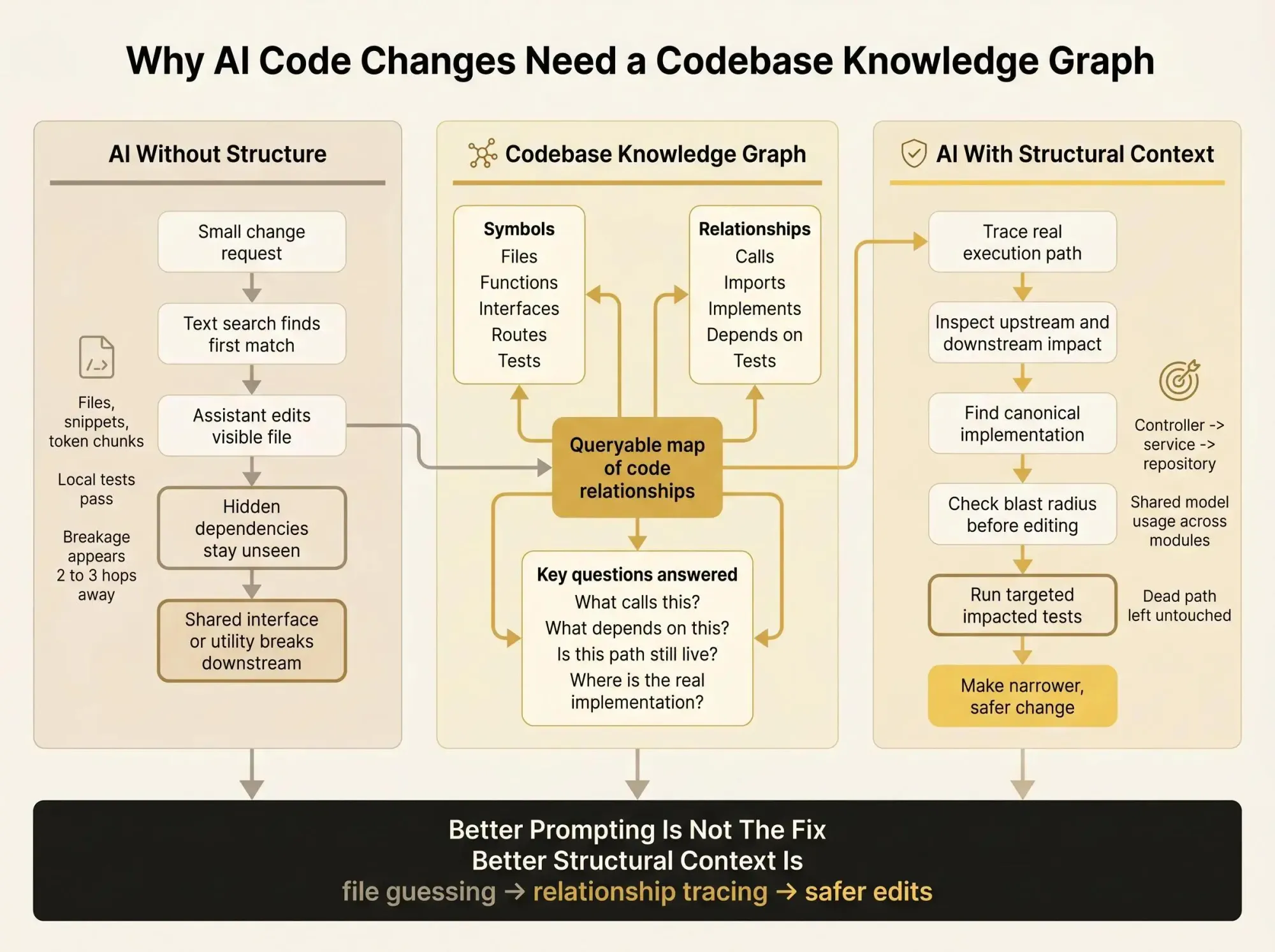
A codebase knowledge graph matters the moment your AI assistant makes a "small" change in the wrong place. The diff looks fine, tests pass, and a shared interface still breaks two modules over.
What saves you isn't better prompting. It's knowing the real source of behavior, what's downstream, and whether that old path is dead or still wired into production.
Here's where teams usually get burned:
- editing the first matching file instead of the implementation your service actually uses
- missing interface, route, and call chains that only show up after 3 hops
- changing a shared utility before checking blast radius, then narrowing the diff before it bites you
Why AI Feels Dangerous in a Real Codebase
You ask Claude Code, Cursor, or Codex for a small change. The diff looks fine. Local tests pass. Then a shared interface breaks a downstream service two days later, or an old flow wakes up because the assistant touched code that still existed but wasn't really alive. Most teams know this feeling now.
It's not panic. It's low-grade dread.
AI isn't the problem by itself. The problem is that most assistants still see code as files, snippets, and token chunks. Your system is not a pile of files. It's a set of relationships, boundaries, and dependency paths that only become obvious after you've lived in the repo for a while.
This gets worse fast in multi-module and multi-repo systems:
- behavior is split across services and packages
- framework wiring hides the real execution path
- interfaces fan out into several implementations
- the "real" source of truth often isn't the first file search finds
- old code sticks around long after the team stopped trusting it
We've seen the same failure modes repeat:
- the assistant edits the first matching file, not the actual source of behavior
- it changes an interface and misses two other implementations
- it touches a shared helper and quietly widens blast radius
- it reuses a deprecated path because text search still makes it look current
- it duplicates a pattern that already exists in another module
That last one matters more than people think. Duplicate logic isn't just messy. It creates future disagreement inside the repo, and AI is very good at making that problem bigger if you let it guess.
Safer AI code changes don't come from asking the model to be more careful. They come from giving it a map.

What a Codebase Knowledge Graph Actually Is
A codebase knowledge graph is a structured model of code entities and the relationships between them, built so humans and AI can query how the system fits together before making a change.
The nodes can include things like:
- files
- modules and packages
- classes, functions, methods, and interfaces
- APIs and routes
- data models and types
- tests
- external dependencies
- sometimes ownership and change history
The edges are the useful part. They describe how those things connect:
- imports
- calls
- extends and implements
- references
- instantiates
- contains
- tests
- depends on
That gives you something much closer to how engineers actually reason about code. Not "show me files that mention billing validation." More like "show me every caller of this service method, every interface it implements, and every test tied to this path."
You'll hear nearby terms too, and they overlap:
- software architecture knowledge graph usually emphasizes system structure and boundaries
- architecture graph for repositories focuses on how components connect inside one or more repos
- software dependency knowledge graph leans into dependency chains and impact analysis
- engineering knowledge graph can include docs, ownership, workflows, and other team context
- code relationships graph is the narrower structural layer inside the code itself
The distinction matters because a graph is not just a nicer diagram. A diagram is something you look at. A graph is something your tools can query.
That changes the workflow. Instead of stuffing 40K tokens of maybe-relevant files into a prompt, you can ask for the six connected symbols that actually matter.
Why Text Search, Embeddings, and Bigger Context Windows Still Miss the Point
A lot of retrieval setups work well for prose. Code is different. The hard questions in code are often structural, not semantic.
Before an assistant should edit anything, it often needs answers to questions like:
- what calls this method
- where is this interface implemented
- which controller reaches this repository through the service layer
- what depends on this schema
- which path is active, not just present in the repo
Text search can help. Embeddings can help. Bigger context windows can help. None of them solve structure.
Vector retrieval answers "what looks similar." A graph answers "what is connected."
That gap shows up in multi-hop paths. A search system may find the controller and the repository because both mention the same term. It may miss the actual chain from controller -> service -> repository, or miss that the service is only one implementation behind an interface. That's not a small miss. That's the difference between a safe edit and a blind edit.
There's also the cost problem. On a large repo, feeding huge file sets into every prompt is slow and expensive, and most of that context is junk for the task at hand. We've seen sessions where the assistant burns tool call after tool call on grep, glob, and repeated file reads just trying to rebuild architecture from scratch.
Most code review tools catch problems after the change exists. That's backwards.
Safer AI workflows start earlier, during exploration and impact analysis. If the model doesn't understand the shape of the system before it edits, you're already late.
What Makes a Good Software Architecture Knowledge Graph
Not every graph is useful. The value comes down to three things: coverage, correctness, and whether it matches how engineers really navigate the system.
At minimum, a useful software architecture knowledge graph should resolve:
- symbol definitions and file locations
- imports and exports
- call relationships
- inheritance and interface implementation
- package and module boundaries
- route -> handler -> service chains where relevant
- test relationships for impact estimation
Some systems go further with nodes for routes, components, services, and edges like references, returns, and overrides. That's good if the extra detail stays accurate.
Accuracy is where a lot of graph projects fall apart. A raw parse tree is not enough. If the graph can't resolve a call to the actual definition, or can't connect imports back to source files across packages, it won't help much in a risky change.
Dead code is another quiet win. A strong graph can surface symbols with no inbound usage, or code that only survives in a forgotten corner of the repo. That matters because AI will happily "fix" code your team abandoned months ago if it still looks relevant in text.
We've found a simple rule here: structure first, extras second. Ownership, docs, and temporal signals are useful. But if your structural layer is shaky, the rest is decoration.
How These Graphs Are Built in Practice
The pipeline is less mysterious than it sounds. In most real systems, it looks like this:
- Parse source files into ASTs.
- Extract entities and relationships.
- Resolve references across files and packages.
- Store the result in a queryable graph or local database.
- Update it incrementally as code changes.
Deterministic AST extraction is a strong base because it's compiler-like and predictable. It stays close to what the code actually declares. It doesn't depend on a model deciding what seems important that day.
That difference shows up in real indexing results. In reported runs on Java repos, deterministic AST-derived graphs were indexed in seconds. LLM-mediated graph generation took far longer, roughly 200 seconds to nearly 884 seconds. On one repo, the LLM-driven pipeline missed or skipped 377 files and only succeeded on 833 of 1,210 files. Same repo, smaller graph, lower coverage.
That's not an academic detail. If your map has holes, the AI will reason over the holes as if they were truth.
Static analysis still has limits. Runtime wiring can change the real path through the system, especially with dependency injection, config-driven routing, or framework magic. So runtime signals can be a useful extension when you need a closer view of production behavior.
But extension is the right word. Not replacement.
How a Code Relationships Graph Helps AI Before It Writes a Single Line
The best use of AI in a large repo usually starts with exploration, not generation. That's the part people skip because they want speed.
A code relationships graph gives the assistant a way to investigate before it edits. It can:
- locate the real entry point for a behavior
- trace upstream callers and downstream effects
- find the canonical implementation instead of a nearby copy
- detect established patterns in neighboring modules
- tell whether a symbol is isolated, central, or unused
This is useful in normal work, not just edge cases. Planning a PR. Tracing a bug in a Claude Code session. Refactoring shared code. Migrating a package in a monorepo. Auditing a schema change before it spreads.
Without a graph, agents tend to bounce between file search and file reads until they slowly reconstruct enough architecture to guess. That's expensive in both tokens and time. Pre-indexed structural context cuts that down because the structure doesn't need to be rediscovered every session.
One code graph system reported sharply fewer tool calls and much faster exploration on a large codebase for exactly this reason. The agent wasn't smarter. It just stopped wandering.
Context quality beats context quantity.
The Change-Safety Questions a Software Dependency Knowledge Graph Can Answer
Before approving an AI-generated diff, engineers ask a short list of blunt questions. A software dependency knowledge graph is built to answer them by traversal, not by hope.
What depends on this?
You need direct and indirect dependents. Is the target a leaf node, or a shared hub used by six modules?
What is the blast radius?
Trace call chains, imports, inheritance trees, and package boundaries. If the edit crosses service or interface boundaries, that should be obvious early.
Is there already a pattern nearby?
Find sibling implementations and similar paths. The safest change often isn't inventing new logic. It's following the local pattern that already survived production.
Is this code still live?
Check inbound references, route connections, tests, and package usage. Old code often looks active in search even when nothing reaches it anymore.
What tests should run?
Graph links can suggest impacted tests with better precision than "run everything" and better safety than "run the one local test we already had open."
Where is the safest place to make the change?
Sometimes editing the shared abstraction is right. Sometimes that's exactly how you create damage, and the safer move is a local adapter or boundary layer.
These are relationship questions. Snippet retrieval can hint at them. Graph traversal can answer them.
A Concrete Example: One “Simple” Edit, Two Very Different AI Outcomes
Let's keep it plain. An engineer asks an assistant to change validation logic for a billing endpoint.
Without a graph, text retrieval finds the controller and one validator. The assistant edits the obvious file. The change looks clean. Tests pass in that module.
The miss is structural. The same model is reused through a shared service and interface in two other modules. One consumer expects the old behavior. Another has partial test coverage and doesn't fail until later.
The risky path looks like this:
- local fix in the visible file
- hidden consumers never inspected
- blast radius assumed to be small
- later breakage shows up in a different flow
With an architecture graph for repositories, the investigation changes before the edit does. The assistant can trace endpoint -> controller -> service -> repository, detect shared model usage across modules, surface tests tied to the affected path, and notice whether an older branch is effectively dead.
From there, the safer recommendation may be narrower:
- change validation in the boundary layer, not the shared model
- keep interface behavior stable
- run the tests tied to all known consumers
- leave the dead path alone
The graph doesn't make the decision for you. It gives both you and the model the real shape of the system so the decision is grounded.
Deterministic Graphs vs LLM-Extracted Graphs vs Plain RAG
If you're evaluating approaches, keep the decision framework simple.
Plain RAG
Good for topical matches, docs, and quick setup. Weak on structural and multi-hop questions. It tends to require heavy prompt context because there is no explicit architecture model underneath.
LLM-extracted knowledge graphs
These can infer higher-level concepts if the schema is good. The downside is slower indexing, higher cost, and a real risk of skipped files or partial extraction. That's hard to trust as the base layer for change safety.
Deterministic AST-derived graphs
These are usually the best base for safer AI code changes. They index faster, provide more predictable coverage, and preserve structural fidelity for calls, imports, and type relationships. They still won't capture all runtime behavior or intent on their own.
The reported data supports that shape: deterministic graph building showed much lower indexing time, while LLM-based graph generation carried much higher end-to-end cost and weaker coverage on the same discovered files.
Our view is pretty simple. Use deterministic structure as the base layer. Add semantic retrieval and higher-level signals on top when they help.
What to Look for in an Engineering Knowledge Graph Tool
Treat this like a builder and buyer checklist, not a feature wish list. If the basics are weak, the rest won't matter.
Look for:
- deterministic extraction and strong reference resolution
- support for your languages and framework patterns
- path traversal, inbound and outbound dependency analysis, symbol lookup
- blast radius views and dead code signals
- fit with Claude Code, Cursor, Codex, or other MCP clients
- use during exploration, PR review, and refactoring
- local or self-controlled indexing when code sensitivity matters
- incremental reindexing so the graph stays current
- multi-module and multi-repo support
- explainability, so the agent can show why a dependency or path exists
- query-time context that's lean enough to cut token waste
A stale graph is worse than no graph because people trust it longer than they should.
Pharaoh is one example in this category. We map software architecture into a knowledge graph so AI assistants can inspect dependencies, blast radius, existing code, and dead code before making changes. If you want to see that workflow, it's at pharaoh.so.
How Pharaoh Fits Into an AI-Assisted Engineering Workflow
This is where the category matters more than the brand. The point is to give the assistant a codebase-level map instead of forcing it to reconstruct architecture from search alone.
That fits in a few places naturally:
- before an AI proposes a risky change
- while reviewing a diff that touches shared code
- during refactoring sprints in a monorepo
- when tracing whether a path is active, shared, or safe to remove
The shift is practical. More confidence from context. Less guessing about hidden dependencies. Safer edits because the model can inspect relationships, not just text.
If you're already using Claude Code or another MCP client, adding a codebase graph is often the cleanest next step. Pharaoh does this automatically via MCP at pharaoh.so.
It's also worth being clear about what this does not do. It doesn't replace developers. It doesn't make risky changes automatically safe. It improves the context you and the model use to decide what is safe to touch.
For the linting and testing side of AI code quality, the open source AI Code Quality Framework is a good companion layer.
Common Mistakes Teams Make When They Try to Add Graph Context
Most mistakes aren't technical. They're workflow mistakes.
Teams often:
- treat the graph like documentation instead of an operational tool
- build a nice architecture picture that stops matching the repo by the second afternoon
- rely on semantic retrieval and call it a graph strategy
- use LLM-generated indexing as the only source of truth
- ignore framework-specific relationships like DI wiring, routes, or component usage
- fail to connect graph context to tests, ownership, or review
- assume static analysis answers everything
- let the AI query the graph but never require blast radius inspection before higher-risk edits
- skip measurement entirely
Measure something boring and useful: fewer exploration tool calls, faster path tracing, narrower diffs, fewer architecture regressions. If none of that improves, the graph isn't in the workflow yet. It's just nearby.
How to Start Small Without Turning This Into a Platform Project
Don't start with a grand architecture program. Pick one painful use case this week.
Good starting points:
- blast radius analysis for a shared module
- tracing endpoint-to-data-store paths
- finding dead code before a refactor
- safer AI exploration in one repo that already causes friction
Index one service or package first. Then test it against real questions:
- what calls this
- what breaks if we change this type
- where is the actual implementation
- is this path still live
Compare your current AI workflow with and without graph context. Count tool calls. Count file scans. Watch how often the model picks the wrong change point.
Start with structure. Layer in docs, ownership, or runtime signals only where they clearly help. And don't make it mandatory for every change on day one. Use it during planning and review first.
If your team is already using AI coding assistants through MCP, adding a codebase graph is usually the fastest way to make those sessions safer and less wasteful.
Conclusion
The path to safer AI code changes is not better prompting alone. It's better structural context.
The shift is straightforward:
- from files to architecture
- from snippet matching to relationship tracing
- from reactive review to pre-change impact analysis
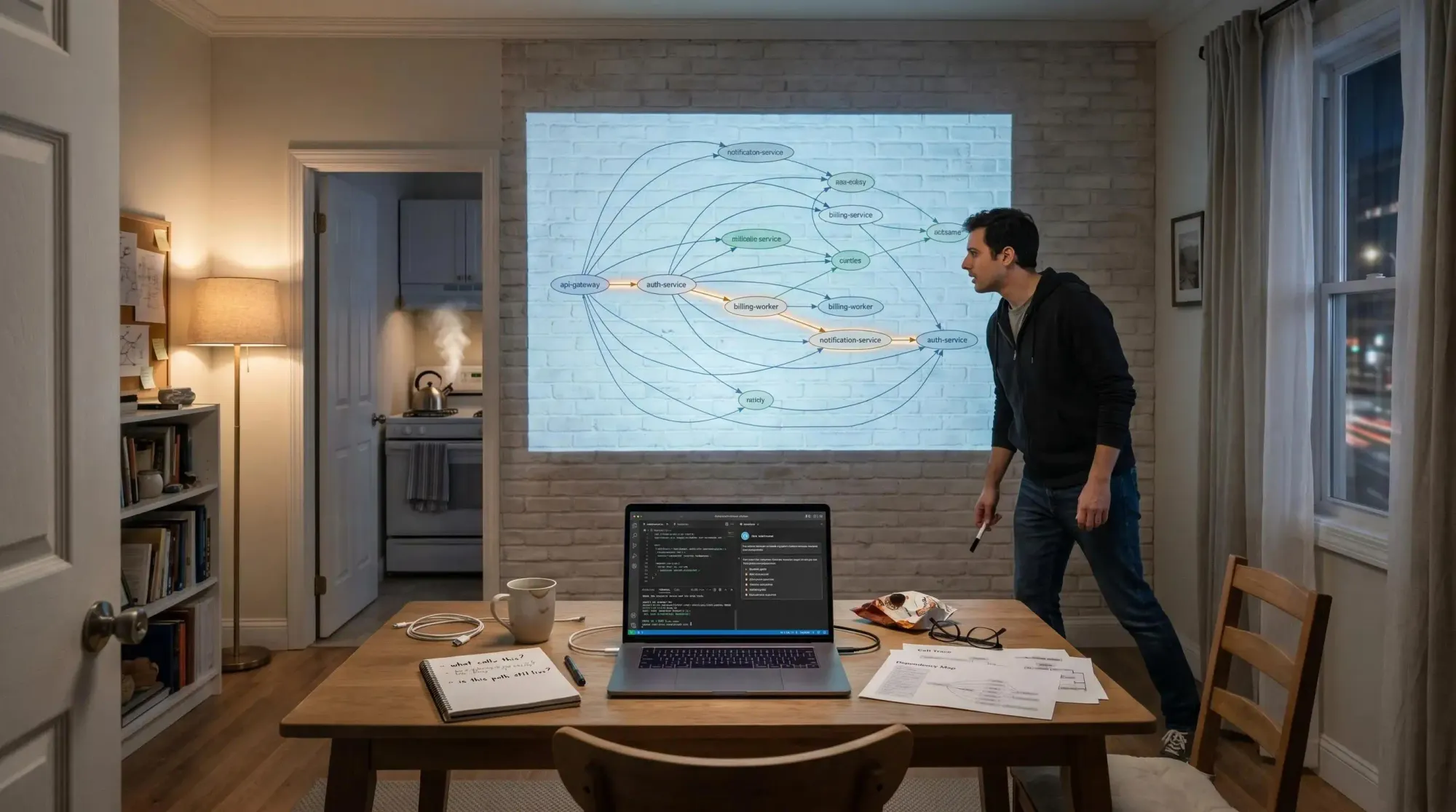
Pick one risky area of your codebase this week. Map the dependencies and call paths around it. Then compare how your AI assistant behaves when it can see the system instead of guessing at it. That's usually where the dread starts to drop.