Best MCP Developer Tools for AI Coding in Complex Codebases

MCP developer tools get lumped together way too easily. For teams using Claude Code, Cursor, or Codex on codebases, that mistake gets expensive fast. Weak options look fine in demos, then fall apart when your assistant needs repo context or tool calls.
What actually separates the good ones is simple. They hold up in day to day work. They don't just speak MCP. We cut this list down to the few that proved useful across multi repo, debugging, and server build workflows.
These are the ones worth your attention.
1. Pharaoh
1Pharaoh Pharaoh codebase intelligence platform Best Choice 2026

Pros
- Deep architecture context for AI
- Knowledge graph updates every push
- Multi-repo support for larger teams
- Answers callers and blast radius
- Does not retain source code
Cons
- Free tier allows one active repo
- Language support is TypeScript and Python
- Overkill for smaller codebases
9.4Excellent VISIT SITE »
If your AI assistant keeps touching the wrong file, missing a downstream caller, or suggesting a cleanup that would break three services two folders away, you don't have a tooling problem first. You have a context problem. That's where Pharaoh fits.
Pharaoh is built for the part most MCP developer tools don't cover well: giving AI coding assistants architecture context for existing codebases. We map repositories into a knowledge graph on every push, then expose that through MCP so tools like Claude Code, Cursor, Codex, and other MCP clients can ask real questions about the codebase before they edit it.
A few things matter in practice:
- It works across TypeScript and Python repositories
- It supports multi-repo setups, not just a single local project
- It can answer dependency, caller, endpoint, env var, blast radius, and dead code questions
- Source code is not stored after parsing
That last point matters more than people think. Plenty of teams want mcp for ai coding assistants, then hit a wall when legal or security asks where code is retained.
The main distinction is simple. Pharaoh is not trying to be an SDK, a proxy, or a general-purpose MCP shell. It's for cases where the assistant can already call tools, but still doesn't understand the shape of the system. Different problem. Different answer.
You see this most clearly in real workflows:
- Refactoring a shared package in a monorepo and needing all callers first
- Reviewing an AI-generated PR where blast radius matters more than the diff
- Tracing dependencies before letting an assistant rename or remove a module
- Hunting dead code that looks unused locally but still feeds an internal endpoint
If the model can't see relationships, faster tool calls don't help much.
This is the tool we reach for when repository awareness is the blocker. If you're in a small single-repo codebase, it may be more than you need. If you're in a multi-module or multi-repo environment, it tends to become obvious by the second afternoon. Pharaoh does this automatically via MCP at Pharaoh.
2. MCP Python SDK
2MCP Python SDK Official Model Context Protocol SDK

Pros
- Official server and client foundation
- Strong Python customization flexibility
- Covers tools, resources, prompts
- Useful dev mode and logging
- Good fit for internal integrations
Cons
- More engineering effort required
- v2 remains in alpha
- Not ideal for quick setup
8.7Good VISIT SITE »
Some teams don't need more tools exposed to the model. They need to build the tool layer itself. That's where the official Python SDK earns its place.
The MCP Python SDK is the foundation option in this list. It gives you official server and client implementations plus the development surface around them: tools, resources, prompts, auth, sampling, logging, and dev mode. If your platform team wants to standardize model context protocol coding around Python, this is the serious starting point.
It's a better fit than operator-first CLIs when you're shipping internal integrations against company systems. Think:
- An MCP server over internal billing APIs
- A private deployment tool for staging environments
- A custom resource layer for internal docs or runbooks
That control comes with work. You own behavior, structure, and maintenance. That's usually the right trade if the tool matters to your business.
There's one thing to watch closely: version track. v2 is in alpha while v1 remains the stable path. That isn't a deal-breaker, but teams should be deliberate. We've seen people build around an evolving interface too early, then spend a sprint cleaning up assumptions they didn't need to make.
Use the SDK when you want ownership and flexibility. Skip it when what you really want is fast access to existing tools without standing up your own MCP layer.
3. mcptools
3mcptools Open-source MCP CLI toolkit
Pros
- Strong protocol-level debugging control
- Works across stdio and HTTP
- Mock, proxy, and guard modes
- Interactive shell and web UI
- Great for repeatable local workflows
Cons
- No built-in codebase intelligence
- Broad surface can feel complex
- Better for operators than assistants
8.4Good VISIT SITE »
mcptools is for people who live in the terminal and want protocol-level control. Not theory. Control.
It covers a lot of ground: discover tools, call them, inspect resources and prompts, run mock servers, proxy traffic, enforce guard behavior, use an interactive shell, spin up a web UI, scaffold projects, manage config. That's a wide surface, and unlike some narrower options, the breadth is the point.
Where it fits best
mcptools makes sense when you need to see how MCP servers behave across stdio and HTTP in real conditions. That shows up in a few common situations:
- Testing a new MCP client against several local servers
- Checking whether a server bug is transport-specific
- Reproducing a bad tool response outside the AI client
- Building repeatable local workflows around discovery and inspection
The useful part isn't just calling tools. It's being able to isolate where failure actually lives. Client bug, server bug, transport issue, bad request shape, auth edge case. Those aren't the same failure. People blur them together and lose hours.
Where it doesn't help
mcptools does not solve codebase understanding on its own. It won't tell your assistant which internal package depends on a file six levels away. It won't create mcp architecture context for an existing repository. That's not a flaw. It's just a different layer of the stack.
If you're an MCP operator or integrator, this is strong. If you're trying to make an AI assistant smarter about your codebase, look elsewhere first.

4. MCP DevTools
4MCP DevTools sammcj
Pros
- Broad utility layer in one server
- Fast Go binary deployment
- Strong built-in search and docs
- Modular tools can expand later
- Simplifies internal developer enablement
Cons
- Too many tools can add noise
- Weak for deep repo semantics
- Breadth beats specialization here
8.1Good VISIT SITE »
Some teams want one server that gives their assistant a broad utility layer and don't want to stitch together ten smaller servers. MCP DevTools is built for that setup.
It's a high-performance Go binary that packages a large set of developer-focused tools behind one MCP interface. Out of the box, you get things like search, web fetch, package search, package docs, GitHub access, a think tool, a calculator, and even a way to find long files. Then there are extra modules you can enable for document work, memory graph, filesystem access, code search, code rename, UI component libraries, agent integrations, and MCP proxying.
That breadth is attractive. It's also where teams get sloppy.
A wide tool surface helps when you're enabling day-to-day AI coding across many tasks. Search here, docs there, GitHub check, quick reasoning pass, maybe a code lookup. For internal developer enablement, one binary is often easier to manage than a patchwork of servers and scripts.
But more tools isn't automatically better tool context for ai coding. Models don't just need access. They need the right access. If you expose too much, discovery gets noisy and the model spends tokens wandering.
A practical rule:
- If the assistant keeps lacking basic utility functions, bundled devtools help
- If the assistant already has tools but still misses change impact, bundled devtools won't fix that
MCP DevTools is broader than the SDK path and less specialized than Pharaoh. That's exactly why some teams should choose it.
5. mcpkit
5mcpkit Open-source MCP server toolkit
Pros
- Fast server scaffolding from schemas
- Real-time JSON-RPC traffic inspection
- Proxying helps isolate hidden failures
- Server-labeled traces reduce debugging noise
Cons
- Very new, early-stage project
- Requires Node 20 or newer
- No built-in codebase intelligence
7.9Solid VISIT SITE »
mcpkit is tighter in scope than mcptools, and that's part of the appeal. It focuses on scaffold, proxy, and inspect.
You can generate MCP servers from YAML config files or OpenAPI specs, proxy traffic for inspection, and debug method calls, arguments, responses, latency, and failures in real time. If you're running several local servers at once, the ability to label traces by server is one of those small details that saves real time. Without it, local debugging gets messy fast.
Here's where mcpkit tends to shine:
tool.call -> 200 OKjson-rpc -> valid responseactual tool result -> failed due to bad upstream parameter mappinglatency spike -> only on one proxied serverThat class of issue is common. Everything looks fine at a glance, but the failure sits one layer deeper than the transport. Good inspection tools make that visible.
Compared with mcptools, mcpkit is more focused on fast iteration while building a server. Compared with lifecycle-oriented tooling, it cares more about local visibility than operational discipline. That makes it a good first stop for teams building an internal server from an API schema and trying to get from zero to working without writing a pile of boilerplate.
A couple of constraints are worth being plain about:
- It's early-stage, with a very new release history
- It requires Node 20+
- It won't give assistants architecture awareness out of the box
If you're choosing between mcpkit and an SDK, ask a boring question: do we want control, or do we want speed right now? That answer usually decides it.
6. MCP Developer Toolkit
6MCP Developer Toolkit donshults
Pros
- Reduces setup drift across repos
- Automates Python env creation
- Built-in health and connectivity checks
- Simplifies server lifecycle management
- Standardizes team repo structure
Cons
- Opinionated around Python workflows
- Less useful for tool authoring
- Won't improve model context
7.8Solid VISIT SITE »
A lot of MCP pain has nothing to do with the protocol itself. The pain is operational drift. Different repos. Broken local setup. Someone forgot a dependency. Someone else has the server running but on the wrong config. That's the lane for MCP Developer Toolkit.
This tool is more about server lifecycle management than tool authoring. It can create MCP servers from repositories, set up Python virtual environments automatically, install dependencies, manage start-stop-restart-status flows, and handle health checks, log tailing, connectivity tests, and config validation. It also pushes a standardized repository layout for distribution.
That sounds mundane. Good. Mundane is where teams lose time.
Why platform teams care
If you're running many Python-based MCP servers internally, repeatability matters more than feature count. The point isn't to impress developers with one more CLI. The point is that five engineers shouldn't spend the same Friday afternoon fixing five slightly different local setups.
This toolkit is stronger for operations hygiene than for code intelligence or deep debugging. It's more structured than ad hoc scripts and more fleet-oriented than tools built for one server at a time.
The tradeoff is that it's opinionated:
- Python environments are central
- Repository conventions matter
- It's for teams willing to accept structure in exchange for less drift
If your main issue is maintenance overhead, this kind of tool pays for itself quietly. If your main issue is missing model context, it won't.
7. MCP DevTools Server
7MCP DevTools Server Open-source Claude Code workflow server
Pros
- Improves test and lint feedback loops
- Broad 40-plus tool coverage
- Zero-config setup lowers friction
- Git workflows help self-correction
Cons
- Alpha maturity limits production confidence
- Not built for server scaffolding
- Less useful for fleet operations
7.7Solid VISIT SITE »
MCP DevTools Server is closer to the day-to-day coding loop than the server-building options. It's aimed squarely at development workflows such as testing, linting, and Git operations, especially for Claude Code users.
The pitch is straightforward: give the coding assistant a set of workflow tools that help it generate code, run checks, and correct itself with fewer bad loops. It includes 40+ tools, zero-config setup, intelligent caching, Git support, testing and linting workflows, and an extensible plugin model.
That makes it relevant for teams trying to tighten the feedback loop between generation and validation. Not just "write code faster," but "fail faster, then recover cleanly." Most code review tools catch problems after they ship. That's backwards.
If your workflow already depends on strong linting and test discipline, it's worth pairing this category with a quality framework. The open source AI Code Quality Framework covers the testing and linting side well.
The main caution is maturity. The project is marked alpha. For some teams that's fine in local or pilot workflows. For others, that's a hard stop until the surface settles.
This is not the tool for protocol scaffolding or operating a fleet of servers. It's for improving the assistant's working loop once the basic MCP setup already exists.
How to Choose the Right MCP Developer Tool
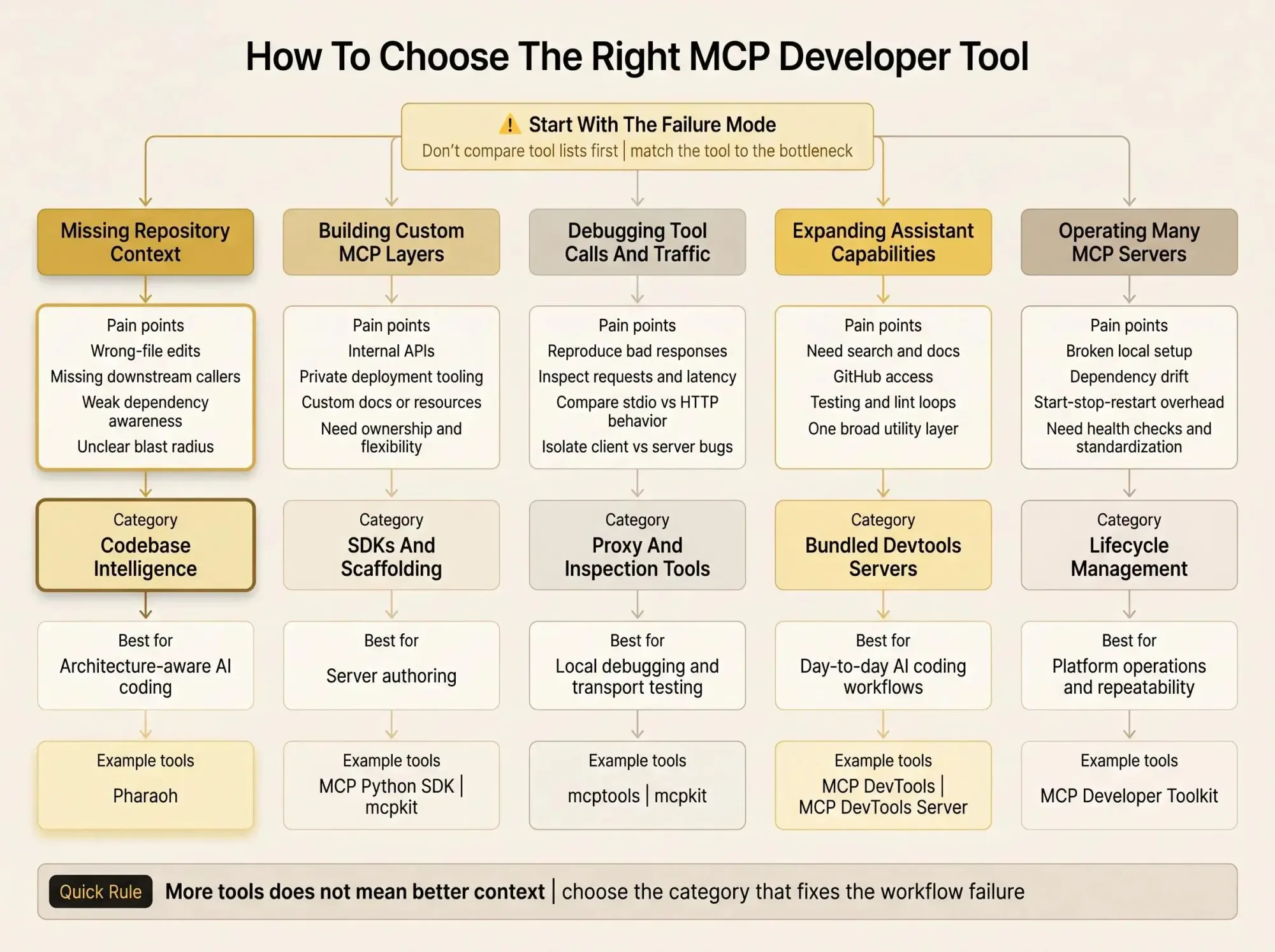
Most teams start by comparing feature lists. That's usually a mistake. Start with the failure mode in your actual workflow.
Here's the cleaner split:
- Wrong-file edits, missing downstream impact, weak dependency awareness: prioritize mcp architecture context
- Building a custom MCP layer over internal systems: prioritize official SDKs and scaffolding
- Debugging calls, traffic, and transport issues: prioritize proxy and inspection tools
- Want one assistant-facing server with many capabilities: prioritize bundled devtools servers
- Running many internal servers: prioritize lifecycle management
A few buying criteria sort this fast:
- Does it improve model context or only protocol plumbing?
- Is it for server authors, operators, or end users of AI coding assistants?
- Does it support the transports your team actually uses?
- Does it fit mono-repo, multi-repo, or single-repo work?
- Is the runtime aligned with your stack?
- Do you need hosted codebase intelligence or self-managed tooling?
If you want the short version:
- Choose Pharaoh when repository awareness is the core need
- Choose the MCP Python SDK when you need to build your own MCP layer
- Choose mcptools or mcpkit when testing and debugging are the bottleneck
- Choose MCP DevTools or MCP DevTools Server when expanding assistant capability matters most
- Choose MCP Developer Toolkit when maintaining many servers is the real time sink
Where Teams Usually Get This Wrong
The common mistake is treating all MCP developer tools as interchangeable. They aren't even solving the same class of problem.
We've seen teams expose twenty tools to a model and still wonder why refactors go sideways. The answer is usually simple: the assistant had more tools, not better context. Tool count is a poor proxy for usefulness.
A few patterns keep repeating:
- Assuming mcp for ai coding assistants means the model understands repository structure
- Ignoring the split between code intelligence, server authoring, server operations, and bundled tools
- Rolling out too many tools at once and creating noisy discovery
- Evaluating tools outside real workflows like refactors, PR review, monorepo migration, or repeated Claude Code sessions
If you don't test in the workflow that hurts, you won't learn anything that matters.
One non-obvious issue: broad tool exposure can make a model look less reliable, even when every individual server works fine. The model spends context budget deciding what to call, not solving the coding problem.
What Matters Most for Different Engineering Workflows
The right choice changes with the work in front of you. That's not indecision. That's just being honest about the stack.
For large codebase changes, favor tools that can answer callers, dependencies, endpoints, and blast radius questions before edits. That's where codebase intelligence earns its keep.
For internal platform work, favor official SDK support, clear versioning, and reusable server patterns. You don't want your internal MCP layer to become a one-team science project.
For local debugging, favor proxying, inspection, mock modes, and transport flexibility. If you can't see requests and responses clearly, you'll guess. Guessing is expensive.
For day-to-day AI coding, favor search, docs lookup, GitHub access, testing, and correction loops. That's the practical surface area most developers feel every session.
For team-wide maintainability, favor predictable setup, isolated environments, and repeatable health checks. Nobody wants to debug an environment issue that only exists on one laptop.
Pick one live workflow this week and test the tool category that matches the bottleneck. If the assistant keeps making wrong-file edits, start with repository context. If your team is hand-rolling servers badly, start with the SDK or scaffolding path. If Claude Code sessions keep stalling on tests and lint, start with a devtools server. Sharp choices beat broad experiments.