Best Software Architecture Visualization Tools for Engineers

Software architecture visualization tools look interchangeable until you're staring at a multi repo mess and half of them are just drawing apps. Most teams get this wrong. They pick something that makes pretty boxes, then expect it to answer dependency or blast radius questions.
The good options hold up when you need real code context, not a slide. For AI assisted teams, that gap matters fast.
We cut this list down to the tools worth your time.
1. Pharaoh
1Pharaoh Pharaoh developer intelligence platform Best Choice 2026

Pros
- Living repo map on every push
- Queryable dependency and blast radius context
- Works with Claude Code and Cursor
- Cross-repo visibility for shared systems
- Does not retain source code
Cons
- Best for larger TypeScript or Python repos
- Free tier allows one active repo
- Not ideal for presentation diagrams
9.5Exceptional VISIT SITE »
If your actual problem is keeping developers and AI assistants aligned with a living codebase, most diagram tools miss it. They show what someone drew. They don't answer what the repo is doing right now.
Pharaoh is built for that gap. We map TypeScript and Python repositories into a knowledge graph on every push, then expose that context through MCP to tools like Claude Code, Cursor, Codex, and similar clients. That means you can query dependencies, callers, endpoints, environment variable usage, dead code, and blast radius before making a change.
A few details matter in practice:
- It supports cross-repo visibility, which matters once shared packages or service boundaries stop being clean.
- It handles the code to build the graph, but does not store source code after parsing.
- It works best when the repo is large enough that "just grep it" stopped being a serious answer.
This is less about architecture diagrams from code and more about architecture you can interrogate during work. In a refactoring sprint, that difference is the whole game. A static box-and-line diagram might tell you there is an auth module. Pharaoh can tell you six services call it, two CLI jobs still import the legacy path, and one env var is only referenced by dead code.
Good architecture context should survive contact with the repo.
It's not the right fit for a single small service where a README diagram is enough. The free tier limit of one active repo at a time also matters if you're evaluating across a larger estate. But for monorepo migrations, shared-module cleanup, or AI-assisted coding sessions where context needs to be fetched on demand, it's one of the few software architecture visualization tools that behaves like an operational system instead of a drawing surface.

2. Structurizr
2Structurizr Structurizr Ltd.

Pros
- C4-native diagrams stay consistent
- One model, many architecture views
- DSL works well in Git
- Publishes docs and ADRs together
- Interactive and embeddable outputs
Cons
- No live repository discovery
- Requires deliberate modeling discipline
- Less suited to dependency analysis
8.8Good VISIT SITE »
Structurizr is what we point teams to when they're serious about the C4 model and want diagrams-as-code with discipline behind it. It isn't trying to discover your repository for you. It expects you to model the architecture on purpose.
That tradeoff is usually worth it when consistency matters. A single Structurizr DSL model can generate system landscape, context, container, component, dynamic, and deployment views without each diagram drifting in its own direction. By the second afternoon of an architecture review cycle, that starts paying back.
Useful pieces here:
- The DSL is readable enough for code review.
- Views can be interactive, embeddable, and animated.
- It can publish documentation and ADRs next to diagrams.
- Themes for AWS, Azure, GCP, OCI, and Kubernetes save time.
- The MCP server helps with DSL validation, parsing, and inspection.
Compared with Mermaid or PlantUML, Structurizr is more structured and more opinionated. Compared with Pharaoh, it's less about live repository intelligence and more about clear architecture communication that still lives in version control.
If you want the best way to visualize codebase architecture for people making design decisions across levels, Structurizr is strong. If you need to visualize dependencies in codebase reality, not modeled intent, you may need something code-aware alongside it.
3. Sparx Systems Enterprise Architect
3Sparx Systems Enterprise Architect by Sparx SystemsS
Pros
- Strong governance and traceability
- Deep UML and modeling support
- Reverse-engineering and code generation
- Broad documentation output options
- Well suited for regulated environments
Cons
- Heavyweight for small teams
- Steeper learning and process overhead
- Less suited to live code mapping
8.3Good VISIT SITE »
Enterprise Architect is a serious tool for formal architecture programs. You feel that quickly. It's built for organizations that need a long-lived source of truth, not just a convenient diagram for this quarter's refactor.
It covers modeling across complex systems, reverse-engineering, model transformations, code generation, UML-based design, extensibility through profiles, and broad documentation output. In regulated environments, that combination matters because architecture is often part design asset, part audit trail.
Where it fits best:
- Large organizations with many stakeholders and approval layers
- Teams that need traceability between models, specs, and implementation details
- Architecture groups with governance duties beyond software teams
This is heavier than Structurizr, LikeC4, Mermaid, or PlantUML. That's not a flaw. It's just expensive in a different currency: time, process, and operator patience. If your team only needs a codebase map for developers or a quick way to explain service boundaries, it can feel like showing up with a bulldozer to plant a mailbox.
For enterprise architecture programs, though, the depth is the point.
4. Lucidchart
4Lucidchart Lucid SoftwareL
Pros
- Easy for mixed audiences
- Strong real-time collaboration
- Useful templates speed workshops
- Integrates with Jira and Confluence
- Good for executive architecture overviews
Cons
- Manual diagrams go stale quickly
- No automatic codebase dependency mapping
- Less suited to developer-native workflows
8.2Good VISIT SITE »
Lucidchart earns its place because real teams don't only need precision. They also need alignment. In workshops, planning sessions, and architecture review meetings, accessibility often beats purity.
It's web-based, collaborative, and easy for mixed audiences to use. Templates for system diagrams, process flows, and operational views reduce friction. Integrations with Jira, Confluence, and Slack help keep it present in daily work. Data linking can make diagrams more dynamic than the usual static whiteboard export.
Where teams get value fast:
- Sprint planning sessions where people need to reason together
- Executive or product-facing architecture overviews
- Early discovery work before the team commits to a stricter modeling approach
The catch is obvious and still worth saying: manual diagrams go stale fast. Faster than most teams admit. Lucidchart is good at communication, not automatic repository understanding. It won't function as repository visualization software in the same sense as Pharaoh, and it won't give you dependency-level answers from the codebase itself.
If your audience includes non-engineers, Lucidchart is often the fastest path to shared understanding. Just don't confuse shared understanding with current truth.
5. PlantUML
5PlantUML Open-source diagramming tool

Pros
- Git-friendly text-based diagrams
- Works well in pull requests
- Supports UML and related visuals
- Fits docs-as-code workflows
- No canvas editing required
Cons
- Syntax can require upkeep
- Styling grows tedious at scale
- Few guardrails for consistency
8.3Good VISIT SITE »
PlantUML stays popular for a reason. Developers like tools that survive code review, work in Git, and don't require opening a canvas just to move one box.
It's text-defined, version-control friendly, and broad enough to cover UML plus adjacent diagrams like entity relationships and other structured views. That makes it practical in docs-as-code environments where diagrams should evolve with source changes instead of living in a separate file graveyard.
A few real-world notes:
- It's stronger when the team already likes text-first workflows.
- It travels well in pull requests.
- Styling and syntax can become their own maintenance job if the diagram count grows.
PlantUML is more general-purpose than Structurizr. That's useful if you don't want to commit to C4. It also means less guardrail. Teams can create useful diagrams or an unreadable mess with equal freedom.
For architecture diagrams from code-like text, it works well. For live dependency mapping or blast radius analysis, it doesn't play in the same lane as Pharaoh. That's fine. Not every tool needs to.
6. Microsoft Visio
6Microsoft Visio Microsoft 365 diagramming tool

Pros
- Widely familiar across enterprises
- Polished diagrams for stakeholder reviews
- Included in many Microsoft environments
- Easy sharing across large teams
Cons
- Manual diagrams go stale quickly
- No automatic code dependency discovery
- Weak fit for developer workflows
7.4Solid VISIT SITE »
Visio is often chosen before engineering even enters the room. Existing Microsoft licensing, familiarity, and business-wide acceptance make the decision easy for some organizations.
It handles flowcharts, system diagrams, and data flow documentation well enough. Diagrams are easy to share across teams, and availability through Microsoft 365 or as a standalone web platform keeps it reachable in large environments.
That said, Visio is better at formal presentation than active engineering truth. If the real need is to visualize dependencies in a codebase automatically, Visio is the wrong category. It documents what people decide to draw. It does not discover what the repo forgot to mention.
Use it when the output needs to look polished for compliance reviews, stakeholder handoffs, or broader enterprise documentation standards. Don't expect it to help an AI assistant understand a shared module before editing it.
7. Visual Paradigm
7Visual Paradigm Visual Paradigm

Pros
- Broad UML and architecture coverage
- Good for standardizing design artifacts
- More structured than lightweight tools
- Supports wider software design workflows
Cons
- Heavier than simple diagram tools
- Not built for live code intelligence
- Can be more suite than needed
7.9Solid VISIT SITE »
Visual Paradigm sits in the middle ground between lightweight diagram tools and heavier enterprise modeling platforms. Teams pick it when they want a broader software design suite, not just one architecture diagramming feature.
It supports UML and architecture modeling across a wide spread of technical design work. That breadth is the appeal. If your team wants one place for software design artifacts, rather than stitching together multiple narrower tools, it starts to make sense.
It tends to fit teams that are:
- Standardizing software design practices
- Maintaining a wider set of design documents
- Looking for more structure than Mermaid or PlantUML provide
Compared with C4-PlantUML Studio, it's broader and less narrowly focused on one method. Compared with Pharaoh, it isn't built around AI query workflows or live repository understanding.
This is a suite choice, not a quick fix. That's an important difference.
8. Mermaid
8Mermaid Mermaid by Mermaid.js

Pros
- Embeds naturally in markdown docs
- Very low setup and friction
- Great for README architecture sketches
- Fits fast-moving repo workflows
- Easy onboarding and internal notes
Cons
- Limited modeling depth and structure
- Manual diagrams can drift stale
- Not a live codebase map
8.1Good VISIT SITE »
Mermaid is the easiest recommendation in this list for teams that want lightweight diagrams close to the code and don't want ceremony. If a README needs a service map today, Mermaid is usually enough.
Its strength is friction, or rather the lack of it. Text-based definitions, easy embedding in markdown, and natural fit with repo docs make it useful for internal documentation and onboarding guides. You can add architecture visuals without introducing a whole new modeling process.
That simplicity also sets the ceiling. Mermaid is lighter than PlantUML for many documentation use cases, but it's less structured than Structurizr and nowhere near a true codebase map for developers.
We'd use it when:
- The team needs simple architecture notes in docs
- The system is moving fast and "good enough" beats perfect
- You want architecture diagrams from code-adjacent text without much setup
Mermaid is a docs tool first. Treat it that way and it's excellent.
9. C4-PlantUML Studio
9C4-PlantUML Studio Visual Paradigm
Pros
- Guided C4 workflow reduces setup
- Portable editable PlantUML output
- Supports multiple C4 diagram types
- AI-assisted drafting speeds first pass
- Versioned cloud projects aid collaboration
Cons
- Limited repository intelligence capabilities
- Best mainly for C4 users
- Less useful for change impact
7.8Solid VISIT SITE »
C4-PlantUML Studio is interesting because it narrows the problem on purpose. It targets teams that like C4, want help generating diagrams quickly, and still want PlantUML output they can edit and move around.
The guided workflow matters more than it sounds. Support for context, container, component, sequence, landscape, and deployment diagrams gives teams a structured path instead of a blank file. The interactive navigator, tabbed workflow, example gallery, and cloud project management with versioning all reduce startup friction.
That makes it a strong option for:
- Greenfield design where the team needs a fast documentation starting point
- Legacy system mapping when nobody wants to build the first draft manually
- Teams that want AI assistance but still want portable output
It is better for generating diagrams than for repository intelligence. That's the line to keep clear. If you need a diagram quickly, it helps. If you need to know what breaks when a package changes, look elsewhere.
10. Graphviz
10Graphviz Graphviz open-source project

Pros
- Precise control over graph layouts
- Strong for dependency-style visualizations
- Great for custom rendering pipelines
- Handles directed relationship graphs well
Cons
- Steeper learning curve for teams
- Less accessible for mixed audiences
- Weak for polished stakeholder storytelling
7.6Solid VISIT SITE »
Graphviz is the choice for engineers who want direct control over graphs and don't mind operating closer to the metal. It renders relationships well. It does not hold your hand.
For dependency-style views, directed graphs, and custom pipelines that generate visual output from structured text, Graphviz is still useful. It's especially good when the graph itself is the product, not just a means to tell an architecture story to a broad audience.
Where it shines:
- Service dependency views
- Generated architecture or relationship graphs
- Technical outputs where precision matters more than presentation polish
The tradeoff is accessibility. Graphviz is lower-level and more graph-centric than Mermaid, PlantUML, or Structurizr. That's great if you're building a pipeline. Less great if you're trying to get product, platform, and security to agree in one meeting.
A graph can be accurate and still be useless to humans. Experienced teams learn that the hard way.
11. LikeC4
11LikeC4 LikeC4 architecture-as-code toolL
Pros
- Flexible C4-inspired modeling approach
- Live diagrams from the model
- Custom notation fits team vocabulary
- Supports evolving architecture definitions
Cons
- Model must be maintained manually
- Less useful for code discovery
- Smaller ecosystem than established tools
7.6Solid VISIT SITE »
LikeC4 is a good fit for teams that want living architecture diagrams from an architecture-as-code approach but don't want to be boxed into stricter C4 conventions.
It's inspired by C4 and Structurizr DSL, yet more flexible in notation, element types, and nesting levels. That flexibility matters when your architecture doesn't fit clean levels or when your team wants its own vocabulary without giving up model-based diagrams.
A few reasons teams choose it:
- Live diagrams from the model
- Custom notation instead of strict templates
- Better room for evolving architecture definitions over time
This makes LikeC4 attractive for engineering-led teams who want intentional modeling without committing to a formal enterprise method. It still depends on humans keeping the model current. That's the part many teams underestimate.
If your main goal is automatic dependency discovery from active repositories, it won't replace code-aware tooling. If your goal is a living architecture model with more freedom than classic C4, it's worth a close look.
12. Archi
12Archi Open-source enterprise architecture modeling

Pros
- Open-source avoids vendor lock-in
- Strong fit for enterprise architecture
- Models business and system relationships
- Useful beyond code-level diagrams
Cons
- Less developer-friendly day to day
- Overkill for repository visualization
- Less mainstream in engineering teams
7.4Solid VISIT SITE »
Archi matters mostly in enterprise architecture contexts, especially for teams that want an open-source option and more control over tooling choices.
Its center of gravity is broader organizational system modeling, not just software-team diagrams. That makes it more relevant when the architecture lens includes business structure, capabilities, and relationships outside the repository itself.
It's a sensible option for:
- Enterprise architecture practices avoiding proprietary lock-in
- Teams aligning software systems with wider organizational structure
- Groups that need structured modeling but don't need a developer-first workflow
Compared with Visio or Lucidchart, it is less mainstream in day-to-day engineering use. Compared with Mermaid, PlantUML, or LikeC4, it is less about lightweight developer flow and more about enterprise architecture discipline.
If the job is repository visualization, Archi is probably more tool than you need. If the job is architecture beyond code, that changes.
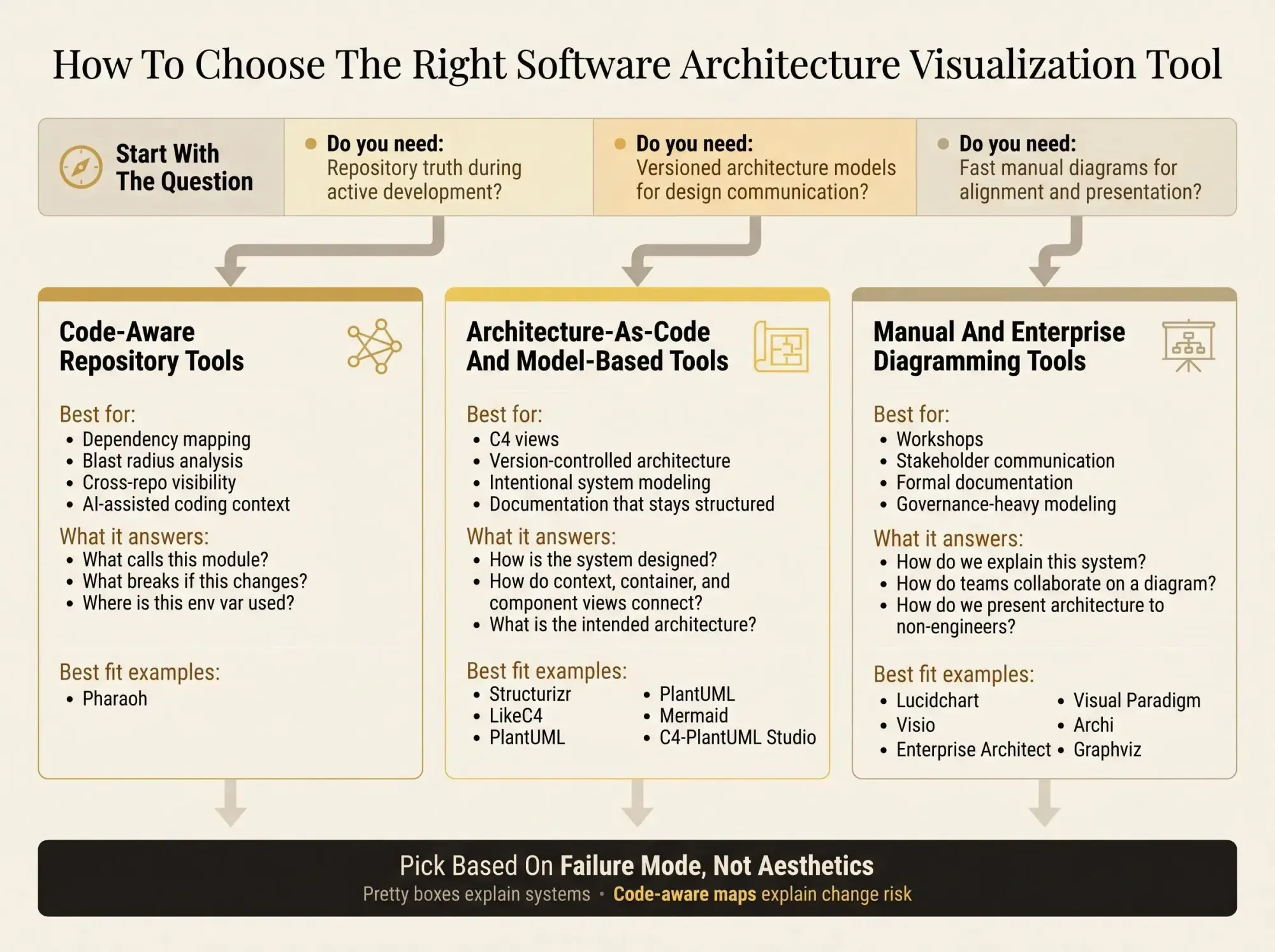
How to Choose the Right Software Architecture Visualization Tool
Start with the actual question you're trying to answer. Most bad tool choices happen because teams buy for the artifact they want, not the workflow they're in.
Ask these first:
- Do you need architecture communication for humans, or a living codebase map for developers?
- Do you need architecture diagrams from code-like text, or actual repository intelligence?
- Are you working in one repo, a monorepo, or several repos with shared services?
- Will developers and AI tools need to query this during real work?
A few decision lines are sharper than they look:
- Static vs continuously updated: if accuracy after two sprints matters, manual drawing tools struggle.
- Manual vs model-based vs code-aware: these are different categories, not interchangeable options.
- Presentation vs execution: a slide-ready diagram and a refactor-safe dependency map serve different jobs.
- AI compatibility: "AI-friendly" often just means text input. It does not mean the tool can expose caller graphs or blast radius to Claude Code.
For small teams with a single service, Mermaid or PlantUML may be enough. Platform teams managing shared services should care more about multi-repo visibility and dependency surfaces. AI-assisted engineering teams in monorepos should be stricter still. If the assistant can touch shared code, context debt becomes production risk.
For code quality more broadly, the open source AI Code Quality Framework covers linting, testing, and review controls around AI-generated changes. That's adjacent to architecture visibility, not a replacement for it.
When Manual Diagrams Break Down and Code-Aware Architecture Wins
You've seen the failure modes. The Lucidchart or Visio diagram is already stale. The markdown diagram shows containers but not who calls what. The AI assistant edits a shared module with no blast radius context and opens a PR that looks fine until integration tests start lighting up.
Manual diagramming tools still matter. They're good for communication and alignment. Architecture-as-code tools are better when you need versioned system views. Code-aware mapping tools take over when you need live repository understanding.
The tipping points are predictable:
- Multi-module repos
- Shared libraries used by several teams
- Frequent refactors
- AI coding sessions where context windows are tight and mistakes compound
Here's the clean distinction:
A system context diagram explains the system. A code-aware map explains the risk of changing it.
Teams often need both. They usually shouldn't expect the same tool to do both equally well. That's where confusion creeps in. A polished diagram can hide operational ignorance. A raw dependency graph can be technically correct and still poor for communication. Pick based on failure mode, not aesthetics.
What Matters Most by Use Case
The best way to visualize codebase architecture depends on the job in front of you, not the logo on the tool.
For active development, prioritize continuously updated mapping, dependency visibility, and change impact context. That's where Pharaoh belongs on the shortlist. If you're using Claude Code, adding a codebase graph via MCP takes about two minutes, and that changes the quality of architectural context immediately.
For architecture diagrams from code in Git-based workflows, look at tools that treat text and version control as first-class. Structurizr is the stricter choice. PlantUML and Mermaid are lighter. LikeC4 gives more freedom. C4-PlantUML Studio helps teams get moving faster.
For workshops and stakeholder communication, ease of use matters more than modeling purity. Lucidchart and Visio work because people will actually open them.
For enterprise modeling and governance, depth beats convenience. Enterprise Architect, Visual Paradigm, and Archi are built for that longer arc.
For graph-style relationship rendering, Graphviz still has a place when you need precise control over dependency views.
Common mistakes show up over and over:
- Choosing a drawing tool when the real problem is repository understanding
- Choosing a modeling tool when the team only needs fast collaboration
- Assuming AI-friendly means code-aware
- Treating all software architecture visualization tools as interchangeable
Pick one real question from your backlog and test each shortlisted tool against it in under 10 minutes. "What calls this shared module?" "What breaks if we rename this package?" "Can we show context, container, and component views from one model?" The tool that answers your real question fastest is usually the right one.