AI Coding Tools Comparison for Complex Codebases

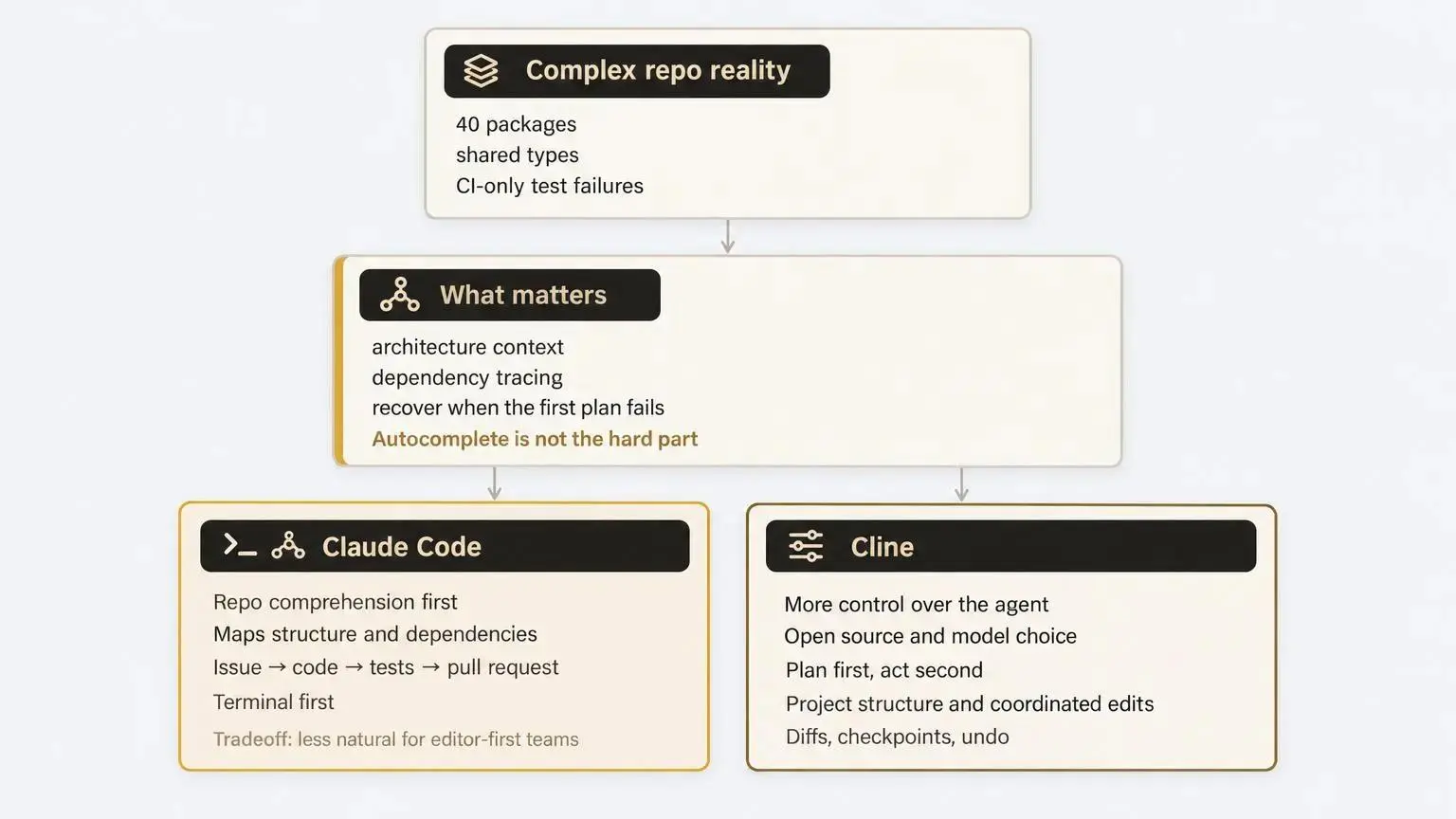
An AI coding tools comparison gets ugly once your repo has 40 packages, shared types, and a test suite that only fails in CI. Most tools can write a convincing diff. Far fewer can tell you what that diff will quietly break.
What matters is architecture context, dependency tracing, and whether the agent can recover when the first plan fails. Autocomplete is not the hard part.
We cut this to the options worth your attention for serious codebases.
Show 4 more productsShow fewer products
1. Claude Code

Pros
- Maps large repos quickly
- Traces imports across many files
- Handles long refactors and migrations
- Runs tests and opens PRs
- Strong enterprise rollout controls
Cons
- Terminal-first workflow isn't for everyone
- Needs clear permissions and review
- May miss legacy code reasons
If your repo is big enough that "where does this type actually flow?" turns into a 40 minute dig through imports, Anthropic's Claude Code is one of the few tools aimed at that reality. It isn't just trying to autocomplete the next line. It's trying to stay with the job long enough to understand the repo, make the change, run the tests, and keep moving.
That matters more than people admit.
In this ai coding tools comparison, Claude Code ranks high because it starts from repo comprehension instead of editor convenience. Anthropic says it can map and explain large codebases quickly, use agentic search to understand structure and dependencies, and handle multi hour refactors or migrations. For complex environments, that's the right shape of promise.
A few things stand out in real engineering workflows:
- It can start from an issue, write code, run tests, and open a pull request in one flow
- It is built to keep going when something breaks, then stop for human judgment when the decision isn't mechanical
- It works from the terminal first, with access across IDEs, desktop, web, mobile, and Slack
That first point is bigger than it sounds. Most AI demos stop at "here's a patch." Real work starts after the patch.
For onboarding, the "I'm new to this codebase" use case is where Claude Code looks especially strong. If the first task is understanding a service graph, tracing imports across packages, and figuring out which module is actually authoritative, terminal first often beats editor first. You ask broader questions. You inspect more context. You don't get trapped in the file you already opened.
The tradeoff is obvious too. Teams that want everything centered in the editor may find it less natural than Cursor or GitHub Copilot. Senior engineers usually adapt fast. Mixed teams don't always.
If the job starts with "understand this repo," Claude Code is usually a serious contender.
We'd still put guardrails around it. Clear permissions matter. Human review matters more when a change crosses modules or shared interfaces. A tool can follow imports and still miss why a weird legacy adapter exists. Large repos are full of code that looks wrong for a reason.
Anthropic also positions Claude Code for team and enterprise use, with seat management, spend limits, role based access, and custom data controls. That won't make the code smarter, but it does make rollout less painful if you're trying to avoid shadow adoption.
2. Cline

Pros
- Strong model choice and control
- Plan mode reduces risky edits
- Shared repo rules guide behavior
- Multi-file diffs with easy undo
- Works across IDE, terminal, SDK
Cons
- Setup choices can slow adoption
- Quality varies by connected model
- Less polished than opinionated tools
Cline matters for a different reason. It gives teams more control over the agent itself. If you're allergic to one vendor deciding how your coding assistant should behave, that's the pitch.
For large repos, that freedom can be useful or annoying. Sometimes both.
Cline's open source approach makes sense for teams that care about model choice, visible behavior, and shared repo rules. The project says it can understand project structure, make coordinated edits across files, react to linter and compiler errors, and show every edit as a diff with checkpoints and undo. That's a practical set of behaviors for complex code.
The plan mode is the part we'd pay attention to. When the blast radius is wide, "plan first, act second" is not fluff. It's what separates a decent assistant from a fast mistake.
Where Cline earns its place
- It can run in the editor, terminal, desktop, and as an SDK
- It supports Claude, GPT, Gemini, local Ollama, LM Studio, and OpenAI compatible endpoints
- It can execute bash commands and watch output from tests, scripts, or dev servers in real time
- Repo rules can carry coding standards, architecture conventions, and deployment procedures across CLI and IDE use
That's closer to an agent runtime than a neat little coding sidebar. Some teams will love that. Some will get lost in options by day two.
The non obvious strength here is shared rules. Plenty of tools can edit code. Fewer can be taught, in one place, that service boundaries matter, migrations need a checklist, and generated files are off limits. If you're trying to compare coding assistants for architecture, that kind of repeatable behavior matters more than a flashy first session.
The catch is model variance. Cline can be excellent or frustrating depending on what you plug into it. That flexibility is the feature. It's also the burden.
We'd look at Cline when the team wants MCP servers, plugins, CI workflows, and strong control over approvals. We wouldn't pick it for people who just want an opinionated default and minimal setup.
3. Cursor

Pros
- Familiar IDE-first workflow
- Parallel agents speed long tasks
- Desktop and CLI flexibility
- Strong daily coding throughput
- Good enterprise rollout story
Cons
- Repo context needs validation
- Parallel agents can drift
- Less architecture-first than rivals
Cursor is where a lot of teams land first because the workflow feels familiar. You stay in the editor, hand off work to agents, and keep moving. For daily engineering throughput, that comfort matters.
It also hides a real question: how much repo understanding is the tool actually building before it starts editing?
Cursor makes a strong case in this roundup because it combines desktop and CLI surfaces, supports multi model access, and offers cloud agents that can run in parallel across long tasks. If you care about shipping velocity inside an existing IDE habit, that is a good story.
In a claude code vs cursor for complex codebases decision, Cursor is usually the better fit for editor centered teams that want fast handoff and visible parallel work. If the team lives in active files, issues, and day to day implementation, Cursor feels natural quickly.
Cursor vs claude code monorepo reality
Here's the blunt version:
- Cursor often wins on editing flow, speed, and parallel task visibility
- Claude Code often has the better starting posture for repo comprehension and long refactor endurance
That doesn't make one "better" in the abstract. It changes what kind of mistakes you're likely to make.
With Cursor, we'd test hard on monorepo specifics:
- Cross package dependencies
- Generated files
- Shared interface changes
- Repo conventions that aren't obvious from a few open files
Parallel agents sound great until they all make locally sensible changes that don't agree with each other. Big repos punish shallow context.
Cursor's enterprise positioning also matters if you're looking at secure rollout at scale. But for architecture heavy work, we'd want to know how well it assembles context before the first diff appears. Good editing is not the same thing as good architectural judgment.
Fast inside the editor is useful. Safe across the repo is harder.
4. Replit
Pros
- All-in-one cloud workflow
- Built-in hosting and database
- Parallel tasks before merge
- Enterprise SSO and admin controls
- Model routing helps manage cost
Cons
- Weaker for repo archaeology
- Less ideal for local tooling
- Not best for hidden dependencies
Replit belongs in the conversation, but for this audience it's usually a secondary fit. That's not a knock. It's just aimed at a different center of gravity.
Replit combines AI coding with a cloud native development environment, built in infrastructure, and parallel task execution. Its platform includes hosting, authentication, database, and monitoring, along with enterprise controls like SSO, SAML, SOC 2, and admin controls. For teams that want code, runtime, and deployment close together, that's attractive.
The question is whether your problem is building software in one platform, or understanding a sprawling codebase before you touch it.
Replit says it supports parallel work on the same codebase with visibility before merge, and it uses model routing aimed at balancing quality and cost. Those are real operational benefits. They just don't directly solve architecture inspection in an existing enterprise repo with odd local tooling and years of sediment.
A fair read on Replit looks like this:
- Better fit when the team values an all in one cloud workflow
- Less naturally aligned with deep repo archaeology
- Worth testing if platform consolidation matters as much as coding assistance
We've seen teams confuse these categories. They ask for "the best AI coding tool" when what they actually want is "the least fragmented place to build and ship." Replit can be the right answer to that second question.
It usually isn't the first answer for "best ai assistant for large repos" if the repo already has heavy local build systems, internal packages, and hidden dependency chains.
5. aider

Pros
- Whole-codebase map aids context
- Auto commits simplify rollback
- Lint-and-test fix loop
- Broad cloud and local models
- Terminal-native, scriptable workflow
Cons
- More pair programmer than agent
- Limited enterprise admin controls
- Less suited to cloud orchestration
Aider sits in a different lane. It is lean, terminal native, and surprisingly practical if your team already has decent repo discipline.
Aider-AI's aider says it maps the whole codebase, works with many cloud and local models, automatically commits changes with sensible messages, and can lint and test after edits, then fix the problems it finds. That's not glamorous. It's useful.
Aider matters in this ai coding tools comparison because a lot of serious engineers don't need a giant agent platform. They need a tool that fits their git habits, doesn't fight their workflow, and can survive a real codebase.
A few reasons experienced teams keep coming back to tools like this:
- Automatic commits make rollback easier when the session goes sideways
- Lint and test loops catch a lot of embarrassing failures early
- Terminal first interaction keeps the workflow close to how many senior engineers already work
The whole codebase map is the part to take seriously. On larger repos, assistants fail quietly when they can't hold enough structure in working memory. Aider is trying to compensate for that with a repo level map instead of pretending raw context window size solves the problem.
We'd still be honest about the limits. Aider is more pair programming than agent platform. It is lighter than Cline. It is much less enterprise shaped than OpenAI's Codex or GitHub Copilot. If you need pooled admin controls, persistent cloud workspaces, or broad organizational orchestration, this isn't the obvious choice.
If you want something sharp, scriptable, and close to the metal, aider earns its spot.
6. Codex
Pros
- Persistent cloud workspaces per repo
- Parallel agents handle long tasks
- PR review surfaces findings clearly
- Computer and browser tool verification
- Shared app, editor, terminal workflow
Cons
- Cloud-first execution raises trust concerns
- Build fidelity needs pressure testing
- Architecture insight may vary in review
OpenAI's Codex is built for teams that want cloud persistent work, parallel agents, and review loops that keep running after the laptop closes. That makes it relevant for architecture heavy engineering, especially when tasks span repos or take hours.
The important part isn't "multi agent." Everyone says that now. The important part is whether the tool can keep context coherent while several agents are doing work in parallel, then bring the results back in a way humans can review.
Codex says it can tackle hard bugs, complex refactors, and new features, run many agents in parallel, use computer and browser tools to verify work, and keep tasks moving in reusable cloud environments per repo. It also supports PR review workflows that surface findings and answer questions.
That pushes Codex closer to a cloud workbench than a simple assistant.
Where we'd pressure test Codex
- Can the repo linked cloud environment stay faithful to how the code actually builds and tests?
- Does the PR review surface help humans reason about architecture, or just point at local defects?
- How much trust is the team willing to place in cloud first execution for sensitive repos?
Those questions matter more than the marketing copy.
For organizations that want asynchronous agent coordination across repos, Codex is a serious option. It also benefits from a shared account experience across ChatGPT, editor, and terminal, which can reduce friction for mixed workflows.
The tradeoff is governance and trust. Cloud persistence is either a superpower or a policy fight.
7. GitHub Copilot

Pros
- Strong GitHub workflow integration
- Starts from issues and PRs
- Works across app, CLI, editor
- Supports automations and parallel sessions
- Offers model choice flexibility
Cons
- Architecture reasoning needs validation
- Best fit for GitHub-centric teams
- GitHub conventions may shape workflow
If your engineering system already runs on GitHub issues, pull requests, search, and automations, GitHub Copilot deserves a close look. This is where workflow integration can beat raw model novelty.
GitHub positions Copilot as an AI coding agent that can start from issues or pull requests with context attached, continue work across app, CLI, editor, GitHub, and mobile, run parallel sessions, review local changes, and support recurring automations. For enterprise AI coding tools, that is a strong operating surface.
The GitHub native angle matters because context isn't just files. It's discussion history, review feedback, issue state, and existing automation.
That makes Copilot a better organizational fit than many standalone tools when the source of truth already lives in GitHub. You don't need to rebuild the workflow somewhere else. You extend the one you already use.
But there's a trap here. Task continuity is not the same as architecture understanding.
We'd test whether repo spanning context turns into actual reasoning about dependency chains, shared interfaces, and existing patterns. Some tools move gracefully from issue to PR while still being shallow about why a file matters.
Plenty of assistants can keep a thread. Fewer can explain the system.
Copilot also gives teams model choice and the ability to connect supported cloud or local models. That's useful if you want GitHub centered workflow with some flexibility underneath, not a fixed model story.
| Claude Code | Cline | Cursor | Replit | aider | Codex | GitHub Copilot | |
|---|---|---|---|---|---|---|---|
| Terminal-first workflow | ✓ | × | × | × | ✓ | × | × |
| Editor-first workflow | × | × | ✓ | × | × | × | × |
| Hosted cloud runtime/workspace | × | × | ✓ | ✓ | × | ✓ | ✓ |
| Architecture-first repo understanding | ✓ | ✓ | × | × | ✓ | ✓ | × |
What Actually Matters in an AI Coding Tools Comparison for Complex Codebases
You already know the failure mode. The demo looked smart. The diff looked plausible. Then the change broke a dependency chain nobody saw coming.
That's the whole game.
For large repos, the real question isn't which tool writes code fastest. It's which tool helps your team understand architecture well enough to change code safely. Once you frame it that way, the evaluation gets much sharper.
We'd score tools on things like:
- How fast they onboard into an unfamiliar codebase
- Whether they can trace dependencies and follow imports across modules
- How well they edit many files without drifting from existing patterns
- Whether they can run tests, lint, and command loops without falling apart
- How they recover after failure instead of just stopping at the first red line
- How well they connect to issues, PRs, and repo workflows
- Whether they support rules, approvals, and clear human checkpoints
- Whether model freedom is actually useful or just more setup work
- Whether enterprise controls, spend controls, and review surfaces are ready for rollout
Then ask harder architecture questions:
- Can it explain why a file matters before editing it?
- Can it show what else breaks if a route, interface, or type changes?
- Can it find the existing pattern instead of inventing a new one?
- Can it expose dead code, duplicate implementations, or hidden coupling?
This is where codebase graphs start to matter. Files alone are not enough context. Relationships are the context. Pharaoh exists for exactly this gap - mapping architecture into a graph so MCP clients can see dependencies, blast radius, existing code, and dead code before they touch anything.
Most review tools catch problems after the change. That's backwards.
Claude Code vs Cursor for Complex Codebases
This is the comparison most teams actually care about because both products are credible, and they pull in different directions.
Anthropic's Claude Code is usually the better starting point when the work begins with repo comprehension, dependency tracing, and multi hour refactoring. Cursor is usually the better starting point when the team optimizes for editor comfort, live throughput, and handing work to parallel agents without leaving the development environment.
A fair pilot should be boring on purpose:
- Same monorepo
- Same refactor brief
- Same test suite
- Same review bar
- Same architecture questions before any code changes
Then watch where they differ.
For new engineer onboarding into a big service graph, Claude Code has the edge. For issue driven feature work with lots of active editing, Cursor often feels faster. For a monorepo refactor spanning many packages, it depends on whether the hard part is understanding the repo or pushing changes through the editor efficiently. For parallel work across several repo areas, Cursor's workflow is compelling, but we'd check for context drift between agents.
Human approvals and failure recovery matter here too. A good tool doesn't just write code. It knows when to stop and ask.

How to Compare Coding Assistants for Architecture and Enterprise Rollout
If you're buying for a serious team, don't run the pilot on toy repos. That tells you almost nothing.
Pick four tasks:
- A refactor with real dependency risk
- A bug that crosses service or module boundaries
- A cleanup task involving duplicate or dead code
- A PR review task where architecture context matters more than syntax
Then score each tool on:
- Understanding before editing
- Diff quality
- Blast radius awareness
- Adherence to repo conventions
- Recovery after failed tests
- Human reviewability
- Security and admin fit
The common mistakes are painfully predictable. Teams judge on autocomplete quality. They skip architecture heavy tasks. They assume a bigger context window means better understanding. Then they roll out the tool before writing repo rules or guidance.
Don't do that.
If you're using MCP clients, add architecture context before the pilot. A codebase graph changes what the assistant can see. Pharaoh is one way to do that. For the linting and testing side, the open source AI Code Quality Framework is a useful companion.
Different teams should bias differently:
- Solo senior engineer - terminal speed, undo, and model freedom matter
- Platform team in a monorepo - dependency tracing and repo wide consistency matter more
- GitHub centered product org - workflow integration may beat raw flexibility
- Enterprise team - admin controls, spend controls, and review surfaces matter early
- Open source first team - model choice and visible behavior usually win
Conclusion
Complex codebases expose the gap between code generation and code comprehension fast. Sometimes within the first afternoon.
Claude Code, Cline, Cursor, Replit, aider, Codex, and GitHub Copilot all help in different ways. They are not interchangeable once architecture risk enters the picture. The strongest tools for serious repo work are the ones that can understand structure, trace dependencies, survive long running tasks, and fit the way your team reviews changes.
The practical next step is simple. Run a short pilot on one monorepo refactor, one cross module bug, and one architecture sensitive PR review. Score context quality before code quality.
Pick the tool that helps your team change code more calmly, not just more quickly.