Best Architecture Mapping Software for Developers

Picking architecture mapping software is where a lot of teams lose the plot. You don't need prettier diagrams. You need something that can answer real change questions when Claude Code, Cursor, or Codex is about to touch a messy repo.
What separates the good tools is simple: fresh dependency context, visibility across repos, and answers you can use mid edit. We cut the weak ones fast.
These are the options worth your attention.
1. Pharaoh
1Pharaoh Pharaoh codebase intelligence platform Best Choice 2026
Pros
- Queryable architecture for AI assistants
- Every-push graph stays current
- Strong multi-repo dependency visibility
- Answers blast radius questions fast
- Does not store source after parsing
Cons
- Only supports TypeScript and Python
- Free tier limited to one repo
- Less suited to documentation traceability
9.4Excellent VISIT SITE »
If your team is already coding with Claude Code, Cursor, Codex, or another MCP client, the question usually isn't "can we draw the architecture?" It's "can the assistant see enough of the system to not break it?" That's a different category of problem.
Pharaoh sits in that lane. We built it to map active codebases into a queryable knowledge graph so assistants can ask useful questions before making edits. Not later in review. Before the change lands.
A few things make it different from a lot of architecture mapping software:
- it maps TypeScript and Python repositories into a graph of dependencies and relationships
- it updates on every push, so context doesn't go stale after the first diagram export
- it works across multiple repos, which matters once your "simple service change" crosses three codebases
- it answers practical questions developers actually ask:
- what breaks if this service changes?
- where is this endpoint called?
- which modules depend on this env var?
- is this code still reachable, or are we carrying dead code?
That last one matters more than people admit. Dead code is where AI assistants get overconfident fast.
In real use, the value shows up during active sessions. You don't want to burn 40K tokens feeding repo structure into a model just to ask whether BillingClient is only used by one worker. You want the assistant to ask the graph and get the answer in a few thousand tokens, with less guessing.
Where Pharaoh fits
Pharaoh is closer to a codebase intelligence platform than a one-time recovery tool. That's the distinction.
If you're planning a refactor in a multi-module monorepo, or reviewing a risky PR on Friday afternoon, queryable architecture context beats a static map every time. Static diagrams explain. A graph answers.
Here's the kind of output that matters:
Module: payments/refundsCallers: api/refundsController, jobs/refundRetryWorkerOutbound deps: billing-service, audit-logEnv vars used: STRIPE_SECRET, REFUND_RETRY_LIMIT[Blast radius](https://pharaoh.so/docs/guides/review-pull-requests) if changed: 6 downstream paths across 2 reposDead code candidate: legacyRefundFormatter.tsThat's the difference between "we think this is safe" and "we checked."
Where to be careful
Two buying constraints are obvious.
- Language support is specific today. If most of your active repos aren't TypeScript or Python, that's a real limitation.
- The free tier allows one active repo at a time, so it's better for proving workflow fit than modeling a large estate all at once.
Data handling is also a real decision point. Pharaoh states it does not store source code after parsing, which matters if security review gets involved. Teams should ask that question early, not after legal slows the rollout.
If your problem is live assistant context during coding, Pharaoh is a strong fit. If your problem is architecture documentation audit trails, it isn't trying to be that. That's intentional. You can see Pharaoh at pharaoh.so.
2. InMap
2InMap InMap by InMapz

Pros
- Strong architecture drift detection
- Interactive mapping improves over time
- Cuts package-level review effort
- Works with limited architecture docs
Cons
- Needs architect feedback to shine
- Less useful during live coding
- Governance-focused, not developer-first
8.4Good VISIT SITE »
InMap is for a different job. It helps teams reconnect source code with intended architecture modules, then check whether implementation is drifting away from that plan.
That's more governance-oriented than developer-first.
Its core move is interactive mapping recommendation. Instead of assuming you have perfect architecture docs, it uses information retrieval to recommend mappings between source units and architectural modules, then improves through architect feedback. That feedback loop isn't a side feature. It's the engine.
If no one is going to review mappings, InMap loses a lot of its edge.
The hierarchical package-level extension is the practical detail worth paying attention to. File-level mapping gets expensive fast. Package-level recommendation cuts review effort enough to matter on real systems, not just on papers and demos.
You'd reach for InMap when your team keeps asking questions like:
- does the implementation still match the intended module boundaries?
- where is architectural drift starting to show up?
- can we reduce manual review burden for architecture conformance?
It doesn't compete directly with Pharaoh on coding-session usefulness. That's not a knock. It just serves a different point in the workflow. InMap is stronger when the team needs consistency checking and iterative refinement. Pharaoh is stronger when the developer or assistant needs fast answers inside the change itself.
One subtle strength here is that partial or real-time feedback has been shown to preserve or slightly improve recall and precision. In practice, that means you don't always need a big review ceremony to get value. You can tighten mappings in smaller passes.
3. ModARO
3ModARO Swordfish Computing Group
Pros
- Strong cross-repo microservice reconstruction
- Reusable extractors adapt to conventions
- Good fit for migration planning
- Handles distributed system sprawl well
Cons
- Less useful during live edits
- Better for recovery than governance
- May need setup across varied stacks
8.5Good VISIT SITE »
ModARO starts from a painful truth: in microservice estates, the architecture usually doesn't live in one repo. It leaks across many of them.
That's why ModARO matters. It's built for reconstruction across distributed microservice systems, with reusable extractors that can adapt to different project conventions and technology mixes. If you've ever spent two days figuring out which service owns a business capability because naming drifted over three years, this category makes sense immediately.
Why teams pick it
ModARO is a better fit when architecture reconstruction is the actual job, especially for platform teams and staff engineers trying to get a system-level view back from service sprawl.
A few situations point toward it:
- a migration is coming, but no one trusts the current service boundaries
- the code is spread across several repos with inconsistent conventions
- documentation exists, but it's stale enough to be risky
- you need architecture-level recovery, not just dependency graphs inside one repo
Compared with InMap, ModARO is less about mapping code to predefined modules and more about recovering what the distributed system is now. Compared with Pharaoh, it's less about assistant-friendly answers during a live edit and more about reconstruction across separated codebases.
It was designed to work across multiple codebases rather than assume one repo tells the whole story. That sounds obvious. It isn't. A lot of developer architecture tools still behave as if system boundaries map cleanly to repo boundaries. In mature teams, they often don't.

4. ArchAgent
4ArchAgent ArchAgent framework

Pros
- Strong for large legacy estates
- Recovers multiview cross-repo architecture
- Surfaces business-critical modules
- Handles limited LLM context well
- Prunes outputs for readability
Cons
- Less useful for edit-time decisions
- Best for recovery-focused workflows
- May be complex to evaluate
8.2Good VISIT SITE »
ArchAgent is the heavy-duty option for large legacy systems where basic dependency extraction won't get you far enough. The real problem in those environments isn't just size. It's missing business context inside the size.
This framework combines static analysis, adaptive code segmentation, graph-based reasoning, and LLM-driven synthesis to recover architecture views from systems that are too large or too messy for direct model context.
That segmentation piece matters. Large models are bad at pretending they have enough context. They sound confident anyway.
Where ArchAgent earns its keep
ArchAgent is a strong fit when you need multiview architecture recovery across repos and want business-critical modules surfaced, not just technical edges. That's useful in legacy discovery, modernization planning, and systems with years of architectural drift.
Its shape is different from the other options in this roundup:
- broader than traceability tools like ExArch or ArTEMiS
- more business-logic aware than ModARO
- less focused than Pharaoh on developer-time impact checks during edits
You'd look here if your team is dealing with:
- repositories too large for direct model ingestion
- weak or missing documentation
- cross-repo legacy systems with unclear ownership
- architecture recovery that needs to be usable by humans, not just technically correct
Context-aware pruning is another practical detail. Recovery outputs that dump everything are barely better than no output. Large systems need selective views or the diagram becomes wallpaper.
If the problem is understanding what a legacy system is now, ArchAgent belongs on the shortlist. If the problem is "should Claude Code change this file safely in today's branch," this is the wrong tool category.
5. ExArch
5ExArch ArDoCo project

Pros
- Reduces manual model creation
- Extracts components from docs and code
- Useful for documentation-heavy teams
- Helps standardize component naming
Cons
- Not for live change analysis
- Needs existing architecture documentation
- Narrow traceability-focused use case
7.8Solid VISIT SITE »
ExArch is useful when the architecture exists across documents and source code, but no one wants to hand-build a software architecture model just to get started.
That setup burden kills a lot of traceability work before it begins.
ExArch uses LLMs to extract architecture entities, especially component names, into simple software architecture models from documentation and code. That's why it's relevant. It lowers the amount of manual modeling needed before you can do something useful.
Compared with TransArC, ExArch matters because it can get near the performance of stronger manual-model-dependent approaches without requiring that groundwork up front. Compared with ArTEMiS, it focuses more on extracting the components themselves than on entity recognition and matching inside text.
A practical way to think about ExArch:
- not for live change impact analysis
- not for repo-first assistant context
- good when architecture docs exist and you want to reduce manual model creation work
- especially useful when consistency of component naming across artifacts is the bottleneck
That's a narrow lane, but a real one. Teams with documentation-heavy processes know this pain well. The architecture is technically documented, yet still hard to operationalize because the model never gets built cleanly enough to support traceability.
6. ArTEMiS
6ArTEMiS KIT research project

Pros
- Strong documentation entity recognition
- Improves architecture-model matching
- Useful in audit-heavy workflows
- Pairs well with ExArch
- Supports traceability maintenance
Cons
- Narrower than broader mapping tools
- Less useful for live coding
- Best with documentation-heavy processes
7.4Solid VISIT SITE »
ArTEMiS is more specialized than ExArch, and that's fine. It focuses on identifying architecturally relevant entities in documentation and matching them with architecture model entities.
If ExArch helps form the component-level view, ArTEMiS helps make the text artifacts usable in a traceability workflow.
This matters in environments where documentation isn't optional. Audit-heavy teams, regulated teams, and groups with long-lived design records often need to maintain links between what was described and what shipped. That's not the same as software architecture visibility during a refactor sprint.
One useful way to place ArTEMiS is as a tool that improves the front end of traceability:
- better entity recognition inside documentation
- stronger matching against architecture model entities
- helpful as a complement to later-stage traceability approaches
Combined with ExArch, it has been shown to outperform stronger no-manual-model baselines in architecture-code traceability settings. That's the non-obvious decision signal here. On its own, ArTEMiS is narrow. Paired well, it gets more interesting.
If your developers mostly need caller graphs and blast radius checks, skip this category. If your team lives in architecture documents and trace links, ArTEMiS is doing a real job.
7. TransArC
7TransArC ArDoCo traceability approach
Pros
- Strong with existing architecture models
- Good fit for formal traceability needs
- Structured architecture-to-code linkage
- Performs well in mature workflows
Cons
- Requires manually created architecture models
- Setup burden blocks lean teams
- Less useful for coding-session context
7.8Solid VISIT SITE »
TransArC is for teams that already have manually created software architecture models and want strong architecture-to-code traceability from that foundation.
That setup assumption is the whole tradeoff.
When the model groundwork is in place, TransArC can be a strong performer. In disciplined environments, that may be perfectly reasonable. Some teams already maintain architecture models because process demands it. For them, the manual cost is sunk cost, not blocker.
The decision line
Choose TransArC when these are true:
- your architecture models already exist and are maintained
- traceability is a formal requirement, not a nice-to-have
- you care more about structured architecture-to-code linkage than coding-session context
Avoid it when the manual model creation step would stall the effort. That's where lean engineering teams get trapped. They buy into the promise, then discover the setup work is the real project.
Relative to ExArch, TransArC can be stronger in mature traceability workflows. Relative to ArDoCode and SWATTR, it sits in a higher-structure part of the process. That can be strength or friction depending on the team.
8. ArDoCode
8ArDoCode ArDoCo project
Pros
- No manual architecture model needed
- Approachable starting point for traceability
- Useful baseline in evaluations
- Fits documentation-to-code linking workflows
Cons
- Narrow traceability-focused use case
- Not built for impact analysis
- Less useful for daily coding
7.4Solid VISIT SITE »
ArDoCode belongs on the list because it gives teams a traceability-focused option without requiring a manually created architecture model at the start.
That's why it still matters.
It sits in the architecture-code traceability family, not the broader class of software architecture visibility tools. So if your real problem is direct code navigation, multi-repo blast radius, or assistant-driven impact analysis, this won't feel close enough to the work.
Still, ArDoCode is useful as both a practical option and a reference point. In evaluations, it appears as a meaningful baseline for no-manual-model workflows. That's valuable when you're comparing newer LLM-assisted approaches like ExArch plus ArTEMiS and trying to understand what they actually improve.
A lot of teams don't need "the best possible traceability method." They need a method they can start. ArDoCode fits that mindset better than approaches that demand a lot of architecture preparation before week one.
9. SWATTR
9SWATTR ArDoCo traceability approach

Pros
- Useful benchmark for traceability comparisons
- Focused on documentation-to-code link recovery
- Helps evaluate newer LLM methods
Cons
- Not built for change impact
- Feels distant from coding workflows
- Specialized traceability use case
6.8Average VISIT SITE »
SWATTR is best treated as a reference point in software architecture traceability link recovery. It's relevant if your team is comparing classical documentation-to-code mapping approaches against newer LLM-assisted ones.
That benchmark role matters more than hype.
SWATTR helps anchor the conversation around traceability recovery rather than architecture reconstruction or live assistant context. If you're evaluating ArTEMiS, ExArch, TransArC, or ArDoCode, it's useful to understand where SWATTR sits in the comparison set. If you're trying to make AI-assisted refactors safer in a monorepo, it will feel pretty far from the problem.
That's not a weakness. It's just specialized.
The recurring mistake in this category is buying a traceability tool when the actual issue is day-to-day change risk. Teams often realize that only after the pilot, once someone asks, "can it tell us what breaks if we touch this endpoint?" and the answer is basically no.
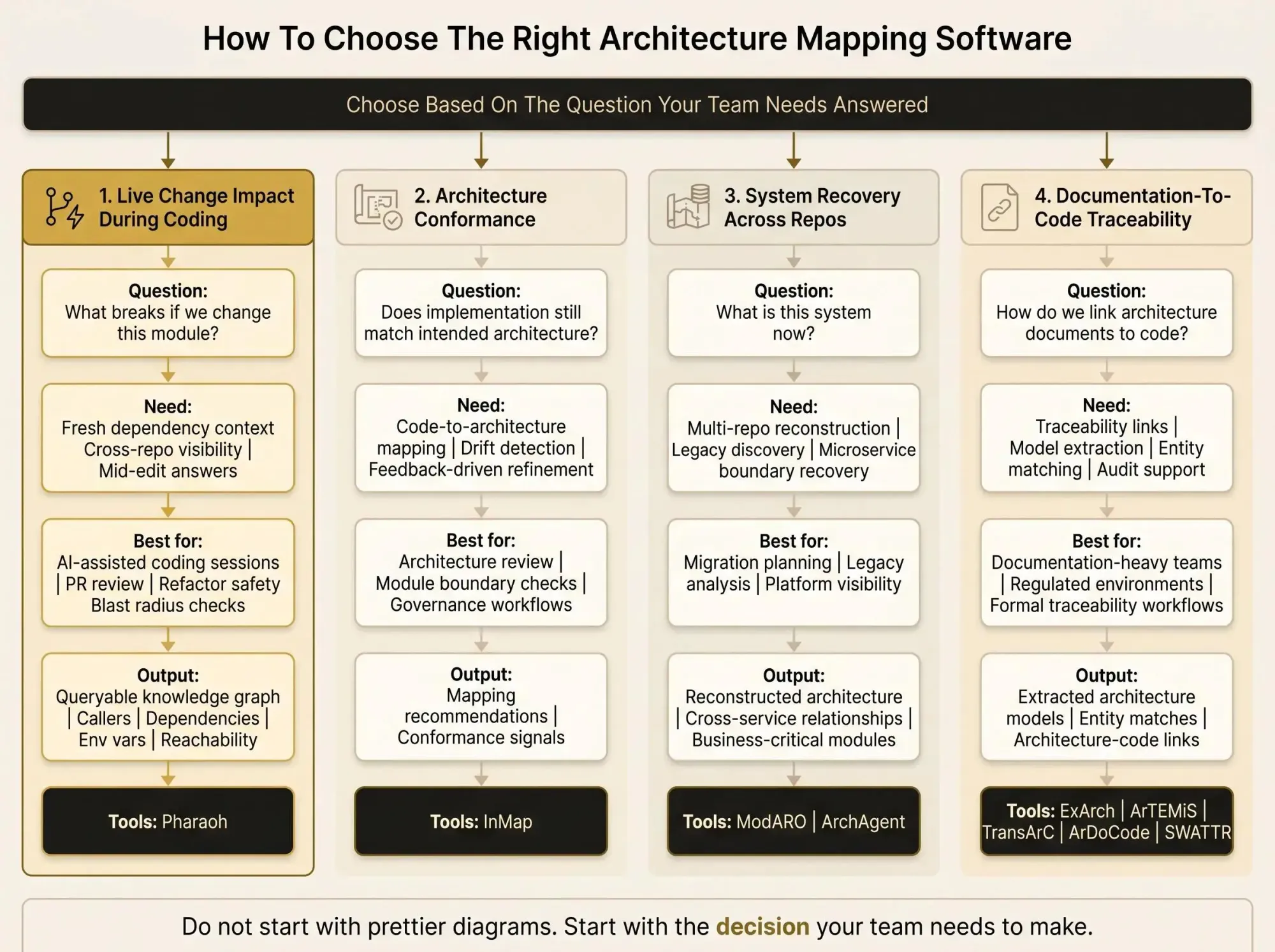
How to Choose the Right Architecture Mapping Software
Start with the question your team needs answered. Not the feature grid.
Different questions point to different tool classes:
- "What breaks if we change this module?"
- look at codebase intelligence platforms and engineering knowledge graph tools
- "Does implementation still match intended architecture?"
- look at code-to-architecture mapping tools
- "What is this legacy or microservice system now?"
- look at reconstruction and recovery tools
- "How do we link architecture documents to code?"
- look at traceability-focused developer architecture tools
Then match the tool to the workflow you actually run:
- AI-assisted coding sessions and refactoring sprints
- PR review and blast radius checks
- monorepo or multi-repo migration planning
- architecture conformance review
- documentation maintenance and audit trails
Don't stop at feature lists. Check the output type.
- queryable knowledge graph
- mapping recommendations
- reconstructed architecture views
- extracted architecture models
- traceability links
Freshness matters too. If the repo changes every day, every-push updates matter. If you're doing legacy discovery once per quarter, periodic recovery may be enough.
Artifact requirements are another trap. Some tools expect architecture docs. Some expect manually created architecture models. Some work mostly from source and dependency context. That's not a small detail. It's the difference between a two-day trial and a three-month side project.
What Separates the Best Architecture Intelligence Tools From Basic Diagrams
A diagram can be correct and still not help you ship safely.
The best architecture intelligence tools answer change impact questions with enough detail to act on. They include callers, dependencies, endpoints, env var usage, and cross-repo paths. They stay current. They fit inside developer workflows.
A static box-and-line export usually fails on three fronts:
- it doesn't explain reachability well enough
- it gets stale quickly
- it can't answer follow-up questions
For AI-assisted developers, one test is simple: can the assistant stay inside the real shape of the system, or is it guessing from local files? If it's guessing, you're paying for speed with hidden risk.
When governance matters, traceability support becomes part of the answer too. Different lane, same standard: the output has to support a real decision.
Common Mistakes When Evaluating Software Architecture Visibility Tools
Most bad evaluations start with the wrong problem statement.
We've seen teams buy recovery frameworks when the real issue is that coding assistants lack system context during edits. We've seen teams buy traceability tools when what they really needed was searchable dependency answers during PR review.
Watch for these mistakes:
- testing on a toy repo instead of the monorepo or service mesh that causes pain
- ignoring manual architecture model creation cost
- assuming architecture documentation exists, is current, and is trusted
- forgetting update cadence in fast-moving codebases
- leaving data handling questions until procurement
- treating static diagrams as enough for change impact work
The sharp version is this: if architecture drift shows up weekly, quarterly exports won't save you.

Which Type of Tool Fits Each Team Best
The shortlist breaks into clear lanes.
For AI-assisted developers working in active TypeScript or Python repos, prioritize queryable architecture context and blast radius visibility. Pharaoh fits that best, especially if you're adding MCP-based context into Claude Code or similar tools.
For architecture conformance and module mapping, InMap is the better match. It's built around source-to-architecture recommendations and feedback-driven refinement.
For distributed microservice reconstruction, ModARO is the better fit. Cross-codebase visibility is the point.
For legacy recovery with business-logic emphasis, look at ArchAgent. That's where multiview recovery and context-aware scaling matter.
For documentation-to-code traceability, the right choice depends on setup tolerance:
- ExArch if reducing manual model creation matters
- ArTEMiS if entity recognition in docs is the weak point
- TransArC if mature architecture models already exist
- ArDoCode if you want a more approachable no-manual-model path
- SWATTR if you need a reference point in traceability recovery comparisons
Conclusion
There isn't one best architecture mapping software category. There are three: developer-first codebase intelligence platforms, architecture recovery tools, and architecture-code traceability tools.
If your biggest pain is unsafe AI-assisted changes in large repos, start with a tool that exposes dependencies, blast radius, and code relationships in a form assistants can query. If you're using Claude Code, you can add a codebase graph via MCP in about two minutes. Pharaoh does this automatically via MCP at pharaoh.so.
If your pain is drift against intended design, start with mapping-first tools like InMap.
If your pain is missing system understanding across services or legacy repos, start with recovery tools.
If your pain is documentation-to-code alignment, stay in the traceability lane and pay close attention to setup demands.
One useful step this week: take a real workflow - a risky refactor, a PR review, a migration planning task, or a legacy discovery session - and test each shortlisted tool against that single job. Abstract comparisons are easy. Real code is where these tools tell the truth.
For teams working on AI coding quality more broadly, the open source AI Code Quality Framework is also worth keeping nearby for the linting and testing side.