Claude Code Context Limits: How Developers Overcome Them

Claude Code context limits usually hit halfway through real work, not at the start. You trace a bug across packages, read a few large files, paste test output, and the assistant starts forgetting what you already ruled out.
What matters is less "more context" and more control. On multi repo or multi module codebases, you need tighter scope, cleaner handoffs, and structure before edits (not after).
A few things to watch closely:
- broad file reads that make replies slower and fuzzier
- repeated fixes for paths or assumptions you already tested
- edits without dependency awareness, where one local change turns into repo wide cleanup
You keep the thread, and the change lands cleaner.
What Claude Code Context Limits Actually Mean
Claude Code context limits are easy to misunderstand because the failure rarely looks dramatic at first. Most teams think about prompt length. In practice, the limit is the total working memory for the whole session.
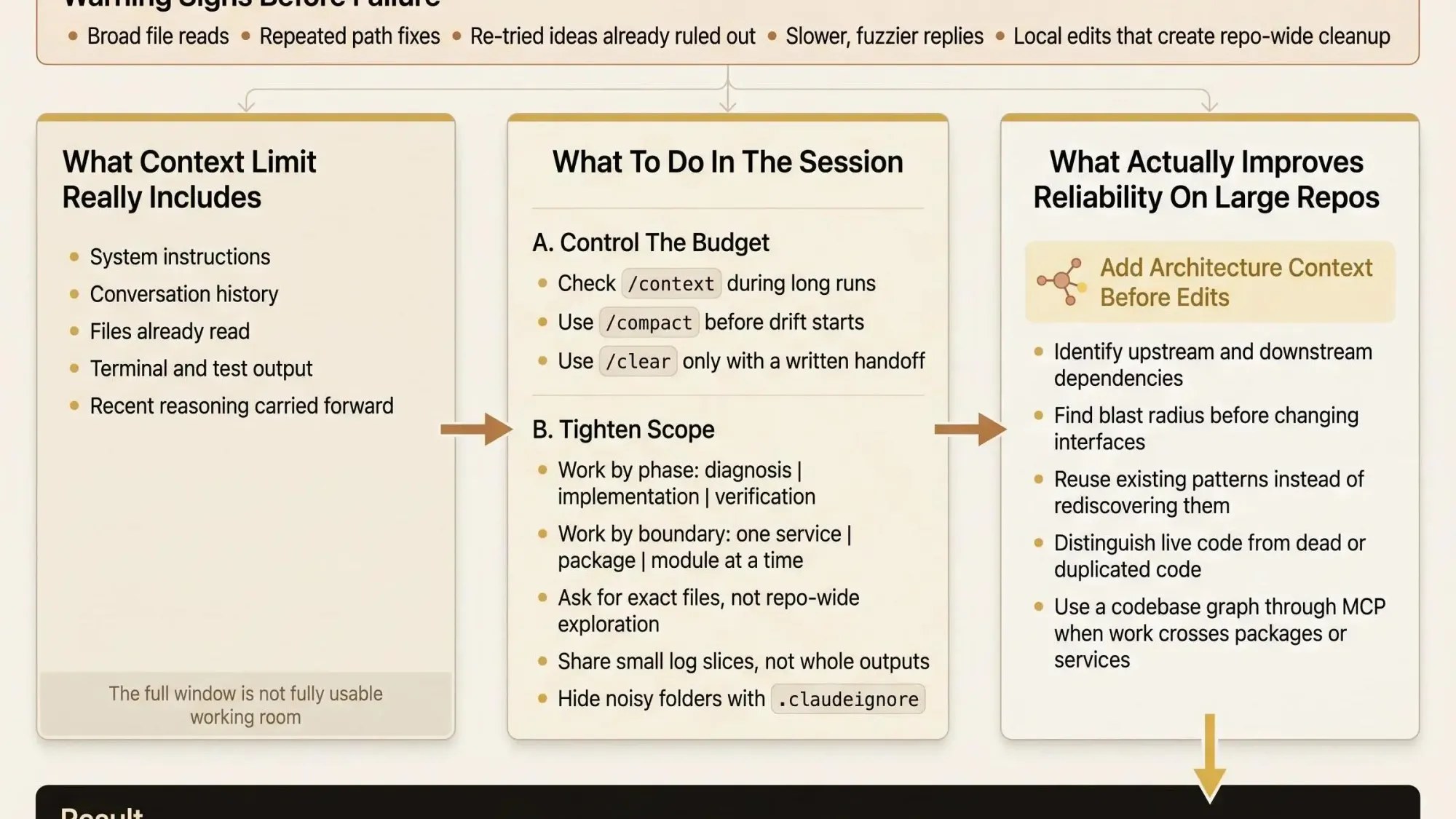
That budget includes a lot more than your last message:
- system instructions and tool definitions
- prior conversation history
- file contents Claude has read
- terminal output, test output, grep results, and other tool responses
- its own recent reasoning carried forward through the session
That matters because a session can feel healthy while the budget is already getting tight. The pain usually shows up before any hard stop:
- answers get less precise
- earlier constraints fade
- Claude repeats paths you already ruled out
- it starts acting like the repo is flatter and simpler than it is
There’s also a gap between the advertised window and the usable one. Many real workflows operate around a 200K-token window. Some newer variants expose more. But Claude Code still keeps room for autocompaction, so you can’t treat the full number as active workspace.
The theoretical window is not the same thing as safe operating room.
That distinction is where a lot of frustration starts.
Why Developers Hit the Limit Faster Than They Expect
You don’t hit claude code context limits on toy examples. You hit them in the middle of real work, usually after you’ve built useful momentum.
A few familiar cases:
- refactoring across three services and a shared package
- debugging a flaky integration test with logs, traces, and config involved
- tracing a data flow through a monorepo with repeated package patterns
- reviewing a risky PR on an enterprise repo where one “small” interface change might hit six downstream consumers
The token burn is not subtle. A 500-line TypeScript file can cost 3K or more tokens. A 2,000-line file can land around 15K. A 5,000-line file can consume roughly 15K to 20K on its own, depending on content and formatting. Then add build logs, test output, grep results, and a few rounds of back-and-forth.
You can lose 40K to 60K tokens without noticing.
The compounding effect is the part most people underestimate. Every new turn carries the growing history forward. So even before quality drops, long sessions get slower and more expensive. By the second afternoon of a refactor, the assistant is dragging around decisions, dead ends, snippets, and logs from hours ago.
And that’s the real operational cost. It’s not just hitting a hard cap. It’s losing the thread of constraints, failed approaches, and repo-specific decisions you already paid to establish.
Why Large Codebases Make the Problem Worse
If you’re asking how Claude Code handles large codebases, the honest answer is: it can do useful work, but file-by-file reasoning breaks down faster than most teams expect.
Large repos punish local reading because the important context usually isn’t local. Relevant behavior is spread across layers, packages, services, shared utilities, configs, scripts, and generated code. The file you want to edit is often just the visible edge of the problem.
So Claude keeps re-reading structure it can’t retain reliably.
Why monorepos are especially rough
Claude code for monorepos gets hard for reasons every platform team knows:
- repeated package discovery
- duplicate patterns across modules
- similar file names in different paths
- hidden coupling through shared libraries, contracts, or generated clients
The assistant may find the right file and still miss the real dependency path. We’ve seen this over and over. The model isn’t confused because it’s weak. It’s confused because the repo shape keeps forcing reconstruction.
Why enterprise repos raise the stakes
Using Claude Code on enterprise repos is the same problem with more downside:
- more surface area
- more legacy code
- more internal conventions
- more ways for a “safe” change to have a bad blast radius
AI can move fast on local code. Trust collapses when the system behind that code is only partially visible. That’s the tension teams feel in practice.
The Warning Signs Before a Session Actually Breaks
You don’t want to manage context after the session falls apart. By then you’re already doing recovery work.
The early signals are usually obvious once you know what to watch for:
- Claude forgets instructions from earlier in the session
- it proposes fixes that were already tried
- it starts ignoring project conventions you already established
- response quality drops after several broad file reads
- latency rises because each turn is carrying heavier history
This is why experienced users check context before things get weird, not after. A vague session is already a damaged session.
A few habits help:
- inspect usage during long runs with
/context - compact before the session gets muddy
- avoid broad prompts like “scan the repo and tell me what’s wrong”
- stop feeding logs wholesale if a 60-line slice answers the question
Small discipline beats late rescue.
How Claude Code Manages the Limit Under the Hood
Claude Code doesn’t simply run until the window is full and then stop. It tries to keep the session alive through autocompaction.
In plain language, older history gets summarized so work can continue. That summary is useful, but it’s lossy. The dropped details are often exactly the ones you needed later:
- exact file paths
- method signatures
- rejected approaches
- odd edge cases from test output
- one-off repo rules that never made it into a stable summary
Current versions reserve about 33K tokens for autocompaction. Earlier discussions often referenced a 45K-token buffer. In practice, compaction tends to trigger around 83.5 percent usage rather than at the full advertised window.
So no, developers can’t treat the full window as available working room. The session starts trading detail for survival before it hits the wall.
Claude Code gives you a few useful controls:
/contextshows token usage and where the budget is going/compactshrinks history on purpose/clearfully resets the conversation without touching repo files
Those commands matter more than most teams think. If you’re not using them, you’re flying blind.
The Short-Term Workarounds Developers Use Today
Most teams already have a survival kit for claude code context limits. The trick is using the right one at the right time.
When /compact is the right move
Use /compact when the session is still coherent but getting heavy. You reclaim room without throwing away the whole thread.
The tradeoff is simple: you keep direction, but lose fine-grained reasoning detail. Good for an active refactor. Risky if you’re deep in edge-case debugging.
When /clear is better
Use /clear when drift has already set in. If the model is reopening closed paths or ignoring your earlier constraints, reset it.
But don’t reset cold. Write a handoff summary first:
- goal of the task
- files in scope
- constraints
- what was tried
- current status
Without that, you’re paying to relearn your own session.
The other habits that actually help
Short-term tactics that work in daily use:
- split work by phase: diagnosis, implementation, verification
- split by domain: one service or package at a time
- tell Claude exactly which files matter
- avoid open-ended repo exploration
- use
.claudeignoreto block generated files, vendored code, build output, and noisy assets
Treat context like a budget, not a free pool. That’s the mindset shift.
Still, these are workarounds. Useful ones. Not the real fix.
Why Bigger Context Windows Do Not Fully Solve the Problem
A bigger window helps. It just doesn’t solve the part that hurts most.
More tokens let Claude hold more fragments:
- longer implementation sessions
- fewer immediate resets
- more room for logs and multi-file reads
That’s real. It’s not enough.
A larger window does not turn fragments into understanding. Hidden dependencies stay hidden. Dead code still looks relevant if the model can’t see actual usage relationships. Blast radius is still guesswork if the assistant sees files but not the system graph.
For experienced teams, the bottleneck on large systems isn’t just memory size. It’s claude code architectural understanding and claude code dependency awareness.
More memory helps you carry more pieces. It doesn’t tell you which pieces matter.
That’s why teams keep asking for bigger windows and still end up babysitting the assistant.
Why Architecture Context Beats Raw File Context
The limit that causes the most damage is not only token count. It’s missing system-level context.
Architectural context means Claude can reason from structure, not scattered reads. In practice, that means knowing:
- which services call which
- which modules own shared types or contracts
- what depends on a utility before you edit it
- what code is dead, duplicated, or orphaned
That changes the mode of assistance.
Fragment-driven assistance reads files and guesses relationships. Structure-driven assistance starts from how the codebase actually fits together. That’s a different quality of help.
When teams have that structural view, the review burden shifts. You stop spending your time checking whether Claude missed obvious dependencies. You spend it deciding whether the proposed change is the right one.
That’s how you reduce hidden blast radius. That’s how you avoid editing a file that looks local but is transitively important elsewhere.
How a Knowledge Graph Changes Claude Code Architectural Understanding
One practical answer to claude code context limits is to map software architecture into a knowledge graph and make that available to the assistant.
Instead of re-reading broad sections of the repo to infer relationships, Claude can query structure directly. That cuts wasted context and improves reasoning on large systems.
This is where Pharaoh fits naturally. We map dependencies, blast radius, existing code patterns, and dead code into a graph the assistant can use. Through MCP, that graph is available to AI coding assistants without forcing the model to rebuild architecture from scratch every session.
What that changes in practice:
- better scoping before edits
- better awareness of downstream impact
- faster discovery of similar logic that already exists
- fewer blind changes based on partial file reads
What it does not change:
- it does not replace developer judgment
- it does not remove the need for tests, review, or repo hygiene
- it does not make bad prompts good
It gives the model a map. That’s the point. When the assistant starts from structure instead of fragments, the session spends fewer tokens rediscovering the repo and more time doing useful work.
A Practical Workflow for Claude Code on Monorepos and Enterprise Repos
If you’re working in monorepos or enterprise systems, you need an operating model, not prompt folklore.
Here’s the workflow we’d use.
- Start with the question behind the change
What are you trying to modify? Which subsystem owns it? What kind of risk would make the change unsafe? - Narrow scope before reading files
Identify the packages, services, or modules that matter. Exclude generated files and low-value directories. Don’t ask Claude to inspect the whole repo. - Pull in architecture context first
Get dependency paths, upstream and downstream consumers, existing implementations of the same pattern, and known dead code or low-usage areas. - Use Claude for a bounded task
Ask it to trace a code path, draft a refactor plan, edit a small file set, or explain blast radius before code changes. - Verify in a separate pass
Run tests and linters. Inspect diffs. Confirm the assistant stayed within the intended surface area.
The open source AI Code Quality Framework covers the linting and testing side well. Pharaoh fits at step 3, where teams usually waste tokens rediscovering structure.
That’s the quiet failure mode on big repos: not bad generation, bad orientation.
What Good Prompts Look Like When Dependency Awareness Matters
Good prompting on large repos is mostly about refusing to be vague.
A high-signal prompt should include:
- the exact change goal
- the subsystem or package boundary
- relevant files or paths
- constraints like backward compatibility or API stability
- the output you want first, often impact analysis before edits
The difference is obvious.
Low-signal:
- “Find the auth flow and update it for the new token format.”
High-signal:
- “Before editing, identify downstream consumers of
packages/auth/src/token.ts. Limit analysis toservices/api,packages/auth, andpackages/contracts. Backward compatibility with current mobile clients is required. Return impact analysis first, then a small refactor plan.”
That kind of prompt improves results because it cuts exploratory reading, saves context, and makes edits more predictable.
Useful structure-aware requests include:
- identify dependencies before modifying this module
- list downstream consumers before changing this interface
- show existing implementations of this pattern before adding new code
Claude code dependency awareness is partly a tooling problem, but it’s also a habit. Good users ask for structure before edits.
Common Mistakes That Make Context Limits Worse
Most of the pain is self-inflicted.
The patterns that burn teams over and over:
- broad prompts that invite repo-wide exploration
- feeding entire logs or full files when a focused slice would do
- keeping diagnosis, refactoring, migration, and verification in one endless session
- treating autocompaction as harmless
- restarting without a written handoff summary
- assuming a bigger window means the assistant now understands the codebase
- ignoring dead code and duplicate patterns
- relying on folder names alone to infer architecture
That last one gets people. Folder structure can hint at ownership. It is not dependency truth.
If Claude is reasoning over dead code, duplicate implementations, or stale modules, the output can look thoughtful and still be wrong in the way that matters.
How Teams Should Decide Which Fix to Apply
There isn’t one answer for every repo. There is a clear decision framework.
Use standard context tactics when the repo is modest, the task is narrow, and the issue is mostly session hygiene. In that case, /compact, tighter scoping, and better handoffs may be enough.
Use repo hygiene improvements when noise is the main problem. If Claude keeps reading irrelevant files, fix ignore rules, reduce noisy output, and tighten prompting discipline.
Add architecture context when the work crosses services, packages, or layers. If dependencies are the real source of risk, raw token capacity is not the deciding factor. Blast radius and existing code paths are.
For small isolated tasks, context management is often enough.
For monorepos and enterprise systems, structure-aware context is usually the difference between a useful assistant and an expensive guesser.
Conclusion
Claude code context limits are real. But on large systems, the bigger problem is usually missing architectural context.
More tokens help less than most teams expect if the assistant still can’t see dependencies, blast radius, and dead code clearly. That’s why long sessions on large repos feel fragile even before they fail. The model is carrying more text, not more understanding.
A good next step is simple. Audit one current Claude Code workflow and look at where tokens are being spent on rediscovering repo structure. Tighten scoping. Use /context and /compact earlier. If you’re working on a large repo, add a codebase graph via MCP so Claude starts with the map instead of rebuilding it every session.
That’s usually the shift that makes the tool feel stable again.