Code Graph MCP Server for Safer AI Code Changes

AI assistants feel sharp right up until a tiny edit breaks a worker three modules away. A code graph MCP server matters when your repo is too big for file by file guessing and the model cannot see the real call path.
What matters in practice is simple. We don't start with the edit. You want callers, dependencies, routes, and dead code in view first, especially in multi module or multi repo work.
A few checks save you pain.
- Direct and transitive callers, not just grep hits
- Route and job entry points before shared handler changes
- Unused exports versus live dependencies, so the diff stays boring
Why AI Code Changes Feel Fast Right Up Until They Break Something
You ask Claude Code or Cursor to update one service method. It edits the file cleanly. Local tests pass. Two hours later a background worker starts throwing errors because the method was also reached through an interface in another package. Nobody saw it in the prompt, and the assistant never asked.
That's the part people feel but don't always name. The problem isn't weak autocomplete. It's missing system memory.
In AI-assisted workflows, that low-grade dread usually comes from a few places:
- dependencies spread across packages, workers, routes, and shared modules
- interface paths or inheritance chains that don't show up in a basic text search
- route handlers, callers, and tests scattered across dozens of files
- dead code and stale exports that make the model reason from bad signals
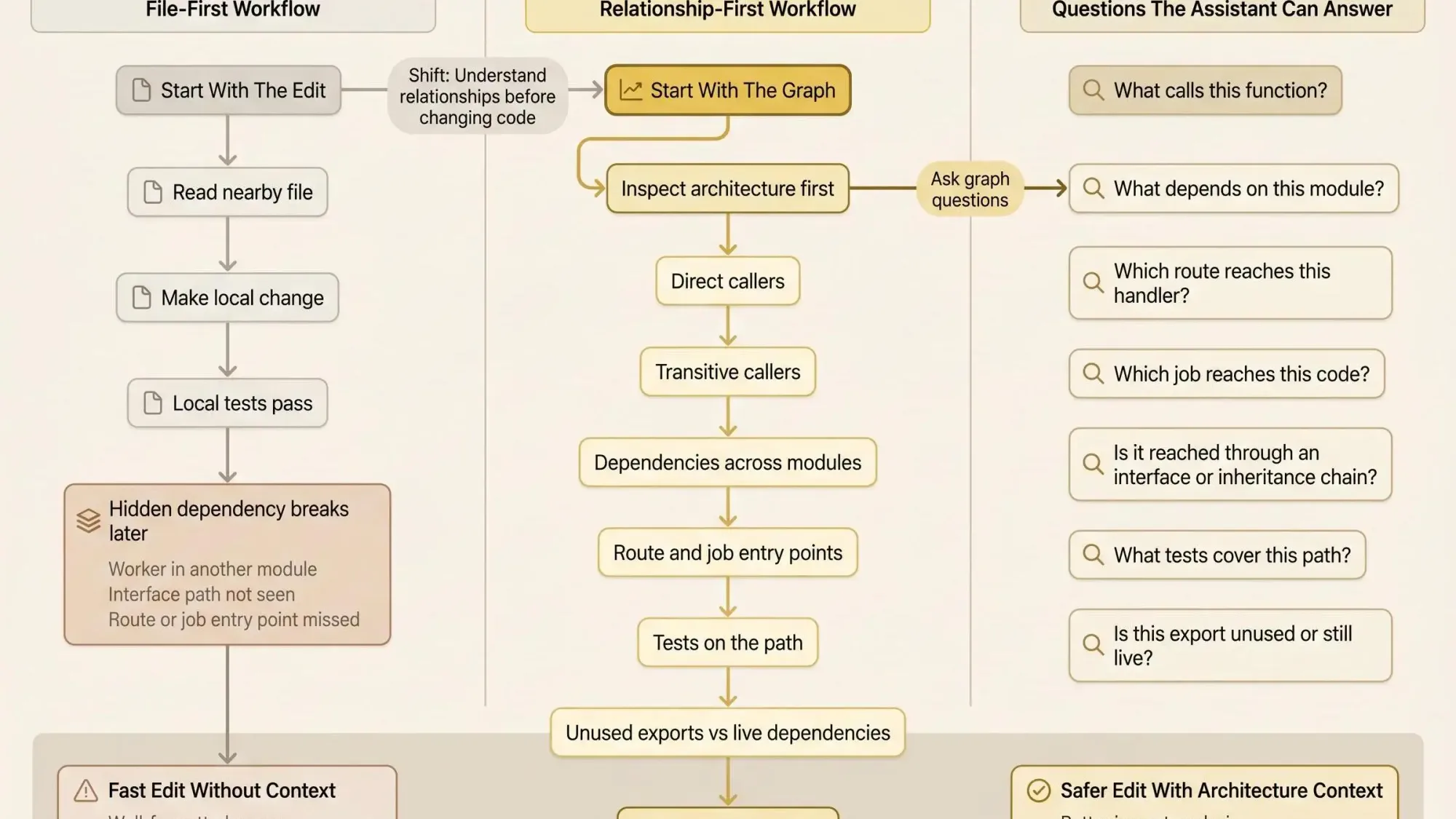
A file-first workflow says: read the nearby code and make the change.
A relationship-first workflow says: before touching anything, ask how this code connects.
That shift matters more than most teams realize. Safer AI coding isn't about trusting the model more. It's about giving it architecture intelligence through a graph of relationships. If the assistant can't see the dependency shape of the codebase, speed just means you can break things faster.
Fast edits without dependency context are just well-formatted guesses.
What a Code Graph MCP Server Actually Is
A code graph MCP server takes your codebase, turns it into entities and relationships, and exposes that structure through Model Context Protocol tools an AI client can query.
There are three parts worth separating.
First, the code graph itself. That's the map: functions, classes, files, modules, imports, calls, inheritance, routes, tests, and the edges between them.
Second, the MCP server. That's the interface layer. Your assistant doesn't need to scrape files blindly if it can call a tool and ask specific questions.
Third, safer changes. The point isn't better code generation during the edit. The point is impact analysis before the edit.
This is why model context protocol architecture tools matter. They let the assistant ask:
- what calls this function
- what depends on this module
- which route reaches this handler
- what tests cover this path
- whether this export is actually unused
That's different from adjacent tooling. A code graph MCP server is not just vector search. It's not only a symbol index. It's not a linter or test runner. And it definitely doesn't replace human review.
What it does give you is a structured way for an MCP client codebase context to stay grounded. Instead of opening 15 files and hoping the right ones were chosen, the assistant can retrieve specific relationship data and reason from that. Less noise. Fewer false positives. Better questions.
How a Code Graph MCP Server Works Under the Hood
Most tools in this category follow the same rough path. They parse source files, extract symbols and relationships, build a graph, then expose query tools to the MCP client.
The interesting differences show up in how they index.
Indexing approaches
You'll usually see one of these patterns:
- AST or tree-sitter parsing for broad multi-language coverage
- LSP-based indexing for deeper cross-file resolution where language server support is strong
- hybrid approaches that combine syntax parsing with semantic resolution
That choice changes the feel of the tool. Tree-sitter-style systems often deploy widely and cover more languages. LSP-driven systems can be sharper in supported stacks, especially around interface resolution and cross-file references. Hybrids try to get both, though they can be heavier to maintain.
Relationship types that matter
A useful graph usually captures more than imports:
- function and method calls
- package and module dependencies
- inheritance and interface implementations
- HTTP routes to handlers
- test-to-code links
- ownership patterns by file or directory
If a tool stops at symbol extraction, it won't help much with risky edits. You'll know what exists, not how it behaves in the system.
Storage and runtime choices
You'll also run into different storage models:
- in-memory graphs for fast session work
- embedded local stores like SQLite for zero-setup persistence
- external graph backends like Neo4j or JanusGraph for team-wide querying
These aren't small implementation details. They change startup time, freshness, and whether the graph is useful in CI or shared review workflows. Some servers watch files and update incrementally. Others rebuild on demand. Rebuild-only can be fine on a small service. On a large monorepo, it gets old by the second afternoon.
If you're evaluating mcp for software dependency context, don't just ask what the graph contains. Ask how stale it gets, how long it takes to refresh, and whether the assistant can depend on it during normal work.
What Makes a Code Graph Useful for Safer Changes, Not Just Smarter Search
A graph becomes safety infrastructure when it answers the questions you should ask before editing anything shared.
The minimum bar looks like this:
- caller and callee tracing
- dependency analysis
- blast radius or impact analysis
- entry point discovery
- dead code detection
- test mapping or at least test gap visibility
Semantic search helps. We use it too. But search alone is still retrieval. It doesn't tell you whether a method is reached transitively through an interface, or whether a route ends up hitting a worker path three calls later.
A good mcp server for codebase architecture should be able to answer practical questions like:
- Where is this method called directly and transitively?
- Is this behavior reached through a base class or interface?
- Which route or job eventually reaches this code?
- Which tests cover this path, and where are the gaps?
- Is this symbol exported but unused, or truly orphaned?
Current tools vary a lot here. Some expose usage lookups, impact reports, root caller discovery, and dead code scans. Some can trace HTTP routes in frameworks like Express, Flask, FastAPI, or Go's net/http. Some classify unreferenced symbols instead of dumping all unused code into one bucket, which matters more than it sounds. An unreferenced private helper and a stale exported API aren't the same cleanup decision.
Most code review tools catch problems after the change is written. That's backwards.
Safer AI workflows move the reasoning step before the edit. If the assistant can inspect blast radius first, you stop spending half your time reviewing changes that should never have been proposed in the first place.
The Features You Should Expect From Modern Model Context Protocol Architecture Tools
The market is getting crowded, and feature lists are starting to blur together. Ignore the noise and look for capabilities that change your workflow.
You'll see servers offering graph queries for callers, callees, hierarchy, dependencies, and route tracing. Many add architecture summaries for packages, hotspots, service maps, and code stats. Some mix semantic search with full-text search. Others focus hard on context compression so the model spends tokens on structure, not filler.
There are real differences under the hood:
- some support around 10 languages deeply through AST parsing, with others in partial modes
- some target 16 languages with zero-config local setup
- some claim support across 37 or more languages through tree-sitter
- tool surfaces vary a lot too - around 14 tools in one server, 18 in another, 42 or 45 in more granular systems
Bigger numbers don't mean better decisions. A giant tool catalog can actually make the assistant worse if it can't choose the right one consistently.
Context compression is practical, not cosmetic
A few tools now compress outputs to save tokens. That's worth caring about if the structure survives the compression.
- one reports roughly 15 to 20 percent token savings with compact JSON output
- another focuses on minified code views and claims about 40 percent fewer code tokens while keeping variable names
That matters when you're trying to fit architecture context into a live Claude Code session. Getting 2K useful tokens instead of 40K noisy file dumps is not a small improvement. But only if relationships stay clear. Cheap compression that strips away call paths or ownership clues misses the point.
Packaging also affects adoption more than teams admit. Some products ship as MCP server only. Others add a CLI, VS Code extension, Claude Code plugin, or GitHub Action for PR review context. The right choice depends on where your team actually works, not what looks good in a demo.
Where Different Approaches Fit Best
There isn't one right shape for every team. The best approach depends on repo size, language mix, and whether you need solo speed or shared memory.
Zero-config local servers with embedded storage are a good fit for solo development and security-sensitive environments. They start fast, stay local, and don't ask your team to stand up more infrastructure just to answer caller queries.
Graph-database-backed systems fit better when teams want persistent architecture context across reviews, refactors, and CI. You pay with setup. You get long-lived querying and shared visibility.
Speed-first static binaries can be the right call for very large codebases, especially when rebuild time is the main point of friction. If indexing takes forever, people stop using the tool. That's predictable.
Then there are systems that bundle MCP with IDE plugins, CI workflows, or persistent project memory. Those can be useful when you want architecture context to show up in more than one place. They can also sprawl if the core graph isn't strong.
A few tradeoffs are consistent:
- LSP-driven tools often resolve semantics better in supported languages
- tree-sitter-based tools usually cover more languages and deploy faster
- in-memory graphs feel quick in one session but don't always persist well
- external graph backends add work but support deeper, longer-lived architecture intelligence
If your priority is software dependency context, blast radius, existing code, and dead code before edits, Pharaoh belongs in this conversation. We built it as an architecture-focused option, not another search layer with a graph-shaped label on top.
How Developers Actually Use an MCP Client With Codebase Context
This is where the idea becomes useful. The workflow isn't exotic. It maps cleanly onto what teams already do.
In a Claude Code session before a risky refactor, you index the repo, ask for the architecture around the target symbol, inspect callers and tests, then decide if the assistant should edit.
In Cursor during feature work across a multi-package app, you ask for route tracing and dependency paths before changing shared middleware.
In a legacy service cleanup with Codex, you identify symbols with zero callers before deleting exports that only look dead.
For PR review, the goal isn't style feedback. It's impact visibility.
A strong workflow usually looks like this:
- Index the repo or the relevant services.
- Ask for architecture context on the symbol or file.
- Inspect callers, dependencies, routes, tests, and possible dead code.
- Only then let the assistant propose an edit.
- Validate with linting, tests, and human review.
Prompts don't need to be fancy. They need to be specific.
- Show the blast radius if I rename this service method.
- Trace all entry points that reach this auth middleware.
- List tests that cover this endpoint and what's missing.
- Identify symbols in this module with zero callers.
- Summarize the architecture around this file for edit scope.
That changes the emotional texture of AI-assisted work. Less vigilance fatigue. Fewer surprise edits in unrelated areas. More confidence during refactors, migrations, and reviews.
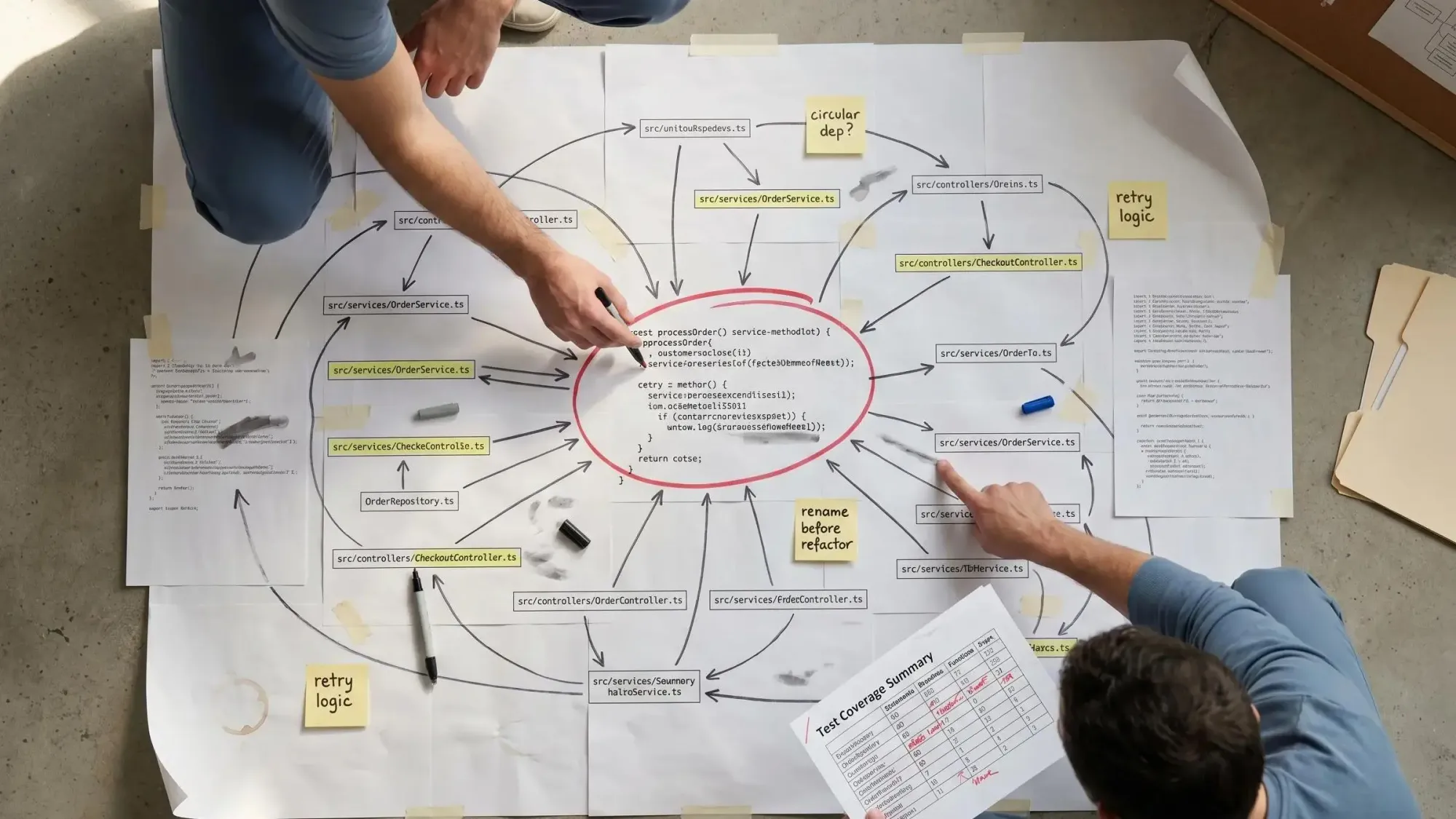
The model stops acting like a fast stranger in your repo and starts acting like it has a map.
How to Evaluate a Code Graph MCP Server for Your Team
Don't test these tools on a toy task. Use one risky change from your real codebase.
Here's the checklist we recommend:
- language support for your actual stack
- quality of cross-file resolution
- caller and impact analysis depth
- support for routes, tests, inheritance, and dependencies
- indexing speed and update model
- storage model and setup burden
- token efficiency and context formatting
- compatibility with your MCP client
- local-only versus team-shared deployment options
Then run a simple bake-off across tools using the same tasks:
- rename a service method used through an interface
- trace an API endpoint to handler to downstream calls
- identify dead code in a package with many exports
- compare impact summaries before and after the proposed edit
Speed is easy to market. Precision is what saves you.
Look closely at the outputs:
- Did it find interface-based calls?
- Did it separate direct callers from transitive dependents?
- Did it surface test coverage gaps?
- Did it avoid dumping irrelevant files into the model context?
Some tools optimize for speed claims. Some optimize for tool count. Some go deeper on graph quality or packaging convenience. For teams that want architecture intelligence mcp around dependencies, blast radius, existing code, and dead code, evaluate Pharaoh alongside open-source options before a bad AI edit forces the issue.
Common Failure Modes and Misconceptions
A lot of teams still assume grep plus file reads is good enough for AI agents. It isn't, once the codebase gets interesting.
Search can find strings. It can't reliably explain architecture. Semantic search improves relevance, but it can still miss relationship-level facts that matter for change safety.
Not all code graph servers are equal either. Some stop at symbols. Some add call graphs and inheritance. Some go further with route tracing, test links, and architecture summaries. The label sounds stable. The depth is not.
A few failure modes show up again and again:
- stale graphs because incremental updates are weak or turned off
- broad language support that is shallow in the languages you actually use
- giant tool catalogs that create choice overload for the agent
- false confidence because the graph exists, even when the query quality is poor
And it's worth saying plainly what these systems do not solve:
- they don't replace tests
- they don't replace review
- they don't infer business intent
- they don't make unsafe code safe by themselves
One more systems note. Some MCP workflows now mix architecture tools with code execution. That can reduce tool-by-tool friction, but it also expands the attack surface. Evaluate architecture context and execution trust separately. They are not the same problem.
A Practical Rollout Plan for Safer AI Code Changes
You don't need a giant rollout. Start small and make it routine.
Pick one repo and one MCP client. Index the codebase. Validate the graph against a few dependency chains you already know well. If it can't explain known relationships, don't trust it on unknown ones.
Use the graph read-only at first:
- PR review
- refactor planning
- migration prep
- dead code validation
Then tighten the team rules before you allow AI edits on shared code.
- ask for blast radius before editing shared services
- ask for entry points before changing route handlers or auth logic
- ask for dead code evidence before deleting exports
- require test mapping for changes in core paths
For larger teams, a little governance helps:
- document which repos are indexed
- define when the graph must be refreshed
- keep architecture summaries close to PR and review workflows
Linting and tests still matter. They catch a different class of problems. We like the open source AI Code Quality Framework for the linting and testing side. Architecture context should sit upstream of those checks, not replace them.
If you're already using Claude Code or another MCP client, adding a codebase graph can usually be done quickly. Pharaoh automates the architecture side of that workflow via MCP.
Conclusion
The shift is simple, but it changes everything. The goal isn't blind faith in faster models. The goal is giving the model architectural memory before it edits.
A good code graph MCP server gives you dependency visibility, blast radius awareness, existing code context, dead code detection, and better questions before any change is made. That's how you turn AI from a fast file editor into something safer to work with in real systems.
Pick one change you don't fully trust an AI assistant to make today. Then run it the safer way: map callers, dependencies, routes, and tests first. After that, decide whether the edit is actually low risk.