Claude Code on a Large Codebase Without Guesswork
Claude Code on a large codebase usually looks smart for the first five minutes. Then you hit the part people gloss over: one shared package, one stale path, one rename that quietly breaks something two teams away.
What matters is scope, repo context, and blast radius. If you're using Claude, Cursor, or Codex in a monorepo, don't start with a bigger prompt. Start narrower.
A few things worth getting right early:
- Launch from the package you want to change, not the repo root.
- Ask for impacted files before edits, especially around shared modules.
- Keep generated and frozen paths out of scope so the diff stays sane.
You get safer changes on the first pass.
Why Large Codebases Make Claude Feel Smart One Minute and Risky the Next
You ask Claude Code for a tidy refactor in a monorepo. It finds the obvious files fast, traces a few imports, proposes a clean diff, and for about thirty seconds it feels great. Then the hesitation kicks in. One renamed module, one indirect consumer, one frozen legacy path nobody touched in 18 months, and that clean diff turns into a hidden regression.
That feeling is familiar. It's low-grade panic. Not because Claude is bad at code, but because confidence drops when the system is bigger than any one engineer's mental model.
On a large repo, the hard part usually isn't generation. It's situational awareness.
A few things make this worse at scale:
- hidden dependencies across services and packages
- dead code that still looks alive in search
- generated code sitting next to hand-written code
- old and new patterns living in the same tree
- different teams enforcing different conventions by directory
Claude can search files. That's not the question. The question is whether it understands enough of the architecture around a change to act safely.
Our view is simple: Claude Code gets more trustworthy when you pair it with explicit repo context, practical guardrails for Claude Code, and dependency visibility that makes blast radius legible. That's the gap tools like Pharaoh are meant to fill in MCP-based workflows - not by replacing engineering judgment, but by making the system less opaque before edits start.
AI is risky in big codebases for the same reason humans are risky in big codebases: unseen dependencies.
How Claude Code Actually Works in a Large Codebase
A lot of confusion starts here. People assume Claude Code has some persistent semantic index of the whole repo and is pulling from that. By default, it doesn't.
In practice, Claude Code explores on demand. It traverses the filesystem, reads files, uses path matching, and runs grep-style searches against your local checkout. That matters more than it sounds.
Fresh local code beats stale retrieval. If your team renames a package at 10:12 and you pull at 10:13, Claude sees the rename immediately. There's no waiting for an index rebuild or wondering whether an embedding store is behind by 400 commits.
For anyone searching for claude code large codebase, that's the first useful mental model: it behaves more like an engineer navigating a repo than a retrieval layer surfacing old chunks.
That has real advantages:
- it works on messy repos, not just polished modern stacks
- it's useful for
claude code for monoreposand long-lived systems - it still holds up in C, C++, C#, Java, and PHP, not just JavaScript and Python
- it doesn't depend on a central upload pipeline to stay current
But live search has a hard limit. Finding files is not the same as understanding relationships.
Grep can show where a symbol appears. It can't tell you whether that symbol is the correct extension point, whether the dependency chain is fragile, or whether the code path is already dead. Reading a few files gives local context. It doesn't automatically reveal downstream consumers, ownership boundaries, or the one background job that still relies on an old contract.
Agentic search reduces staleness. It does not remove guesswork on its own.
Where Claude Code Still Guesses on a Big Repo
This is where teams get tripped up. Code retrieval and architecture understanding are not the same thing, and treating them as the same thing is expensive.
The common failure pattern looks like this:
- Claude locates a matching function or module.
- It infers intent from nearby file context.
- It proposes a change before it has the full dependency picture.
That works fine until it doesn't.
On a big repo, the blind spots are predictable:
- indirect call chains that never show up in the first search pass
- cross-package imports hidden behind barrel files
- event-driven paths and background jobs that don't read like direct consumers
- shared libraries used in odd places nobody expects
- generated clients and checked-in artifacts that look editable
- dead code that still ranks high in search results
This creates ugly loops. You get extra review cycles. Diffs get reverted. Claude explores the wrong branch of the codebase for twenty minutes, and your prompts get broader and broader because you're trying to compensate for uncertainty with more text.
That usually makes it worse.
Claude code repo context is not just "more files in the window." It's the right structure around the files that matter. Before you ask Claude to change code, shape the environment so it sees the right slice of the system.
Start With Scope, Not Prompts
Most teams try to solve large-repo problems with better prompting. That's not the first fix. The first fix is session scope.
Where you launch Claude changes its behavior. Start in a subdirectory and sibling packages stay out of reach unless the task truly spans them. Start from the repo root and Claude has permission to wander, which it often will if the naming is broad or patterns repeat.
That sounds minor. It isn't.
Here's the practical rule for claude code for monorepos:
- launch from the package or service you're changing first
- move up to the root only after you've confirmed the change crosses boundaries
- keep the first task narrow so Claude builds a clean map of one subsystem before touching the wider tree
A root-launched session on a monorepo might touch packages/auth, packages/ui, and two old integration folders because they all match the same token. A package-scoped session in services/api usually stays focused on the API service, its tests, and the local interfaces that actually matter.
Too much context degrades focus. Too little leaves Claude blind. The goal isn't maximum visibility. It's relevant visibility.
We've seen this remove a surprising amount of confusion before any extra tooling enters the picture.
Build Layered Repo Context With Directory-Specific Guidance
One giant CLAUDE.md file feels tidy at first. On a large system, it breaks down fast.
It becomes too generic to guide anything well, or too long to be read usefully. Important conventions get buried. Rules from one domain bleed into another. By the second afternoon, people stop trusting it.
A layered approach works better:
- keep repo-wide rules at the root
- place stack-specific guidance near each package, service, or domain folder
- document test commands, naming rules, architecture boundaries, and known traps where the code actually lives
Claude can load guidance from the current directory and its ancestors, which means local instructions can stay targeted instead of polluting every task. That's the difference between useful claude code repo context and a global wall of text.
Treat /init as a starting draft. Not as finished documentation.
The guidance that actually helps tends to be plain and specific:
- auth moved to the new provider in
services/identity- ignore archived auth paths - server actions live in
app/actions- don't introduce REST handlers in this domain generated/db-clientis checked in for deploy reasons - never hand-edit itfinance/legacy-syncis frozen except for incident fixes
The best local guidance usually answers one question: what should Claude not infer from what it sees here?
Add Practical Guardrails for Claude Code Before You Ask for Changes
Guardrails for Claude Code are not a restriction system. They're a safety system.
On large codebases, a few simple guardrails do most of the work:
- keep generated, vendored, dist, and frozen areas out of read and edit paths where possible
- rely on
.gitignoreso common junk doesn't pollute search - add explicit deny patterns for checked-in generated code or vendor trees that still appear in the repo
Important nuance: content search already respects .gitignore, which helps with node_modules, build output, and the usual debris. But checked-in generated code still needs deliberate handling if it should never be touched.
Policy matters too. We recommend making these explicit:
- directories Claude should never modify
- commands Claude should run to validate changes in each subproject
- acceptable patterns for errors, state management, tests, and API boundaries
Process guardrails matter just as much:
- Ask Claude to map impacted files before editing.
- Ask for a proposed blast radius before implementation.
- Require a short explanation for why each file needs to change.
- Require test and validation steps before accepting a final patch.
This is where teams often mix up two different problems. Linting and tests catch some issues after a change. Architecture guardrails help stop the wrong change from being proposed in the first place. Those are not the same job.
If you're tightening quality policy across AI-assisted work, the open source AI Code Quality Framework is useful for linting, testing, and review discipline. We keep this article focused on repo understanding and dependency risk because that's where large-codebase failures usually start.
Why Architecture Understanding Matters More Than Raw File Access
Here's the central point: the missing ingredient in many Claude workflows is not more retrieval. It's claude code architecture understanding.
In practice, that means:
- knowing which modules depend on which
- seeing likely blast radius before editing
- identifying existing patterns instead of inventing new ones
- spotting dead code and low-signal paths before they waste attention
File-level awareness tells you where a function exists. Architecture-level awareness tells you whether changing it will ripple into six modules, two services, and an old reporting job nobody remembered.
That changes the day-to-day work in a very real way. You spend less time chasing phantom consumers. You make fewer changes based on assumptions. Your prompts get better because you understand the right place to make the change before asking Claude to help.
This matters even more in monorepos and multi-repo systems. The code can be physically close or far apart. That's not the issue. Relation matters more than location. A dependency chain can be invisible from directory structure alone.
Tools that map architecture into a graph give Claude a clearer model of dependencies, blast radius, existing code paths, and dead code. That shifts the workflow from vague exploration to grounded decision-making.
Use a Codebase Graph to Give Claude Dependency Visibility
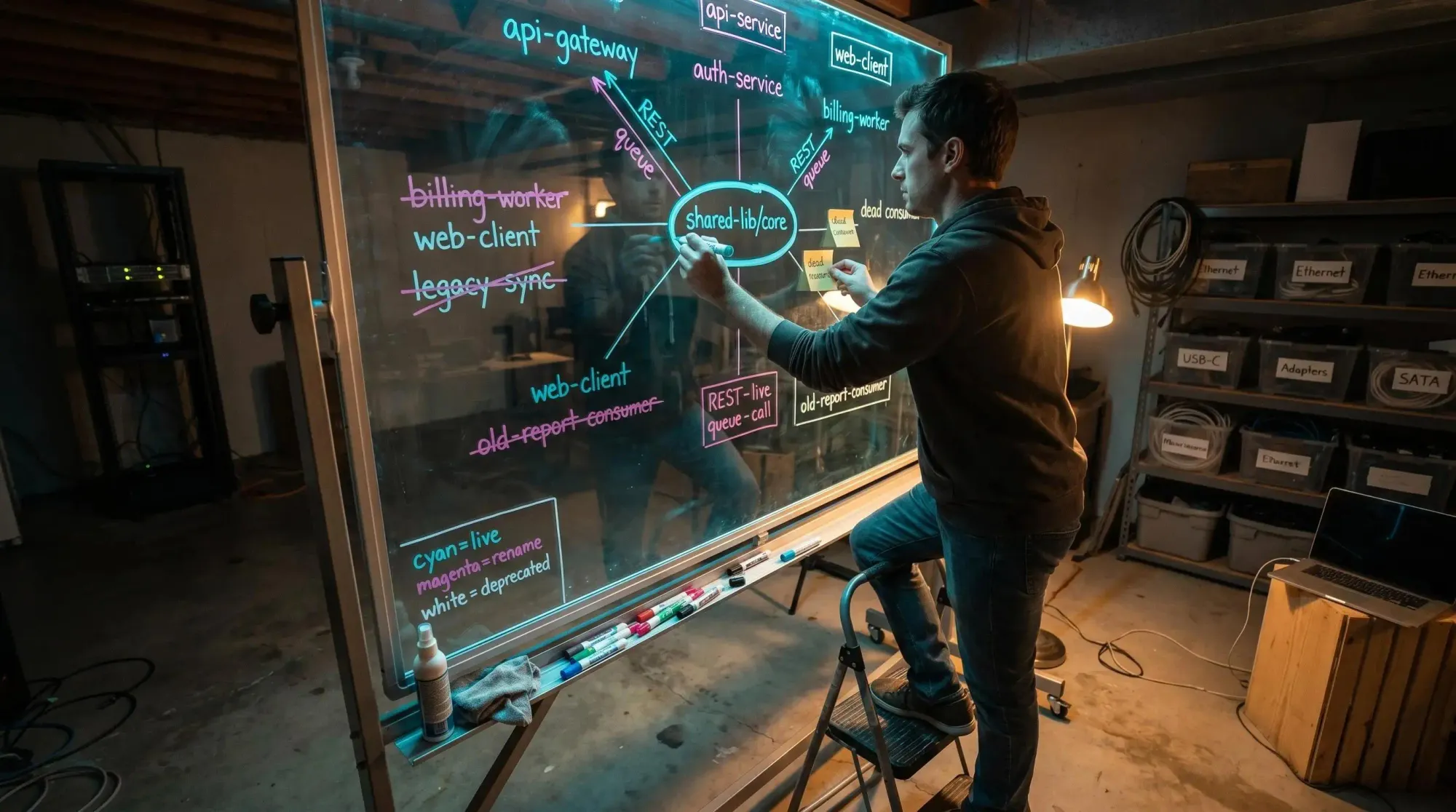
A codebase graph is just a mapped network of services, packages, modules, calls, ownership boundaries, and relationships. Something both a developer and an AI assistant can inspect before a change is proposed.
That matters for claude code dependency visibility because it answers questions search alone doesn't answer cleanly:
- what depends on this module before we rename it?
- which adjacent systems won't show up from local file reads?
- are we editing a leaf while missing the trunk?
- which references are live, and which are dead leftovers?
Without a graph, Claude searches and infers. With a graph, Claude can start from known dependencies and actual system structure.
A simple example: you ask for a rename in a shared library. The safe path isn't "find symbol, replace all." It's inspect dependents first, identify dead consumers, update only the live paths, and explain any skipped legacy usages. That's a very different first move.
Pharaoh fits this gap by mapping software architecture into a knowledge graph so AI coding assistants can understand dependencies, blast radius, existing code, and dead code before making changes. If you're already using MCP clients, adding a codebase graph is a practical way to improve architecture awareness without changing editors.
It doesn't replace review. It improves the quality of the first plan.
A Safer Workflow for Claude Code on Monorepos and Multi-Repo Systems
If you want a repeatable workflow, keep it simple and disciplined.
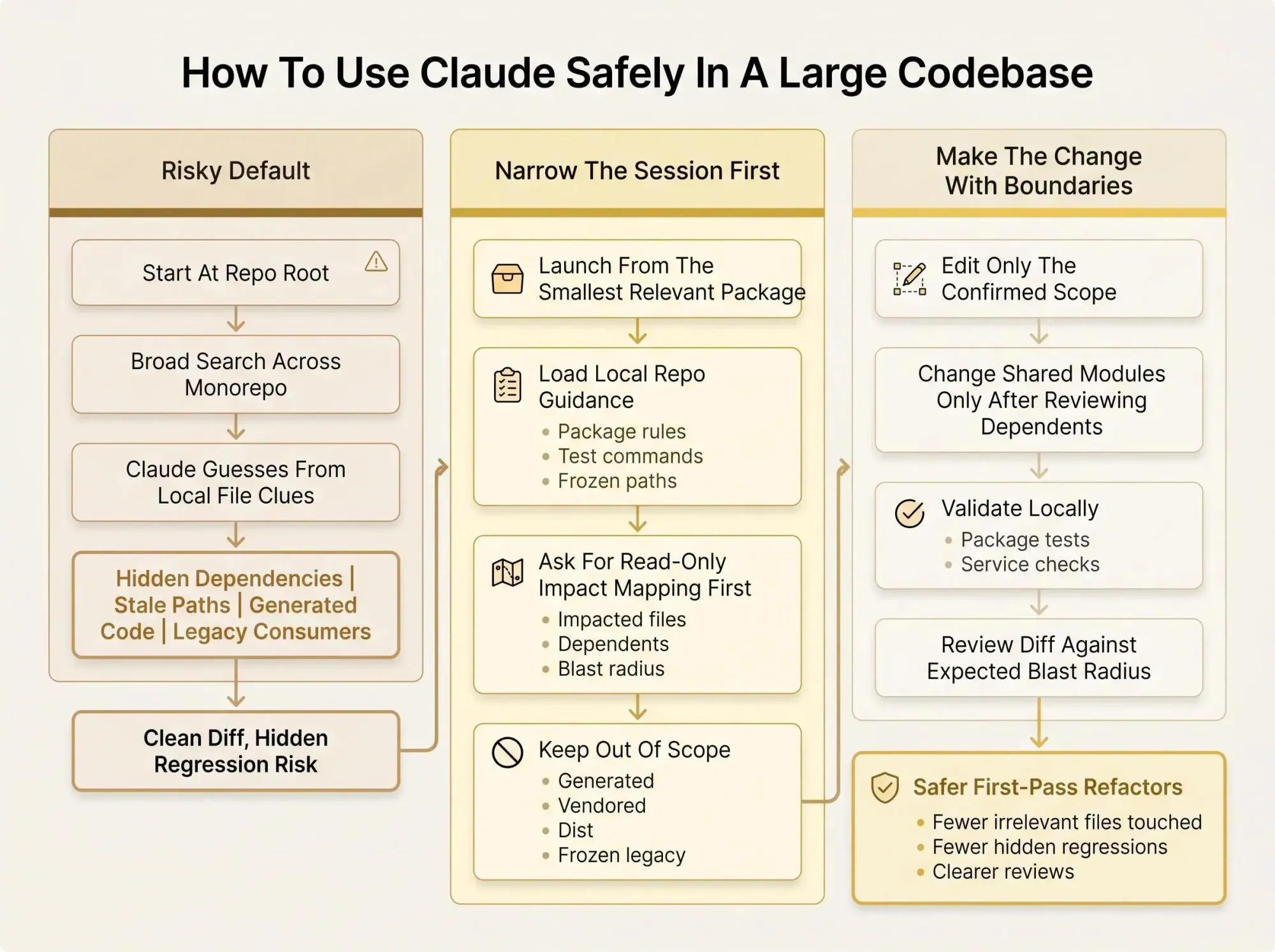
The workflow
- Start in the smallest relevant directory
Pick the package or service closest to the request. Avoid root-level sessions unless the task clearly spans domains. - Load local conventions
Check that root and directory-specific guidance are accurate. If the instructions are stale, fix them before asking for code changes. - Map the architecture around the target
Identify dependencies, consumers, and affected modules. Use a graph if you have one so blast radius is visible early. - Ask for read-only analysis first
Have Claude summarize the current implementation, impacted files, and risk areas before it edits anything. - Make the change with explicit boundaries
State which folders are in scope and which generated or frozen paths are off-limits. - Validate locally
Run the correct tests and checks for that package or service. Then confirm no cross-package breakage was introduced. - Review the diff against expected blast radius
If a file appears that doesn't fit the architecture map, pause and investigate.
For claude code for monorepos, a package-scoped session plus an architecture map is often a better starting point than a root-scoped session with broad instructions. If the change touches multiple packages, expand scope deliberately. Don't start broad out of habit.
When to Use Subagents and When Not to
Subagents are useful in large codebases because they let you investigate unfamiliar areas in separate context windows and return summaries instead of flooding the main session with exploratory reads.
Good use cases are pretty specific:
- tracing how auth flows through one subsystem
- finding where token refresh actually happens
- checking how one package consumes another
- comparing similar implementations across modules
They're good for exploration. They are not a substitute for architecture visibility.
An isolated subagent can still miss system relationships if all it sees are file-level clues. So the better pattern is hybrid: use subagents to explore, ground them with a dependency map or codebase graph, and ask them to report back with likely blast radius and uncertainty.
A good instruction pattern is blunt: investigate dependencies, consumers, and risky legacy paths first; do not edit; return a summary for the main agent. That's usually enough to stop a lot of bad first moves.
Common Failure Modes and How to Catch Them Early
Advanced teams still make the same mistakes with Claude Code on a large codebase. The difference is whether they catch them before the patch gets socialized.
Here are the common ones and the fix:
- launching from repo root by default
- fix: scope narrower unless the change truly spans domains
- stuffing every rule into one global
CLAUDE.md- fix: layer repo context by directory
- trusting grep hits as dependency truth
- fix: validate relationships, not just string matches
- allowing generated or frozen code into the edit path
- fix: block bad targets explicitly
- skipping read-only discovery and jumping to implementation
- fix: require impact mapping first
- treating lint and tests as enough
- fix: compare diffs against expected blast radius
Dead code deserves separate attention. Old modules often look active because they still import cleanly or match search terms. That's where architecture-aware tooling helps sort dead paths from live consumers before a refactor starts.
We've seen the same trap in cleanup work: a "simple" removal looked harmless until downstream consumers and a frozen finance integration surfaced. Suddenly the cheap cleanup wasn't cheap.
Most code review tools catch problems after they ship. That's backwards for AI-assisted refactoring in big systems.
What Good Looks Like in Practice
Good looks boring in the best possible way.
Claude Code is still searching locally and reading actual files. But it isn't operating as if the repo were a flat pile of text. You've scoped the session, layered the guidance, and made dependencies visible before edits begin.
The outputs change fast:
- better first-pass plans
- fewer irrelevant files touched
- clearer explanations for why each file changed
- less time lost to dead ends and legacy traps
Trust changes too. Not blind trust in the model. Earned trust in a workflow that grounds the model in the real architecture.
If you're using Claude Code in an MCP-friendly setup, adding a codebase graph through Pharaoh is one practical way to make architecture context available before changes start.
The outcome is straightforward: faster reviews, safer refactors, less guesswork when the codebase is too large to hold in your head.
Conclusion
Claude Code can work well on a large codebase. But file search alone isn't enough. You need scoping, layered repo context, and clear dependency visibility.
The goal isn't to make AI feel magical. The goal is to make it situationally aware enough that engineering decisions stop feeling like a gamble.
A good next step is simple: launch Claude from the smallest relevant directory, tighten your CLAUDE.md files, and ask for a read-only impact map before the next refactor. If your team keeps getting surprised by hidden dependencies, add architecture mapping to the workflow so blast radius is visible before edits begin.