Code Change Blast Radius: A Safer Way to Code with AI

AI can rename a function in seconds. Code change blast radius is the part people skip, then CI breaks in a worker nobody touched.
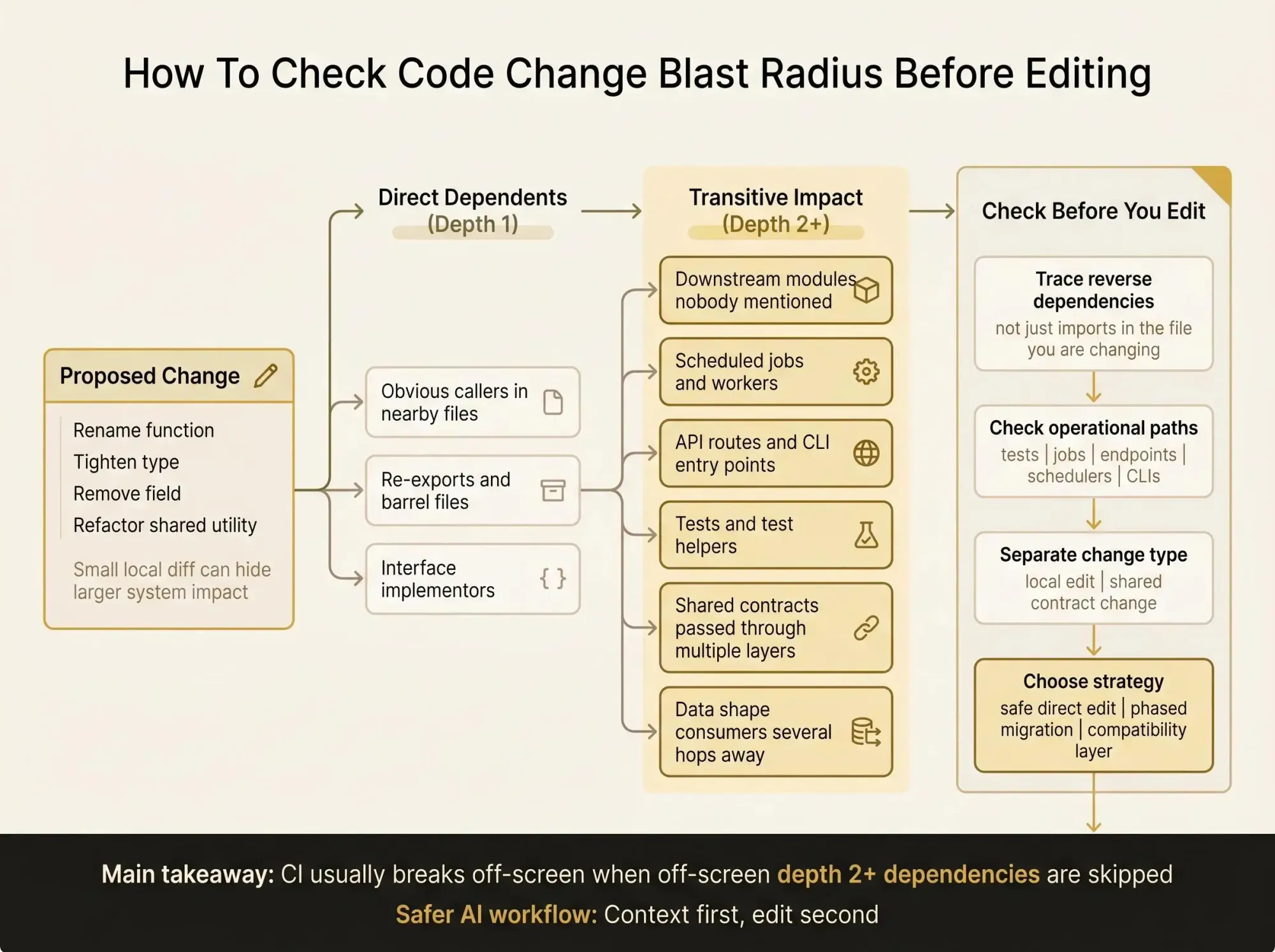
What matters is knowing which callers, jobs, and contracts sit a few hops out before you edit anything. In multi-module code, the risky stuff is usually off-screen (depth 2 hurts).
Start here.
- Trace reverse dependencies, not just imports in the file you are changing.
- Check tests, jobs, and entry points before trusting a safe refactor.
- Separate local edits from shared contract changes, and you will break less.
The Problem Developers Recognize Right Away
You ask Claude Code, Cursor, Codex, or another MCP client to make what looks like a safe edit. Rename a function. Tighten a type. Remove a field from a shared object. Clean up a utility that has felt wrong for months.
The assistant edits the file in front of it. It patches a few obvious callers. The diff looks clean. Then CI fails in a module nobody mentioned, or a scheduled job breaks, or a production-only path starts throwing because one old interface implementation never got updated.
That's the real fear with AI-assisted edits. Not that AI writes bad code every time. It's that it edits without a true map of dependencies, existing code relationships, and dead code, so the change looks smaller than it is.
Most teams are in the same place right now:
- impressed by how fast AI can make local changes
- uneasy about hidden ripple effects
- tired of learning the impact after the edit instead of before it
Most review and test workflows catch blast radius after the risky move has already happened. That's backwards.
Safer AI coding starts earlier. Before the prompt. Before the patch. You need to understand the system around the change first.
What Code Change Blast Radius Actually Means
Let's make this plain. Code change blast radius is the set of files, functions, services, or components that break, need updating, or may behave differently when one piece of code changes.
That sounds obvious until you hit a real codebase. The blast radius is rarely just the direct imports.
A file might have three direct dependents and thirty transitive dependents spread across packages, background jobs, test helpers, and entry points. That's why a tiny edit can produce a very non-tiny failure.
You need to think in two directions:
- Forward dependents - what relies on this, directly or indirectly
- Upstream dependencies - what this code relies on, and what could destabilize it
Both matter, but they answer different questions.
Forward dependents tell you change risk. Upstream dependencies tell you fragility. If you're asking, "if I change this, what else breaks," code change blast radius is the practical answer.
You can measure it at different levels depending on the decision in front of you:
- file level for quick local changes
- symbol level for function, type, and interface edits
- package or service level for shared modules
- feature or entry-point level when the concern is operational fallout
One operator truth here: file-level analysis feels good because it's easy, but symbol-level analysis is where the real surprises usually live.
Why AI Coding Assistants Miss Impact by Default
AI coding assistants are good at local edits and pattern completion. They are not naturally aware of your full dependency graph unless you provide one.
That's the root limitation.
A model looking at one file, a few related files, and some search results can fix obvious callers. It will often miss the paths that matter more:
- transitive callers across multiple modules
- interface implementors not visible from the changed file
- re-exports and barrel files
- consumers of a data shape several steps downstream
- dead code that looks active, and active code that looks isolated
Then there are the messy paths. Runtime dispatch. Reflection. Config-driven wiring. Event handlers. Scheduled jobs. Those don't show up cleanly in a grep, and they definitely don't show up in a one-file edit session.
Better prompting helps a little. A better map helps a lot.
Asking the model to be careful is not a strategy.
The safest AI workflow is not "please inspect everything before editing." It is giving the model architectural context before it changes anything. If the assistant can't see the system, it can't respect the system.
What Counts as Impact in a Real Codebase
Impact is broader than imports and call sites. Engineers know this, but teams still fall back to shallow checks when the deadline gets tight.
In practice, blast radius includes things like:
- direct callers
- transitive callers
- interface and contract consumers
- downstream services or jobs using shared libraries
- tests that should fail or need updates
- build scripts, config references, and generated code inputs
- API endpoints, event consumers, cron jobs, and CLI entry points
Data flow is where a lot of teams get blindsided. Change a return type, rename a field, or tighten an object shape, and you can break consumers that never import the changed symbol directly. They only see the data after it has passed through two or three layers.
Dead code makes this trickier. If a module really has no meaningful dependents, the blast radius may be much smaller than the team assumes. Good news. But if "dead" code is still reached through a hidden job path or one old service boundary, the blast radius is larger than expected, and usually discovered late.
The goal of safe change planning isn't just to count impacted files. It's to understand the kind of work the edit creates and where the highest-risk fallout sits. Three affected files on a payment path can matter more than twenty in internal scripts.
How to Find Blast Radius Before Code Changes
This is the practical part of how to find blast radius before code changes. You need a dependency graph.
At a minimum, the graph should represent files or symbols as nodes, and imports, references, calls, or other relationships as edges. Once you have that, the basic move is simple:
- Start from the target file or symbol.
- Walk outward through reverse dependency edges.
- Separate direct impact from deeper transitive impact.
Traversal depth matters. Depth 1 shows direct dependents. Depth 2 and beyond shows transitive impact. Useful analysis usually goes several hops out, because a lot of expensive failures aren't in the first layer.
A useful output should give you something like:
- direct dependents
- transitive dependents
- affected tests
- affected entry points
- dependency depth by layer
Here's a simple example of the shape:
Target: formatOrderSummary()Direct dependents: 3- checkout/summary.tsx- jobs/send-order-email.ts- shared/invoice/renderer.tsTransitive dependents: 14Affected tests: 2- checkout/summary.test.ts- invoice/renderer.test.tsKnown entry points:- POST /checkout/confirm- nightly order digest jobFor a small codebase, grep and IDE call hierarchy can get you part of the way. We still use them. But they fall apart in multi-module systems with re-exports, indirection, and cross-repo relationships.
Some teams go a step further and combine static analysis with runtime traces. That's useful when you need to estimate which affected paths actually carry production traffic. Static structure tells you what can break. Runtime data helps you rank what hurts.
A knowledge graph can push this further by preserving richer architectural relationships than a plain import tree. That matters when AI tools need to query the system before they edit it, not after.
A Practical Workflow to Assess Impact Before Refactor Work
When you need to assess impact before refactor work, don't start with the patch. Start with a short decision pass.
1. Define the exact thing changing
Be precise. Is it a file, function, type, schema, interface, or shared module? "We're cleaning up auth utils" is too vague to analyze well.
2. Identify direct dependents
Find who imports or calls it today. Then classify the usage. Is it execution, re-export, rendering, configuration, or type consumption? Those are different kinds of risk.
3. Trace transitive dependents
Which of those dependents pass the contract forward? Follow the chain until you hit leaf nodes like pages, endpoints, jobs, tests, or service boundaries. By the second hop, the edit usually stops looking local.
4. Check data shape impact
Where do the current return shape, field names, or type assumptions flow? Consumers often encode old assumptions in quiet ways, especially when a helper returns "just an object."
5. Inspect operational entry points
Look at API routes, event listeners, schedulers, and CLIs. This is where a code edit stops being an internal change and becomes a production issue.
6. Review tests and coverage gaps
Which tests directly exercise the change? Which affected areas have weak coverage? A change with thin coverage and high transitive depth is not a one-shot refactor, no matter how small the diff looks.
7. Choose the change strategy
Now decide:
- safe direct edit
- phased migration
- compatibility layer
- parallel interface
- postpone until visibility improves
Blast radius analysis isn't just analysis. It decides whether the work should be one PR, a staged rollout, or not attempted yet. That's the part people skip.
Dependency Blast Radius Analysis Gets Harder in Monorepos and Multi-Repo Systems
As architecture grows, dependency blast radius analysis stops being nice to have. Shared packages, internal SDKs, service boundaries, duplicated patterns, and version drift all increase the odds that one local edit has system-level consequences.
In a monorepo, one utility change can affect apps, workers, tests, scripts, and internal libraries at the same time. Direct file relationships don't tell the full story when packages expose and re-export shared contracts.
In a multi-repo setup, it's worse in a different way. A service can look isolated inside its own checkout while still sitting in the middle of a contract chain. Change a schema, generated client, or shared definition, and systems outside the repo may be exposed without any local signal.
This is why AI feels riskier in larger environments. Assistants work inside the local workspace unless connected to broader system context. They'll optimize the repo-local edit and miss the org-level consequences.
A very practical goal here is to predict affected services. If a shared package, event schema, or interface changes, you need to know which services, endpoints, or background processes are exposed.
Local reasoning can be enough in small projects. In multi-module and multi-repo systems, graph-based context becomes the safer default. Not fancy. Just safer.

What Good Blast Radius Analysis Output Looks Like
A lot of tooling claims to show impact. Much of it gives you a pile of filenames and calls it done. That's not enough.
The minimum useful output should include:
- the changed target
- direct dependents
- transitive dependents
- depth or hop count
- affected tests
- likely entry points
Better output is organized for decisions, not just inspection. We want to see impact grouped by file, symbol, package, or service. We want re-exports, interface implementors, and contract boundaries called out. We want clues about uncovered risk areas.
A decent output might look like this:
Target symbol: UserProfile.emailDirect dependents: 3Transitive dependents: 14Affected tests: 2Affected packages: web-app, notifications, admin-apiKnown entry points:- PATCH /users/:id- account sync workerNotes:- exposed through re-export in shared/models/index.ts- consumed by 2 interface implementors- no direct test coverage in notificationsPlain counts don't help much on their own. Twenty affected files in low-value scripts is not the same as three affected files on a checkout path.
If you're comparing approaches, judge them with real criteria:
- does it work across the languages in your codebase
- does it understand symbol-level relationships or only files
- can it surface dead code
- can AI assistants query it before editing
- can you use the output in PR review and refactoring planning
If the answer to the last two is no, the tool may still help humans, but it won't change how safe your AI workflow feels.
Static Analysis Is Necessary, but It Is Not the Whole Story
Static analysis is the starting point, not the finish line.
It's very good at structural relationships:
- imports
- references
- call graphs
- direct and transitive dependencies
It gets weaker when behavior depends on runtime choices. Dynamic dispatch, reflection, config-driven resolution, runtime-only paths, and feature flags can all hide real impact.
Experienced teams close that gap in a few ways. They combine static dependency maps with runtime traces where they have them. They review operational entry points for risky changes. They treat high-blast-radius edits with staged rollout discipline, even when the code diff looks ordinary.
The goal isn't perfect prediction. That's not available. The goal is reducing unknowns before the edit, especially the expensive unknowns.
Even partial architectural context is far better than asking an assistant to infer the system from a handful of files and a prompt history.
Why a Knowledge Graph Is Better Than Tribal Memory for AI-Assisted Changes
The people who know which utility is dangerous, which service still depends on an old contract, or which folder is effectively dead code are usually not sitting inside the prompt window.
That's the weakness of tribal memory. It exists, but it doesn't scale, and AI can't query it.
A knowledge graph gives you persistent relationships between code entities. Not just imports, but dependency paths, blast radius visibility, existing code patterns, dead code signals, and context you can query instead of reconstructing every time.
That matters for AI-assisted development because the assistant can reason from actual structure rather than inferred guesses. It can choose safer edit boundaries. It can update more of the true impact surface before handing work back to you.
We built Pharaoh around this idea. Pharaoh maps software architecture into a knowledge graph so AI coding assistants can understand dependencies, blast radius, existing code, and dead code before making changes. It's useful for teams working with Claude Code, Cursor, Codex, or other MCP clients across multi-module or multi-repo codebases.
The point isn't to automate judgment away. The point is to give developers and AI a shared map of the system. That's a better starting condition than memory, grep, and hope.
For linting, testing, and broader AI code quality process, the open source AI Code Quality Framework is worth a look alongside architecture context.
Common Mistakes That Make Blast Radius Worse Than It Needs to Be
Most blast radius problems are not mysterious. They're repeated habits.
Teams get into trouble when they:
- change shared interfaces without tracing implementors
- edit utility functions used across many layers
- rely on grep alone in codebases with re-exports or indirection
- ignore test gaps in affected areas
- skip service and job entry points during review
- treat dead code assumptions as fact
- let AI refactor broadly without architecture context
The deeper mistake is organizational. Teams accept system opacity as normal. Then they're surprised when AI amplifies the cost of that opacity.
The fixes are not glamorous:
- run dependency blast radius analysis before writing the patch
- classify the change as local, shared, or system-level
- decide if the work needs a migration plan instead of a one-shot refactor
- attach blast radius findings to the PR so reviewers start with impact, not just diff text
Most workflows still discover blast radius after code has already changed. That's backwards for AI-assisted development.
How to Add This to Your Team’s Daily Workflow
This doesn't need to become a heavy process. It just needs to happen early enough to matter.
Blast radius checks fit naturally in a few places:
- before a Claude Code session that edits shared code
- at the start of a refactoring sprint
- in PR review for utilities, interfaces, schemas, or shared packages
- during monorepo migrations and service decomposition work
A few lightweight rules go a long way:
- If a change affects shared contracts, map dependents first.
- If blast radius extends beyond one module, document migration steps.
- If affected areas have weak coverage, reduce scope or stage rollout.
Keep the artifacts small. A short impact summary in the PR description. A list of affected services or entry points. A risk note for high-depth dependency paths. That's enough to change the conversation.
If you want AI to query architecture context directly, a codebase graph through MCP is the practical move. Pharaoh does this automatically via MCP, but the important part is the pattern: context first, edit second.
Pick one shared module your team touches often and map its direct and transitive dependents before the next edit. Do it once. The value becomes obvious fast.
Conclusion
Code change blast radius is how you move from guessing at impact to seeing it before the edit. That shift matters even more with AI, because speed without context raises risk.
The practical model is simple:
- distinguish dependents from dependencies
- trace direct and transitive impact
- include tests, entry points, and service boundaries
- use graph-based context when the codebase is too large for local reasoning
Before your next refactor or AI-assisted edit, run a blast radius check on the target and write down what sits one, two, and three hops away. If your assistant can query a codebase graph through MCP, use that context first and let the edit come second.