Code Change Impact Analysis for Safer AI-Assisted Refactors

AI-assisted refactors fail in boring places: a renamed field, a changed signature, one background job nobody checked. Code change impact analysis matters before you touch the file, not after CI lights up.
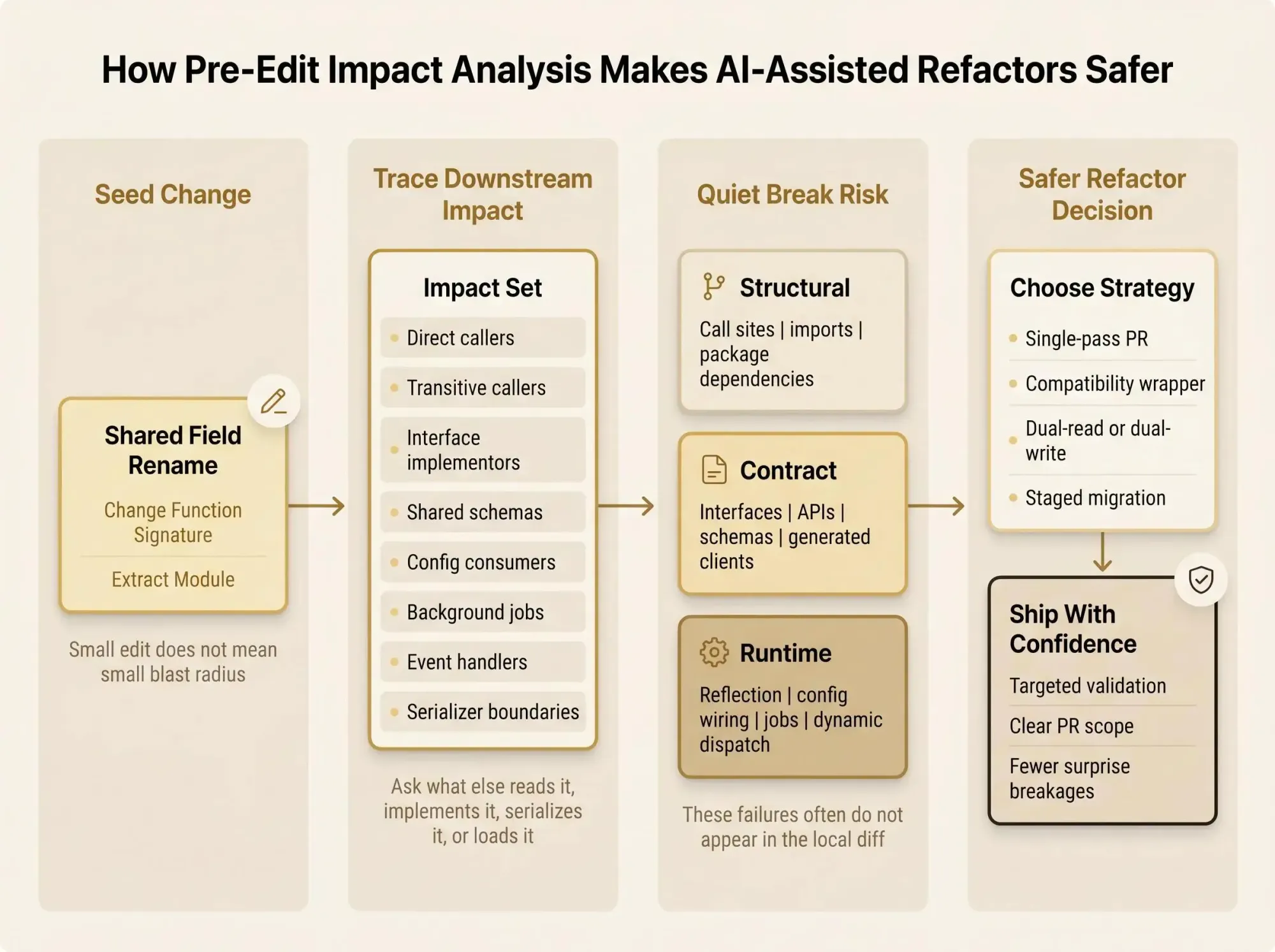
What matters is not the diff. It's who else reads it, implements it, serializes it, or loads it through config. If you're using Cursor, Codex, or Claude Code on a multi-module codebase, don't trust local context.
A useful pass usually answers three things:
- Which callers sit one or two hops away
- Which interfaces, schemas, and jobs break quietly
- Whether this stays in one PR or needs a safer sequence before you ship
The Refactor Scenario Every Team Recognizes
You ask Claude Code, Cursor, Codex, or another MCP client to rename a shared field, change a function signature, or extract a module. The assistant updates the file you're looking at, patches a few obvious callers, and the diff looks clean enough to tempt you into merging.
Then the real question shows up. Not in the diff.
Did that field name also drive a serializer? Did a background job call the old interface through an internal package? Did a config string, template, generated client, or event handler just fall out of sync? In multi-module systems, the dangerous part of a refactor is usually not the line you changed. It's the structure you couldn't see fast enough.
That's where code change impact analysis belongs. It's the missing pre-edit step that answers: what else depends on this before the first write lands?
We don't need slower refactors. We need less guessing. If you're using AI to move faster, the fix isn't to distrust the assistant. It's to give it and your team a better map.

What Code Change Impact Analysis Actually Means
Code change impact analysis is the practice of identifying what parts of a system may be affected by a proposed or actual change. Plain version: you start with one thing you're changing, then trace what else could move because of it.
There are two parts to keep straight:
- Seed change - the code entity or diff hunk being modified
- Impact set - the callers, implementors, dependent modules, tests, jobs, outputs, or contracts that may be affected
That distinction matters because teams often confuse a small seed with a small blast radius. Those are not the same thing. A three-line signature change can touch six modules.
Change impact analysis for code changes happens at different levels:
- Textual or diff-level - what files or lines changed
- Syntactic or structure-level - what functions, classes, imports, and references are involved
- Static dependency-level - what depends on what in source
- Dynamic execution-level - what actually runs in tests or production paths
- Semantic or behavior-level - what behavior meaningfully changes, even if the edit looks minor
Research has treated impact analysis as a family of approaches for years, and that's the right frame. There's no single magic technique. Each method catches a different slice of risk and misses a different slice too.
The practical goal is simpler than the taxonomy: help developers understand downstream code effects early enough to change scope, sequence, or strategy before the refactor gets expensive.
Why Tests, Diffs, and IDE Call Hierarchies Are Not Enough
A git diff tells you where code changed. It does not tell you where the effect travels. That's a big difference, and teams blur it all the time.
Basic call hierarchy tools help, but only up to a point. They usually show direct callers. They often stop short of full transitive reach. They may miss interface implementors, implicit contracts, generated code, or consumers in another repo. Most of all, they don't turn that graph into a decision.
You need answers like:
- Is this local or cross-cutting?
- Are we breaking a public contract?
- Should this be one PR or three?
- What needs targeted validation first?
A flat caller list doesn't get you there.
Tests are necessary. They are not enough. Recent work on behavior validation of code changes found existing regression tests caught only a small fraction of semantics-changing edits, with recall as low as 7.6%. That's bad news for "safe" refactors, because many edits intended to preserve behavior still change it in subtle ways.
Most review and test workflows catch breakage after the edit. For AI-assisted refactors, that's too late.
If your assistant writes first and your system explains later, you're already playing from behind.
The Types of Downstream Effects Teams Need to Surface
Useful impact analysis needs to surface more than direct calls. Different refactors fail in different ways, and the map has to reflect that.
Here's the set we look for before treating a refactor as safe:
- Direct callers
- Transitive callers across modules or services
- Interface implementors and contract matches
- Shared types, schemas, and config consumers
- Data-flow dependents through definitions and uses
- Runtime-only paths like dynamic dispatch, reflection, and config-driven wiring
- Tests and review surfaces that should be rerun or inspected
Why these categories matter depends on the change.
A signature change can break call sites and implementors in one pass. A rename sounds harmless until you remember generated code, serialization, templates, or string-based lookups. Moving code can shift import structure, initialization order, or package boundaries. Deleting code is only safe when you know whether it's dead, dormant, or just invoked indirectly in an ugly way nobody wants to admit.
This gets worse in the environments most teams actually run:
- Monorepos with shared libraries
- Multi-repo systems with internal packages
- AI edits that cross language and ownership boundaries in a single session
By the second afternoon of a refactoring sprint, the real problem usually isn't writing the next patch. It's losing confidence in what you can't see.
Static, Dynamic, and Semantic Impact Analysis Each Catch Different Risks
No single analysis mode is enough. If you're doing impact analysis for refactors seriously, you need to know what each approach is good at and where it lies to you.
Static analysis
Static impact analysis works from source structure and dependency relations. It's fast, broad, and useful before any edit happens. That's why it fits planning well.
It also over-reports. In large systems, static-only results can get noisy fast. Work on ERP customization showed how ugly that can become, with user feedback reporting 71% false positives and 15% false negatives. That's not a rounding error. That's a trust problem.
Dynamic analysis
Dynamic impact analysis works from executed paths and observed behavior. It can be much more precise for what you actually run. If a path executed in tests or runtime traces, you have stronger evidence it's live.
But dynamic analysis only sees what ran. Unexecuted paths stay dark. Coverage gaps turn into blind spots, and most teams have more of those than they think.
Semantic analysis
Semantic impact analysis aims to capture behaviorally meaningful relationships, not just structural adjacency. This matters when the diff is small but the meaning is large.
In JavaScript, semantic change impact analysis reduced false positives by 9 to 37 percent and shrank impact sets by 19 to 91 percent compared with diff-based and dependency-only approaches. That's the kind of reduction that turns a scary impact list into something a reviewer can reason about.
One more uncomfortable detail: studies on source-code change history found that for large changes, impacted code can be relatively small yet carry high fault density. That's one reason big refactors feel deceptively contained. The danger isn't always broad. Sometimes it's concentrated.
The best pattern is layered:
- Static analysis for pre-edit reach
- Dynamic signals for live path confidence
- Semantic checks where behavior preservation matters
Small diff. Large meaning.
Why LLMs Alone Still Struggle With Code Change Impact Analysis
The instinct is understandable: if the model can read the repo, shouldn't it infer the blast radius?
Not reliably.
Recent experiments asking frontier models to predict impacted code entities from source code changes found poor performance overall. Parent commit context helped only a little. Adding diff hunks improved results slightly, but not enough to trust the model as a standalone impact engine.
That's the current gap in plain terms:
- LLMs are good at proposing edits
- They're less dependable at exhaustively mapping hidden dependencies
- More local code in the prompt does not equal real system understanding
We've seen this in practice. The assistant can sound certain while missing the one interface implementor or event-driven consumer that matters. Confidence is cheap when the model doesn't carry an explicit system model.
The safer pattern is AI plus structure. Give the assistant a map of the system, not just 40K more tokens from the local folder. Retrieval and grounded context keep helping on impact tasks more than prompt wording alone.
If you're using AI for refactors, architectural context is not optional overhead. It's the part that makes speed survivable.
What a Good Pre-Refactor Impact Analysis Pass Looks Like
Before an AI-assisted refactor starts, the minimum useful output is not a pile of edges. It should answer the decision questions that shape the work.
At minimum, you want:
- The changed entity or entities
- Direct and transitive dependents
- Interface and contract matches
- Modules, services, or jobs likely to be affected
- Tests to run or expand
- Confidence notes and known blind spots
That output should help you answer:
- Is this local or cross-cutting?
- Is the blast radius compile-time, runtime, or behavioral?
- Can this stay atomic, or should it be split into phases?
- Do we need a compatibility layer?
- Is some "impacted" code probably dead?
Here's what that looks like in practice:
Seed: UserProfile.display_name -> full_nameImpact:- 12 direct callers in 3 modules- 2 interface implementors- 1 serializer boundary- 1 background sync job- 4 tests to rerun, 2 missing around payload compatibilityBlind spots:- config-based field mapping in legacy importerDecision:- do adapter-first migration, not single-pass renameThat's useful. A 90-node graph dump isn't.
A good impact pass helps both humans and AI choose the next move. It shouldn't just document damage after the refactor is already in flight.
A Practical Workflow to Assess Blast Radius Before Deploy
This is the workflow we recommend when you need to assess blast radius before deploy without turning the refactor into a week-long audit.
- Isolate the seed change
Name the function, type, API, schema, config key, or module boundary being changed. Mark it as additive, breaking, behavioral, or intended behavior-preserving. - Resolve reverse dependencies
Find direct callers, readers, writers, and importers. Then go one or two hops further. A lot of risk only appears at the transitive layer. - Check contract surfaces
Look at interface implementors, base and derived types, public exports, shared schemas, and serialization boundaries. Contracts break quietly. - Look for runtime-only paths
Include dynamic dispatch, reflection, config wiring, background jobs, and event handlers. If it depends on a string, grep won't save you. - Separate live impact from probable dead code
Flag structurally connected code with weak evidence of actual use. Treat deletion differently from reachable refactoring. - Decide the change strategy
Pick one:- Single-pass refactor
- Compatibility wrapper
- Dual-read or dual-write period
- Staged migration across repos or services
- Validate after the edit
Run targeted tests first, then broader checks. For behavior-preserving refactors, use behavioral validation, not just compilation. - Record the impact map in the PR
Make the reasoning reviewable. Future AI sessions should inherit your map, not rediscover it badly.
A short PR note like this goes a long way:
Blast radius checked:- direct callers: yes- transitive package consumers: yes- interface implementors: yes- runtime config paths: partial, importer still manual- dead code candidates: 3, not removed in this PRReviewers can work with that. So can your next Claude Code session.
Where Knowledge Graphs Fit Into Safer AI-Assisted Refactors
A knowledge graph turns scattered code relationships into a navigable map of how the system fits together. That's the developer version. Instead of implied structure spread across files, imports, schemas, and conventions, you get queryable relationships.
For code change impact analysis, that matters because:
- Dependencies become queryable instead of guessed
- You can assess blast radius before deploy
- Existing code, dead code, and cross-module relationships become visible to humans and AI
This shows up in real workflows fast.
In a Claude Code session, you can ask for downstream effects of changing a shared package contract before the assistant edits anything. In PR review, you can verify whether a refactor really stayed inside one boundary. In a monorepo migration, you can see ownership and dependency lines that are fuzzy in the file tree. In multi-repo systems, you can reason about consumers outside the current checkout, which is where a lot of "safe" edits stop being safe.
Pharaoh is one approach here. We map software architecture into a knowledge graph so AI coding assistants can understand dependencies, blast radius, existing code, and dead code before making changes. The value isn't code generation. It's architectural context that makes change decisions safer. If you want to see that model, Pharaoh does this via MCP at pharaoh.so.
The prompt changes from:
Rename this field across the codebase.to:
Before editing, explain the downstream effects of changing this contract:- direct and transitive dependents- implementors- runtime consumers- dead-code candidates- safest migration strategyThat's a better conversation.
How to Choose Dependency Impact Analysis Software
If you're evaluating dependency impact analysis software, don't start with the UI. Start with whether the tool can answer the refactor decisions you actually face.
Use this checklist.
Coverage
- Can it model direct and transitive dependencies?
- Does it handle interfaces, shared types, and public APIs?
- Can it work across modules, packages, or repos?
Quality
- How noisy are the results?
- Does it include semantic or behavior-aware signals, or only raw edges?
- Can it show why something is in the impact set?
Workflow fit
- Is it fast enough to use before every meaningful refactor?
- Does it fit CLI, IDE, MCP, or PR review workflows?
- Can AI assistants consume the output directly?
Operational reality
- How fresh is the graph or index?
- How does it handle generated code, config wiring, and runtime-only paths?
- Can it help distinguish dead code from reachable code?
The main tradeoffs are familiar:
- Broad static coverage versus precision
- Pre-edit planning versus post-edit validation
- Repo-local insight versus system-wide context
Pick for the work you actually do. A repo-local tool may be fine for isolated services. It breaks down fast when your assistant edits shared contracts across package boundaries.
Common Mistakes That Make Impact Analysis Unreliable
Most failed impact analysis isn't caused by bad intent. It's caused by teams stopping one layer too early.
Common mistakes:
- Treating direct callers as the whole blast radius
- Assuming green tests mean a safe refactor
- Letting the AI assistant inspect only the local diff instead of the dependency graph
- Using static-only analysis without a plan to validate runtime paths
- Ignoring interface contracts, event flows, or config-driven wiring because they're harder to inspect
- Failing to split large refactors into smaller seed changes
- Confusing unreferenced code with removable code before checking hidden consumers
- Generating long impact lists without helping the team decide what to do next
The human factor matters too. Developers don't need more output. They need confidence and clarity.
Good impact analysis lowers cognitive load. Bad impact analysis just spreads the uncertainty around.
If your refactoring sprint produces twenty pages of graph output and nobody knows whether to ship one PR or stage three, the analysis failed. It may be technically accurate and still operationally useless.
For the testing and validation side, the open source AI Code Quality Framework is a good companion. It won't replace impact analysis, but it helps tighten the linting, testing, and review path after you know what changed.
Conclusion
Safer AI-assisted refactors come from structural understanding, not blind speed.
Code change impact analysis gives you a way to understand downstream code effects before the edit ships. Static, dynamic, and semantic approaches each catch different kinds of risk. LLMs still need explicit architectural context if you want dependable refactor decisions instead of confident guesses. And when that context is mapped clearly, blast radius becomes visible to both developers and AI assistants.
Pick one upcoming refactor and do the pass before touching the file:
- define the seed change
- trace direct and transitive dependents
- inspect contract surfaces
- check runtime-only paths
- flag likely dead-code candidates
If your team uses AI coding tools, add a codebase graph to that workflow so the assistant can reason from system structure instead of guesswork. If you're using Claude Code, you can add that kind of architectural context via MCP in about 2 minutes. Pharaoh does this automatically at pharaoh.so.