Architecture Intelligence for Smarter, Safer AI Coding

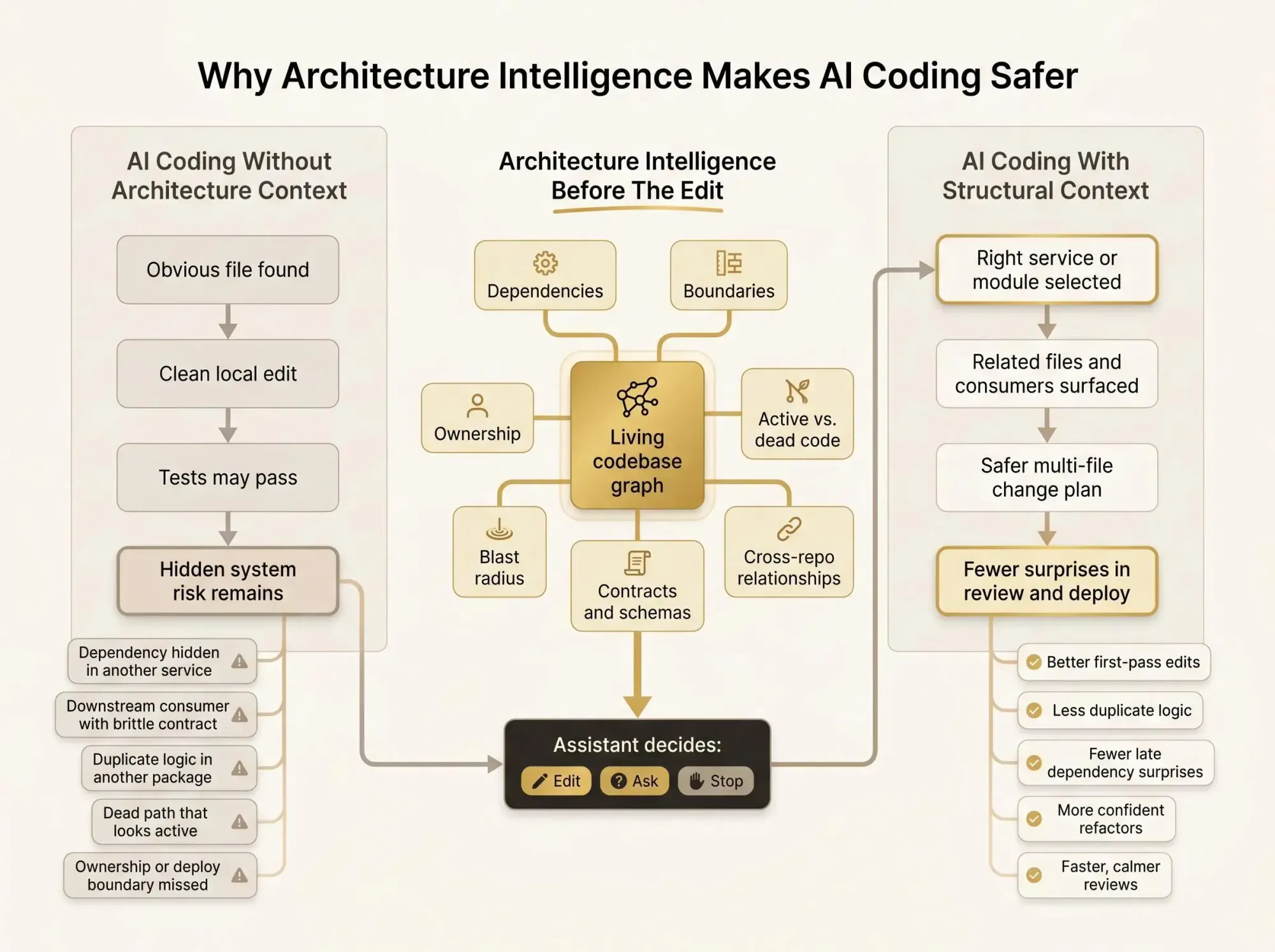
If you use Cursor or Codex on a multi-repo codebase, AI coding feels fast until an edit lands in the wrong service or package. That is where architecture intelligence matters: before the model starts typing, not after the diff.
What saves you isn't more prompt stuffing. It is knowing dependencies, ownership, dead paths, and when the assistant should stop instead of guessing.
Start with the misses:
- What breaks if this file changes?
- Is the model editing live code, or a path nobody uses?
- Does this logic belong here, or in another module? Fewer surprises, better changes.
Why AI Coding Feels Fast and Fragile
You know the session. You ask Claude Code, Cursor, or Codex to make a change. It finds the obvious file, writes something clean, maybe even updates a test, and the diff looks reasonable. But you still hesitate before accepting it.
That hesitation is earned.
In a multi-module or multi-repo system, the real risk usually isn't in the file the assistant touched. It's in what the assistant couldn't see:
- a dependency hidden two services away
- a downstream consumer with a brittle contract
- duplicate logic already living in another package
- dead code that looks active enough to fool both search and AI
- config, ownership, or deploy boundaries that never show up in the local edit
This is the gap between local correctness and system correctness. AI can produce code that compiles. It can pass tests in the touched module. The change can still be wrong for the system.
We've seen this pattern over and over. The assistant isn't making absurd mistakes. It's making plausible ones. Those are harder to catch.
Fast code generation without structural context is just faster guessing.
The fix is not mostly about trusting the model more. It's about giving the model architecture intelligence before it acts. In software terms, that means live structural context about dependencies, boundaries, ownership, and impact.
That's the job here. We'll define architecture intelligence, show why standard context methods fall short, explain what intelligent architecture mapping looks like, and give you a practical way to add architecture context for engineering teams without slowing everything down.
What Architecture Intelligence Means in Software
Architecture intelligence is living, queryable knowledge about how your codebase is actually structured. Not how you intended it to look six months ago. How it works today.
It answers questions like:
- What depends on this component?
- Which service consumes this event?
- Is this path still active?
- If we change this contract, who feels it first?
- Where does this logic belong?
That sounds obvious until you compare it with the things teams usually rely on.
Static architecture docs help, until they drift. Tribal knowledge helps, until the one engineer who knows the path is on vacation. Diagrams help, but they often capture design intent, not the state of the system after three urgent releases and a partial migration.
Plain code search is different again. Search finds strings and symbols. Architecture intelligence explains relationships. It tells you not just where a thing appears, but what it connects to, who owns it, and what changes with it.
And a single-repo view isn't enough in a lot of real systems. Important boundaries sit across repos, services, queues, schemas, APIs, and infra definitions. That's where change risk hides.
A good software architecture intelligence platform turns those scattered structural signals into a shared map for humans and AI. That's what real codebase architecture understanding looks like. Not a better wiki. A working model of the system at the moment of change.
We don't need perfect diagrams. We need structure to be visible when decisions are being made.
Why Code Search, Big Prompts, and Test Runs Still Miss the Real Risk
A common reaction is to throw more context at the assistant. More files. Bigger prompts. Longer retrieval windows. It feels safer, but most of the time it's just louder.
More tokens are not the same as architecture awareness. You can paste 40K tokens of nearby code into a session and still miss the one contract edge that matters. The raw files may be present, but the relationship stays hidden. The assistant still has to infer dependency chains from fragments.
Code search and symbol indexing help with location. They don't reliably answer impact. They tell you where something is mentioned. They don't tell you what breaks if you change it, or whether you're editing the right layer at all.
Tests help too, but they have a different job. Tests tell you what is covered. They don't reveal all consumers, duplicate pathways, or dead code that nobody executes anymore. Passing tests can mean "safe enough for this module." It does not mean "safe for the system."
Post-change review tools are useful, but most of them enter the story late. By the time a risky diff is in review, the assistant has already generated it and the team has already spent attention on it. That's backwards. AI can create risky edits in seconds. Structural checks have to happen before generation, during generation, and during review.
The real decision point is simple: should the assistant act, ask a clarifying question, or avoid the change until it has better context?
If your setup can't answer that, it's not ready for serious AI coding in a large system.
The Five Kinds of Structural Understanding AI Actually Needs
It helps to break structural judgment into parts. Strong reasoning isn't one skill. It spans different kinds of understanding, and software teams feel the gaps quickly.
Perception
This is basic identification. Which modules, services, configs, schemas, and interfaces are actually involved in the request?
Most assistants are decent here. They can usually find the likely files.
Reasoning
This is where things get harder. The assistant has to infer dependency paths, contract boundaries, ownership, and blast radius. That's not string matching. That's structural judgment.
Navigation
Good navigation means moving through the codebase in the right order. Not bouncing between loosely related files because their names look similar. In a large codebase, bad navigation burns time and creates false confidence.
Transformation
A real change rarely lives in one file. A contract update may require types, tests, docs, handlers, and config changes. Many assistants are weaker here than people admit. They can patch locally and miss the shape of the full edit.
Configuration
This is the highest-order piece. Where does the logic belong? Is this an extension of an existing path or a duplicate branch that should never exist? Configuration is where system design and code generation meet.
Many AI tools are acceptable at local perception. They're much weaker at transformation and configuration. That's why an assistant can look smart in a demo and still create bad engineering debt by the second afternoon.
The model isn't failing because it's lazy. It's failing because you asked it to operate without a map.
What Architecture Intelligence Looks Like as a Knowledge Graph
In practice, intelligent architecture mapping works best as a graph. Not a folder tree. Not a document index. A graph of entities and relationships.
The nodes can include:
- repositories
- modules and packages
- services and APIs
- database tables and schemas
- jobs, queues, and events
- feature flags and config
- owners, teams, and docs
The edges are where the value is:
- imports and calls
- data flow
- runtime dependencies
- contract relationships
- shared libraries
- ownership links
- change history
Software risk lives in relationships, not just artifacts. That's why a graph fits the problem better than a flat search result or a static diagram.
With a graph, you can ask direct impact questions:
change: payment_event schemadownstream consumers: 6cross-repo dependencies: 3owner teams affected: billing, fraud, analyticstests likely impacted: 14legacy consumers detected: 2That is architecture intelligence in usable form.
The graph also has to be living. If it's updated once a quarter for an architecture review meeting, it's ceremonial. If it's updated from code and related signals and exposed in daily workflows, it becomes useful.
Architecture intelligence becomes real when codebase structure is mapped into something both developers and AI can query.
Why Architecture Context Should Be Multimodal, Not Just Source Code
Real engineering decisions rarely come from source code alone. The code tells you what exists. It doesn't always tell you what is intended, who owns it, or what broke last time someone touched it.
Useful context often spans:
- ADRs and design docs
- diagrams
- API specs
- schema definitions
- infra config
- ownership metadata
- test coverage signals
- PR history
- incident notes
That matters because many risky changes cross formats. If an assistant proposes a payment event change, you don't just want the handler code. You want the contract definition, downstream consumers, related runbook, and owning team.
And you want it to be traceable.
A good system should be able to say, "This edit touches payment.completed, here are the consumers, here is the schema source, here is the team on call, here is the doc that defines the contract." That's architecture context for engineering teams, not just for AI.
There's also a safety behavior that teams should insist on: when relevance is weak or context is incomplete, the assistant should ask instead of guessing.
That sounds basic. It isn't common enough.
How Architecture Intelligence Changes Real AI-Assisted Workflows
This gets real when you look at normal development work.
In a feature change inside a monorepo, the assistant can identify the service boundary first, surface related modules and downstream consumers, narrow the edit plan to the files that matter, and flag tests or configs that need to move with the change. You spend less time steering it away from noise.
In a refactoring sprint, architecture visibility for developers changes the work entirely. The assistant can find duplicate patterns across modules, separate intentional shared abstractions from accidental copies, and point out dead code that should be removed instead of migrated. We've seen teams find 23 duplicate patterns across 6 modules in the first pass. Not because the code was hidden. Because nobody had a structural view of it.
PR review changes too. A reviewer can check blast radius before reading implementation detail. Small diff, large impact. Large diff, isolated impact. That's a better order of operations.
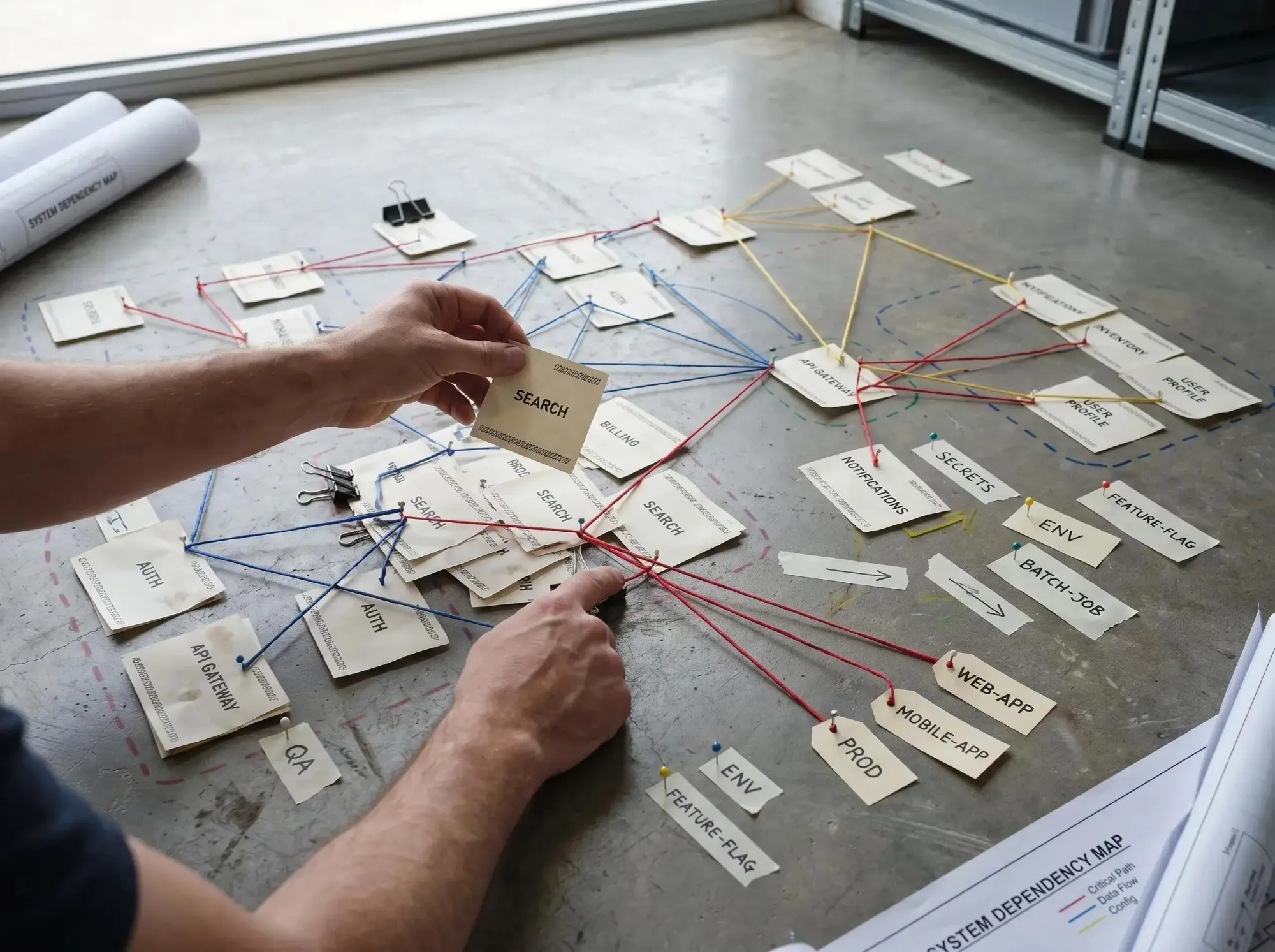
For multi-repo migrations, the graph is often the difference between a staged rollout and a guessing contest. Hidden contract consumers show up early. Cross-repo dependencies stop being folklore.
And onboarding gets less painful. The assistant stops acting like a clever file searcher and starts acting like a guide. New engineers spend less time asking where logic lives and more time deciding what should happen next.
The emotional payoff matters here:
- less guessing
- fewer surprise breakages
- calmer use of AI in code that matters
That's not hype. It's just what happens when the map shows up before the change.
What Good Architecture Visibility for Developers Should Answer Instantly
If you're evaluating an internal approach or a software architecture intelligence platform, start with the questions that should come back fast.
- What depends on this component?
- What will likely break if we change it?
- Is similar logic already implemented elsewhere?
- Is this code active, legacy, or dead?
- Which team owns this path?
- What tests, config, and contracts are tied to this change?
The assistant needs these answers before it generates code, not after the diff is already on the table.
And the output quality matters as much as the answer itself. You want:
- traceable reasoning
- visible dependency paths
- ranked impact, not a flat dump
- easy handoff from AI suggestion to human review
Good architecture visibility for developers supports two modes. Exploration when you're learning an area. Action when you're planning a safe edit or reviewing one under time pressure.
If it only supports browsing, it's not enough. If it only supports one-shot answers, it's not enough either.
Architecture Intelligence vs RAG, Static Analysis, and Code Review
Most teams already have pieces of this puzzle. That's good. They just shouldn't confuse the pieces with the full layer.
Plain RAG is useful for retrieving relevant text. It's weaker when the real question is structural impact across systems.
Static analysis is useful for symbols, types, and local call graphs. It often gets thin when risk spans runtime behavior, ownership, docs, and cross-repo context.
Tests and CI are essential for verification. They don't tell you whether the change plan itself is architecturally sound.
Traditional architecture docs are useful for intent. Fast-moving teams know how quickly they drift.
Code review still matters. Human judgment is where tradeoffs get resolved. But if blast radius is first considered in review, the workflow is late.
These are complements, not replacements. Architecture intelligence is the missing layer that helps humans and AI make better decisions before the change is made.
A practical pairing works well:
- a graph-based context layer helps before and during generation
- tests, CI, and the open source AI Code Quality Framework help validate the result after the plan exists
Different layer. Different job.
How to Add Intelligent Architecture Mapping to Your Workflow
Treat this like rollout, not ideology.
- Start with the risky questions your team already asks.
- Where is this used?
- What else changes with it?
- Who owns this path?
- Is this duplicate or dead?
- Map the signals that answer those questions first.
- code dependencies
- service boundaries
- contracts and schemas
- ownership
- build and deploy relationships
- Expose the graph where developers already work.
- editor assistant
- MCP client
- PR workflow
- review bot or internal portal
- Define safe assistant behavior.
- retrieve structural context first
- show dependency reasoning
- ask clarifying questions when confidence is low
- avoid edits when blast radius is unclear
- Keep humans in the right role.
- not passive approvers
- active owners of intent, tradeoffs, and acceptance
One way to do this is Pharaoh. We map software architecture into a knowledge graph and make that structure available to AI assistants through MCP, which is useful if your team already works in Claude Code or similar tools. If you're using Claude Code, you can add a codebase graph via MCP in about 2 minutes.
The outcome isn't more process. It's less avoidable uncertainty.
Common Failure Modes When Teams Skip Architecture Context
These failure modes show up fast, and they look familiar.
Treating the nearest file as the right file leads to local fixes that violate system boundaries.
Mistaking retrieval for understanding leads teams to think the assistant is informed because it saw the file. Seeing a file is not understanding its role.
Assuming passing tests mean the change is safe hides untested consumers and contract drift.
Letting AI invent architecture is worse. When structure is missing, the assistant fills the gap with plausible guesses. Plausible is dangerous.
Over-trusting tribal knowledge creates another trap. One senior engineer may know the dependency path. The team and the assistant still don't.
Ignoring dead code and duplicates leads the model to extend the wrong branch of the system or repeat logic that should have been centralized months ago.
And if architecture intelligence lives outside daily tools, it won't shape the moment of change. A slide deck doesn't help during a live coding session.
How to Measure Whether Architecture Intelligence Is Helping
You don't need a long rollout to tell if this is working. Look for changes in team behavior and workflow quality.
Team-level signs:
- fewer surprise dependencies discovered late in review
- faster answers to impact questions
- better AI edit plans on first pass
- less duplicate logic introduced during feature work
- more confident refactors in unfamiliar areas
Workflow-level indicators can show up within a sprint. Fewer abandoned AI-generated changes because blast radius was unclear. Shorter review cycles for structurally simple changes. Clearer escalation when a change crosses ownership boundaries.
Quality signals matter too. More traceable reasoning in AI suggestions. Fewer edits to dead or legacy paths. Better alignment between the requested change and the actual system boundary.
A simple exercise works well. Take three recent risky changes. Ask whether your current setup could have answered the impact questions before code was written.
If not, architecture intelligence is the missing layer.
Why This Matters More as AI Gets Better at Writing Code
This asymmetry is already here. Code generation quality is improving faster than codebase understanding. That means the cost of blind changes goes up as the models get faster.
The winning teams won't be the ones with the longest prompts. They'll be the ones that give AI structural context, clear boundaries, and traceable reasoning.
That's the shift.
The best setup is not human versus AI. It's human judgment paired with machine speed and a shared map of the system. Architecture intelligence supports safety and speed at the same time. It reduces unnecessary search, lowers review uncertainty, and improves the quality of changes before they hit CI.
Better models make this more urgent, not less.
Conclusion
AI coding gets safer when the assistant understands the architecture it's changing, not just the file it's editing.
Architecture intelligence turns hidden structure into visible, queryable context. That gives both humans and AI a better way to reason about dependencies, blast radius, existing code, and dead code before a change is made.
Pick one risky workflow this week - PR review, a refactor, or a multi-repo change - and ask what architectural questions your assistant still can't answer today. If those answers are missing, add a graph-based context layer through MCP and see how the next change feels when the assistant has a real map.