Claude Code Project Context for Safer, Faster Refactors

Refactors go sideways when Claude sees one tidy file and misses the ugly part: who else depends on it. Claude code project context matters most in monorepos and multi-repo setups, where a "safe" cleanup can break a sibling package by lunch.
What helps is not a fancier prompt. You need the repo rules, the local boundaries, and some real blast-radius signal before you ask for edits. That's the difference between fast and FAST.
A few things to check first:
- Whether the module has callers outside the folder Claude opened
- Whether your repo notes include exact test, lint, and typecheck commands
- Whether code that looks dead is actually unused or just hidden from the first search
You ship the refactor with fewer surprises.
The Refactor Problem Every AI-Assisted Team Recognizes
You ask Claude Code to clean up a shared module. The patch looks sane. Local tests pass. Then a sibling package breaks in CI because an indirect consumer depended on behavior nobody mentioned in the prompt.
That’s the real feeling of AI-assisted refactoring in a larger system. Fast, useful, and slightly dangerous.
The risk gets worse as the codebase spreads across modules, packages, and repos. Claude Code usually starts from the files you point it at. Your system does not. The actual impact may sit three directories away, or in a service nobody opened during the session, or behind an old path that looks dead until production traffic proves otherwise.
Most teams respond by trying to trust the model more. That’s backwards.
Safer refactors don’t come from more faith in the assistant. They come from better repo context.
If you want Claude Code to move quickly without feeling reckless, you need to understand what claude code project context actually is, what it can see by default, and what you need to add before asking it to make structural changes.

What Claude Code Project Context Actually Means
When we talk about claude code project context, we mean the full set of information shaping how Claude reasons during a session. Teams often call this “memory,” but that collapses different things into one bucket, and that’s where confusion starts.
There are really three layers:
- In-session context - the active conversation, file reads, command output, search results, tool responses
- Persistent instruction files - rules loaded at session start, like repo instructions and local working conventions
- Project context gathered live - what Claude discovers by exploring the repo, reading code, and running commands
Those layers behave differently. Persistent instructions exist before your first prompt. Live discovery only appears if Claude goes looking for it. Session history can be useful for continuity, then quietly become clutter by the second afternoon.
That practical difference matters. Some facts should be available every time. Some should only load in the part of the repo you’re touching. Some should be rediscovered because the code changed.
Improving claude code project context is less about writing clever prompts and more about making the right project facts available at the right time.
Where Claude Code Gets Context Today
In normal use, Claude Code pulls context from a hierarchy of instructions and from repo exploration during the session. Those instruction layers are not flat. They narrow as Claude gets closer to the code you’re working on.
The hierarchy usually looks like this:
- Global preferences in your user-level setup
- Project-level
CLAUDE.mdat the repo root - Subdirectory-level instruction files for local rules in bigger repos
That structure is useful because broad preferences and local exceptions are different things. Your global file can say how you like plans or diffs presented. A root CLAUDE.md can define repo-wide commands and rules. A service-level file can say, “Don’t change this API shape without updating fixtures in this package.”
The best persistent instructions usually include:
- Build, test, lint, and typecheck commands Claude can run directly
- Architecture constraints that don’t show up from one file read
- Repeated corrections from prior sessions
- Workflow rules your team actually enforces
Here’s the subtle point teams miss: the best instructions explain why a boundary exists, not just where files live. “Billing imports nothing from fulfillment” is more useful than a directory tour. Operators know this. File trees don’t explain intent.
Claude also gathers context on demand by reading files, searching symbols, traversing directories, and running commands. That works well for local tasks. It works less well when the refactor depends on relationships spread across the repo.
And there’s a hard limit. The context window is finite. As session history, file reads, and command output pile up, performance usually gets worse. Not always in obvious ways. Sometimes the model just starts making softer assumptions.
Why Better Prompts Alone Do Not Fix Risky Refactors
A lot of advice about how to improve Claude Code output is really prompt advice. Better wording. More detail. Stronger instructions. Some of that helps. It does not fix missing dependency and architecture context.
“Refactor this service safely” sounds precise. It isn’t. Claude can’t infer unknown callers, hidden side effects, deprecated paths, or dead code status from tone.
There’s a basic mismatch here:
- Claude can read the file you point to
- It may not know which modules depend on it
- It may not know whether a duplicate pattern is intentional
- It may not know whether an old path is inactive or just far away
That gap shows up in real workflows. During a refactoring sprint, the model may propose a clean abstraction that duplicates one already used in another package. During PR cleanup, it may rename a helper without seeing the odd import path used in a test harness. During a monorepo migration, it may “simplify” something that was intentionally awkward because of an integration boundary.
Prompt quality matters. Context quality matters more.
If you want better output, fix the context stack first. Then tune the prompt.
Why CLAUDE.md Helps and Where It Stops Helping
CLAUDE.md is valuable because it gives Claude Code a stable operating manual at session start. That’s the right place for rules that should not depend on who asked the question or which files got opened first.
High-value content usually includes:
- Exact commands for build, test, lint, and typecheck
- Architecture decisions and hard constraints
- Non-obvious conventions
- Temporary rules, like “leave the v1 adapter untouched this week”
Teams underuse CLAUDE.md by leaving out the commands Claude actually needs. Or they overuse it by turning it into a repo wiki.
That has a real cost. If you carry an 800-token global file and a 1,200-token project file, you’ve spent 2,000 tokens before the first prompt. Large windows don’t make bad context free. Stale instructions still waste attention. Broad notes still crowd out the task in front of you.
What belongs there, and what does not
Root-level instructions are best for stable rules:
- standard commands
- repo-wide conventions
- constraints that rarely change
They are not the right place to manually encode the whole architecture. That becomes stale fast, and stale context is worse than missing context because it looks authoritative.
CLAUDE.md can tell Claude Code how the repo should be handled. It cannot, by itself, map live dependencies, blast radius, or dead code across a codebase that keeps moving.
The Missing Layer: Repo Mapping for Claude Code
Between static instructions and ad hoc file search, there’s a missing layer. That layer is repo mapping for Claude Code.
Before a refactor starts, you want answers to a few blunt questions:
- What depends on this code?
- What else changes if we touch it?
- Which patterns already exist elsewhere?
- Which paths look unused or dead?
- Which boundaries are architectural, not accidental?
That information changes the quality of the work. Claude can scope edits better. Reviewers can compare the patch to the real blast radius. The assistant is less likely to create a new abstraction just because it didn’t see the old one in time.
Hand-maintained notes help with intent. Mapping helps with relationships. You want both.
Pharaoh is one way to provide this layer. We map software architecture into a knowledge graph so AI coding assistants can understand dependencies, blast radius, existing code, and dead code before making changes. If you’re using Claude Code, this can be added through MCP via pharaoh.so.
That doesn’t replace Claude Code’s normal file reading or repo instructions. It gives Claude Code dependency context that raw search often won’t assemble fast enough during a live refactor.
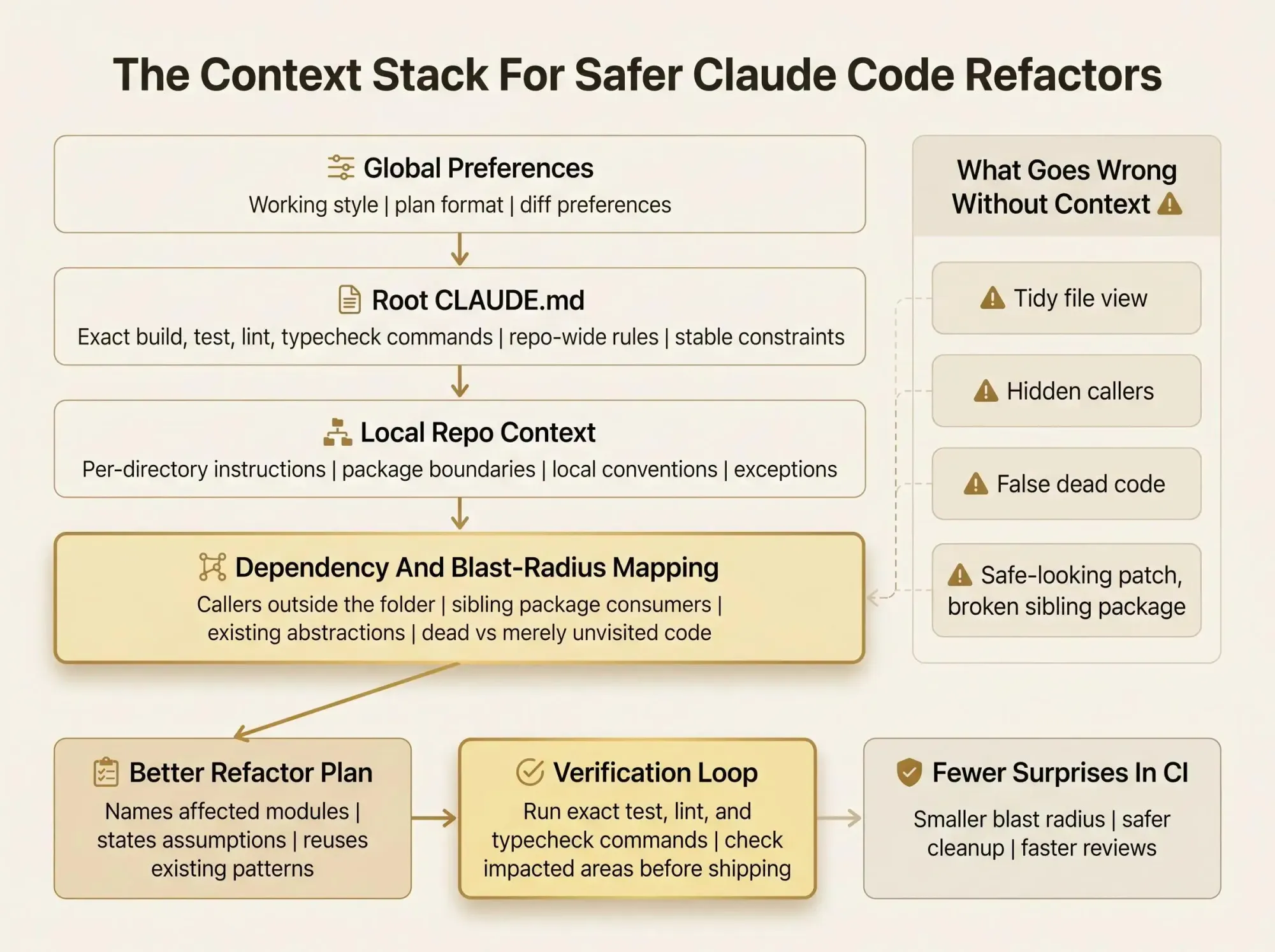
A Practical Context Stack for Safer Refactors
You don’t need a giant setup. You need the right layers doing the right jobs.
A practical stack looks like this:
- Global preferences for your working style
- Root
CLAUDE.mdfor repo-wide rules and commands - Per-directory files for service or package-specific context
- Verification commands Claude runs after edits
- Architecture and dependency context for blast radius
Each layer has a job, and each has a failure mode when misused.
The global layer should shape interaction, not store repo facts. Root instructions should define stable rules, not every exception in a monorepo. Per-directory files should narrow context, not repeat the root file. Verification should be explicit and pass-fail. Architecture context should expose relationships, not become another prose dump.
A workable split might look like this:
- Root file: coding rules, standard commands, shared constraints
services/payments/CLAUDE.md: fixture quirks, migration boundaries, local conventions- Repo map: cross-module dependencies, consumers, dead-code signals
That’s how you give Claude Code better repo context without loading irrelevant detail into every session. And once it’s set up, it becomes a repeatable system instead of a one-off ritual before every refactor.
How to Give Claude Code Better Repo Context Before a Refactor
If you want a process you can use this week, use this one.
1. Define the task boundary
Be specific about the change target.
- module, service, or package
- cleanup, extraction, consolidation, or API change
- clear out-of-scope areas
This keeps Claude from roaming and keeps you honest about what kind of refactor you’re actually asking for.
2. Load stable project rules
Make sure CLAUDE.md includes exact commands for build, test, lint, and typecheck. Add architecture constraints Claude repeatedly misses. Keep instructions short and durable.
A short line like Run pnpm test --filter billing after edits is worth more than three paragraphs of explanation.
3. Narrow context to the relevant part of the repo
In monorepos, use per-directory files so local conventions load where they matter. Don’t drag unrelated packages into startup context if the task is isolated.
Scoped context beats more context.
4. Provide dependency and blast-radius visibility
Surface callers, consumers, related services, and known integration points. Mark nearby dead or deprecated paths if you know them. If you have a codebase graph available through MCP, connect it before editing so Claude sees relationships first, not halfway through.
5. Give Claude a verification loop
Tell it exactly what to run after the refactor. Tests, builds, linters, fixture diffs, screenshots. It needs pass-fail signals, not vague reassurance.
6. Compact or reset when the session drifts
Long sessions get weird. Earlier exploration starts crowding out the current task. Compact before a new refactor or start clean.
That workflow is how to improve Claude Code output without depending on prompt tricks.
Claude Code Architecture Prompts That Work Better With Real Context
Claude code architecture prompts are prompts that force reasoning about boundaries, dependencies, and impact before editing. They work only when the project context exists for Claude to verify.
Here are two patterns that hold up in real work:
Before changing this module, identify likely affected packages, current callers, and any existing abstraction in the repo that should be reused. Then propose a minimal-change option and a cleaner long-term option.Give a blast-radius summary for refactoring this service method. List files likely affected, assumptions you're making, verification commands you'll run, and any risk points or open questions before editing.The response should include:
- likely affected files or modules
- explicit assumptions
- commands it will run to verify
- open questions and risk points
These prompts are not about making Claude sound smarter. They’re about forcing explicit reasoning over the right context. If the answer can’t name affected modules or verification steps, the setup isn’t ready.
Large Codebases Need Scoped Context, Not More Context
If you’re in a monorepo or multi-repo setup, giant root instructions are usually a trap. They feel safe because everything is “documented.” In practice, they blur the task.
The better pattern is tighter scoping:
- Per-directory files for local conventions
- Exclusions so unrelated packages stay out of context
- Read-deny rules for generated files, vendored code, and build output
- Code intelligence for definitions and callers instead of brute-force scanning
- Additional directories only when a task truly crosses into a sibling package or nearby repo
This matters during refactors because smaller context means less distraction and less file thrash. Localized instructions also reduce bad cross-system assumptions. The assistant stops treating every package as if it follows the same rules.
One giant root file tries to describe everything and usually describes nothing well. Local context follows the engineer into the subsystem actually being changed.
And when structural relationships span packages or repos, local notes still won’t explain the whole picture. That’s where repo mapping for Claude Code starts earning its keep.
How Claude Code Dependency Context Changes the Refactor Loop
Claude code dependency context is the set of relationships that tells Claude what a change touches, what relies on it, and what can be removed safely.
That changes the loop at every stage.
Before edits, Claude can identify likely impact instead of pretending the visible file is the whole system. During edits, it can preserve dependency patterns already established in neighboring modules. After edits, it can verify affected areas instead of stopping at the nearest passing test.
A few common failure cases become easier to avoid:
- Renaming an internal helper that an unexpected package imports
- Collapsing “duplicate” code that actually serves different integration boundaries
- Removing code that looks unused locally but is still reached through another service
We take a pretty direct view here: architecture should be mapped and inspected, not guessed from a few file reads. If your refactors regularly cross module boundaries, dependency context is not optional. It’s part of the safety system.
Common Ways Teams Accidentally Make Claude Code Worse
Most failures here are system mistakes, not model failures.
The usual ones are familiar:
- Overloading
CLAUDE.mdwith prose instead of keeping it as an operating guide - Treating all context as static even when dependencies change faster than docs
- Letting Claude explore a huge repo without narrowing scope
- Giving commands but no pass-fail verification criteria
- Assuming a clean-looking patch is a safe patch
- Repeating the same corrections across sessions instead of writing durable instructions into the right layer
- Confusing dead code with merely unvisited code because the assistant never got a broader view
You can fix every one of these. None require a new model. They require better operating discipline.
For code quality checks after changes, the open source AI Code Quality Framework is useful on the linting and testing side.
How to Evaluate Whether Your Context Setup Is Working
You don’t need a formal benchmark to tell if the setup is getting better. The signals show up quickly.
Good signs look like this:
- Claude asks fewer orientation questions at the start
- It reuses existing patterns more often
- Refactor plans mention affected modules and verification steps without being asked twice
- It spends less time reading irrelevant files
- Review comments shift toward design tradeoffs instead of avoidable breakage
A simple checklist helps:
- Does Claude know the standard commands?
- Does it know local conventions for this part of the repo?
- Can it see likely callers and consumers?
- Can it distinguish active from deprecated or dead paths?
- Does it have a clear test or build loop to run?
Context quality is an engineering input. You can improve it. You should.
A Lean Setup You Can Apply This Week
Don’t rebuild everything at once. Start where the pain is.
- Audit the root
CLAUDE.mdand remove documentation that isn’t working guidance - Add or tighten per-directory context in the areas refactored most often
- Make build, test, lint, and typecheck commands explicit
- Add deny rules or exclusions for generated and irrelevant code
- For structural refactors, add a source of dependency and blast-radius context before asking for edits
If you want architecture mapping available inside the AI workflow, Pharaoh does this automatically via MCP at pharaoh.so.
Start with one real refactor. The one people hesitate to touch. Tighten the local context, add dependency visibility, and compare the plan Claude gives you before and after. The difference is usually obvious.
Conclusion
Faster refactors with Claude Code get safer when the assistant sees more than the file in front of it.
The working model is simple:
- Use persistent instructions for stable rules
- Scope context to the subsystem that matters
- Give Claude a verification loop
- Add architecture and dependency context when changes cross boundaries
That’s the shift that matters. Stop hoping the model guesses correctly. Engineer the context it needs to reason well.
Pick one refactor that feels risky. Tighten the local context around it. Add a blast-radius view. Then look at the quality of Claude’s plan before you let it touch the code. That’s usually the moment this clicks.