Code Knowledge Graph: Safer AI-Assisted Changes

AI tools feel smart right up to the moment a small edit breaks two services you forgot were connected. A code knowledge graph gives your assistant the relationships it needs before it starts guessing.
What matters in practice is not a bigger context window. If you use Cursor, Claude Code, or Codex in a large repo, you need callers, imports, tests, and shared contracts in view first (yes, first).
Start here:
- Real callers, not symbol name noise
- Tests tied to the path you changed
- Shared models or events that widen blast radius before you ship the diff
The Failure Mode Every AI-Assisted Developer Recognizes
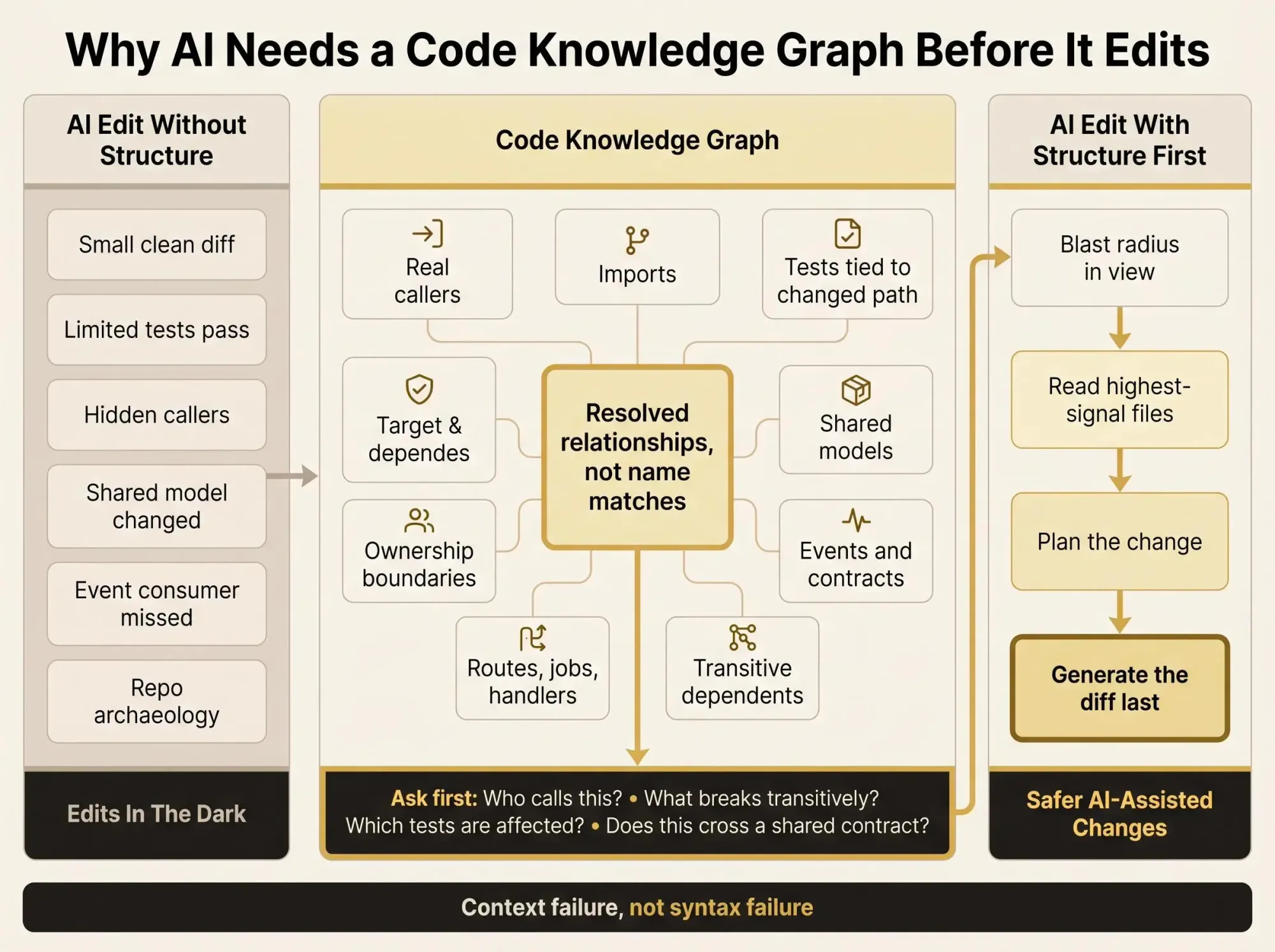
You ask Claude Code, Cursor, or Codex to update one function. The diff looks clean. The tests you happened to run pass. Then someone notices the function feeds a shared model used by two other services, one hidden import path, and a reporting job nobody touched in months. Now you're back in repo archaeology mode.
That tension is the real problem. The model sounds sure. You still can't see the blast radius.
In a small repo, you can brute-force your way through it. In a multi-module or multi-repo system, architecture is scattered across imports, naming conventions, framework magic, old ADRs, and whatever your staff engineer remembers from last year. AI makes the first draft faster. It doesn't magically reveal the structure of the system.
You've seen the symptoms:
- repeated grep searches across the repo
- opening file after file just to rebuild one call chain
- false positives from symbol-name search
- PR reviews that catch structural breakage after the diff is already written
- "unused" code that turns out to be reached through a route, event, or runtime registration
Most unsafe AI edits don't fail because the model can't write syntax. They fail because it edits in the dark.
Safer AI help doesn't come from trusting the model more. It comes from giving it a map before it starts changing things.
That's where a code knowledge graph comes in.

What a Code Knowledge Graph Actually Is
A code knowledge graph is a typed, queryable representation of a codebase. Nodes represent software entities. Edges represent the relationships between them. Not guessed relationships. Resolved ones.
You'll hear adjacent terms too:
- software knowledge graph - broad label for graphing software entities and relationships
- knowledge graph for software architecture - same idea, with more focus on boundaries and system shape
- dependency knowledge graph - emphasizes dependencies, callers, imports, contracts
- repository relationship graph - useful when the scope is one repo or a set of repos
- engineering knowledge graph - often includes code plus ownership, services, docs, and operations context
The names vary. The useful part is the same: can you ask structural questions and get answers grounded in actual code relationships?
A good graph includes nodes like:
- files, packages, modules, directories
- functions, methods, classes, interfaces, types
- tests and the code they exercise
- APIs, routes, schemas, models, message topics, environment variables
- ownership and architectural boundaries when you have them
And it includes edges like:
- calls
- imports and package dependencies
- implements and overrides
- references and usages
- data flow between inputs, outputs, and values
- cross-repo contracts such as shared APIs or published events
That last part matters. A real graph is not a glorified symbol index.
A symbol index tells you where a name appears. A code knowledge graph should let you traverse questions like:
who calls BillingService.calculateTax directly?what reaches it transitively?which tests touch those paths?what breaks if InvoiceSchema.total_cents changes?If the system can only return matching names, you're still doing manual reconstruction. That's useful. It's not enough.
Why Safer AI Help Starts With Structure, Not Better Prompts
Prompting helps up to a point. Then it runs into a wall. The wall is structure.
LLMs read text well. Developers ask relationship questions. Those are not the same thing.
When you ask, "What calls this method across services?" you're not asking for a good summary. You're asking for resolved graph traversal. "Which tests cover this path?" "Where does this event get published and consumed?" "Is this code dead, or just rarely reached?" These are graph-native questions. Text retrieval struggles because it doesn't know whether two matching strings are actually connected.
Here's the practical mismatch:
- grep finds names, not resolved callers
- embeddings find similar code, not actual dependencies
- manual file reading can work, but it's slow and easy to lose transitive context by the second afternoon
Recent graph-based code exploration work makes the tradeoff pretty clear. It reached about 83 percent answer quality versus 92 percent for full file exploration, while using around 10 times fewer tokens and 2.1 times fewer tool calls. That's a very good deal for architecture and impact analysis.
Not every question belongs to the graph. If you're asking how a function handles a null edge case, open the file. If you're asking what breaks when the output shape changes, start with the graph.
This is the line we keep coming back to: unsafe AI edits are usually a context failure, not a generation failure.
What the Graph Needs to Contain to Be Useful in Real Repositories
A dependency knowledge graph that only tracks imports and AST nodes will disappoint you quickly. It looks impressive in a demo. Then you ask a real question and get half an answer.
The minimum structural layers are pretty clear:
- symbol definitions and containment
- internal call graph
- import and package relationships
- inheritance and interface relationships
- test-to-code mappings
- service and API boundaries
That gets you a decent baseline. Safer AI assistance needs more than baseline.
The higher-value layers are where the graph starts earning its keep:
- transitive dependencies across modules
- data flow through function calls
- shared schemas and event contracts
- dead code signals
- architectural ownership and boundaries
Three distinctions matter in practice.
First, modeling library calls matters. Real code leans heavily on external packages and frameworks. If the graph stops at your repo boundary, control flow gets fuzzy fast.
Second, following data and control flow across multiple calls matters more than isolated function analysis. Lots of risky changes aren't in the edited function. They're two hops away.
Third, reachable behavior matters even when there's no obvious main. Jobs, handlers, routes, and event consumers often define the real execution paths.
This isn't a toy-repo concept. Research systems have applied code knowledge graph techniques to more than 1.3 million Python files, 2,300 modules, and 47 million forum posts, producing more than 2 billion triples. Scale isn't the hard objection anymore. The hard part is choosing the right structure and keeping it current.
How a Knowledge Graph for Software Architecture Reduces Blast Radius
Blast radius is just the set of things your change can affect: callers, dependencies, contracts, tests, downstream systems. We like that definition because it's operational. You can work with it.
A repository relationship graph turns blast radius from guesswork into traversal.
Before an assistant edits code, it should be able to answer:
- Who calls this symbol directly?
- Which paths reach it transitively?
- What models, routes, or events depend on its output?
- Which tests are likely to fail or need updates?
- Is there duplicate logic elsewhere that should change too?
- Is the target code active, legacy, or dead?
That last one gets people. Dead code cleanup sounds safe until you remove something "unused" that's only referenced through convention, registration, or a workflow you didn't model. The graph shouldn't just say "no inbound refs." It should help you distinguish "no known inbound relationships" from "safe to remove." Those are very different statements.
Here's what this looks like in a real pre-edit pass:
symbol: pricing/apply_discountdirect_callers: 4transitive_dependents: checkout, refunds, invoice-previewaffected_tests: 12contract_touchpoints: DiscountApplied event, InvoiceResponse schemadead_code_signal: falseduplicate_impls_nearby: pricing_legacy/apply_discount_v2That's enough to change the conversation. The assistant isn't starting with "Here's a diff." It starts with "Here's the risk surface."
Good. That's the right order.
Code Knowledge Graph vs Grep, Embeddings, and File-by-File Exploration
You don't need one tool. You need the right starting point for the question in front of you.
Let's make the tradeoffs plain.
Grep is fast and still worth using. If you need raw text lookup, string constants, comments, or quick confirmation, it's great. It's weak when names collide or when relationships need resolution. Comments, strings, and same-name symbols add noise immediately.
Vector search and RAG help when you need semantically similar snippets, old patterns, or supporting docs. That's useful during refactors and migrations. But similarity is not dependency. A snippet that looks similar to your function is not proof that it calls it, implements it, or depends on its schema.
File-by-file exploration is still the best path for implementation detail. If you're debugging edge-case behavior, reading code directly wins. The downside is cost. Cost in tokens, cost in time, cost in attention. On a large repo, it's easy to inspect eight files and still miss the one transitive consumer that matters.
The graph fits in the middle:
- use the graph to narrow the search space
- use targeted file reads to verify behavior
- then make the change
Grep is for text. A code knowledge graph is for truth about relationships.
Our rule of thumb is simple. If the question starts with who, what depends on, what breaks, or where does this flow, start with a software knowledge graph. If it starts with how is this implemented, open the file.
Static Analysis Is the Floor, Not the Whole System
Static analysis is the base layer because it extracts real structure: symbols, imports, calls, types, syntax. Most teams should start there. You need a floor before you can ask better questions.
A lot of modern graph tooling leans on Tree-sitter for this reason. It parses many languages and supports incremental parsing, so changed files can update without rebuilding the entire graph. That's not trivia. It affects whether the graph stays current enough to trust during daily work.
The market is moving in a useful direction:
- some graph systems support dozens of languages
- some keep themselves fresh with file watching
- some expose the graph through MCP so AI assistants can query it directly
Still, static analysis alone won't capture production reality. It misses things you already know are messy:
- dynamic dispatch
- dependency injection
- runtime configuration
- generated code
- event-driven systems and async workflows
The practical ideal for an engineering knowledge graph is layered:
- static structure as the base
- runtime signals where available
- human context such as ownership, boundaries, and architecture rules
You're not chasing perfect omniscience. That's a trap. You're trying to give the assistant enough structural truth to stop making reckless edits.
Real Workflows Where a Dependency Knowledge Graph Pays Off Fast
This gets real when it changes how work moves.
During refactoring sprints, the graph helps you identify all callers before touching a shared utility, find duplicate patterns spread across modules, and surface dead code candidates before you drag them into the new design. We've seen teams find 23 duplicate implementations across 6 modules once they stopped searching by name and started traversing relationships.
PR review is another obvious win. A local-looking diff often crosses boundaries quietly. The graph can show that the changed path touches a shared schema, three services, and tests outside the package under review. That's the kind of thing code review tools often catch too late. That's backwards.
Monorepo migrations benefit because dependency order stops being guesswork. You can trace imports, shared types, and contracts across packages, then sequence changes in the right order. Hidden consumers are still a risk, but less of one.
Multi-repo API changes are where a repository relationship graph becomes hard to ignore. You need providers, consumers, and contract touchpoints mapped before rollout planning means anything.
For AI pair programming sessions, the workflow should be disciplined:
- Ask for callers, callees, and impact first.
- Read only the highest-signal files next.
- Ask for a change plan.
- Generate the diff last.
Dead code cleanup belongs here too. Inbound references, test relationships, and architecture context let you separate safe deletions from optimistic guesses.
A useful query set looks like this:
- show direct callers
- show transitive dependents
- list affected tests
- list duplicated implementations nearby
- flag code with no inbound relationships
That takes a vague "be careful" instinct and turns it into a repeatable process.
How to Add a Repository Relationship Graph to Your AI Workflow
Don't wait for a perfect company-wide map. Start narrower.
Pick one service, one package group, or one high-risk repo. Then decide what matters most for that slice. Backend teams usually care first about calls, imports, routes, schemas, and events. Frontend teams often care more about components, state flow, routes, and API contracts. Platform teams usually need cross-repo dependencies and ownership early.
From there, the path is straightforward:
- Parse source into structural entities.
- Extract relationships.
- Store them in a graph-friendly format.
- Expose query access to humans and AI tools.
- Connect it to your coding assistant through MCP or an equivalent interface.
- Keep updates incremental as files change.
The assistant should be able to ask structural questions before editing. Otherwise the graph becomes another dashboard nobody opens.
Your pre-edit checklist should include:
- direct callers
- transitive dependencies
- affected tests
- contract boundaries
- dead code risk
- ownership or review path
Pharaoh is one approach here. We map software architecture into a knowledge graph and expose dependencies, blast radius, existing code, and dead code so AI assistants can ask better pre-edit questions through MCP.
What to Look for in a Tool or Platform
Teams usually compare categories before they compare products. That's the right move.
Some tools are code indexers. Some are graph databases aimed at code. Some are AI-facing MCP servers. Some are architecture mapping tools, like Pharaoh. The category matters because it shapes what questions the tool can answer well.
When you evaluate, check these things:
- Coverage: does it handle your languages and repo layout, across modules and repos?
- Relationship depth: definitions, calls, imports, inheritance, references, and data flow where possible
- Update model: one-time indexing versus incremental refresh, file watching, or CI-based updates
- AI interface: MCP support or another clean query path
- Query quality: can it answer direct and transitive relationships, blast radius, and dead code signals?
- Trust: can developers inspect why two things are related and verify it quickly in code?
- Ecosystem fit: does it complement tests, linting, review, and code search?
That last point matters more than teams admit. Good systems slot into existing habits. They don't ask you to replace everything.
If you're working on code quality more broadly, the open source AI Code Quality Framework covers the linting and testing side well. That's adjacent to this problem, not the same as it.
A grounded caution: if a tool can't explain relationships in a way your team can verify, it won't become part of real engineering decisions.
The Questions to Ask Before Letting AI Edit Production Code
You can use this today, even if your graph is basic.
Ask about reach first:
- who calls this directly?
- what depends on it transitively?
- is it part of a public API, event contract, or shared model?
Then ask about safety:
- what tests map to these paths?
- what modules or services are in the blast radius?
- what ownership boundaries does this cross?
Then correctness:
- is there duplicate logic elsewhere that must stay in sync?
- is the target code actually active, or just still present?
- are library calls or framework conventions changing control flow?
Then rollout:
- do consumers need coordinated changes?
- can this be staged, deprecated, or feature-flagged?
The sequence matters:
- ask the graph first
- read the highest-impact files second
- plan the change third
- generate the diff last
That habit alone will cut down a lot of avoidable breakage. Pharaoh surfaces this kind of pre-edit context automatically for AI-assisted workflows, but the habit matters even if you build the graph another way.
Conclusion
The mindset shift is simple and it changes everything. Safer AI-assisted changes come from better context, not blind faith in the model.
Software is not a pile of files. It's a web of relationships. A code knowledge graph makes enough of those relationships visible that you can reason about change before the edit exists.
That gives you fewer surprise dependencies, clearer blast radius, better use of AI tools on large codebases, and less time spent doing manual repo archaeology with grep, tabs, and hope.
Pick one risky change this week. Before your assistant writes a single line of code, require answers to the graph questions first. That's where safer AI starts.