Cursor for Large Codebases: Faster, Safer Refactors

Cursor for large codebases gets risky fast. A simple rename passes local tests, then breaks a package nobody knew shared that type.
What matters is context: what the edit touches, what Cursor indexed, and when search stops being enough (usually sooner).
Check these before you edit:
- Shared libs and config folders are actually in the workspace
- Indirect consumers of the symbol, not just direct imports
- Blast radius before the diff, so you ship cleanly
Why Large-Repo Refactors Feel Risky Even When the AI Is Fast
You know the move. A rename looks clean, Cursor updates 37 files in seconds, local tests pass, and two days later some batch job in another package falls over because a shared model had one weird consumer nobody remembered. The edit was fast. The system understanding wasn't.
That's the tension behind using Cursor for large codebases. The assistant is usually good at changing code quickly. Your repo is usually bad at exposing the full consequences of those changes.
In a real monorepo, risk hides in places search alone won't explain:
- shared types used by five packages and one forgotten script
- config assumptions that only exist in deployment paths
- circular imports nobody meant to create
- dead code that looks live
- live code that looks dead
- ownership gaps where everybody thinks another team owns it
Most bad refactors don't fail because the assistant wrote invalid syntax. They fail because it was asked to operate without enough architectural context. Search can find text and symbols. Safety comes from understanding relationships.
That's the frame for the rest of this guide. We'll cover how Cursor helps in large repos, how to use Cursor on a monorepo without creating blind spots, and where a codebase graph like Pharaoh earns its keep when retrieval stops being enough.
What Cursor Actually Does Well in Large Codebases
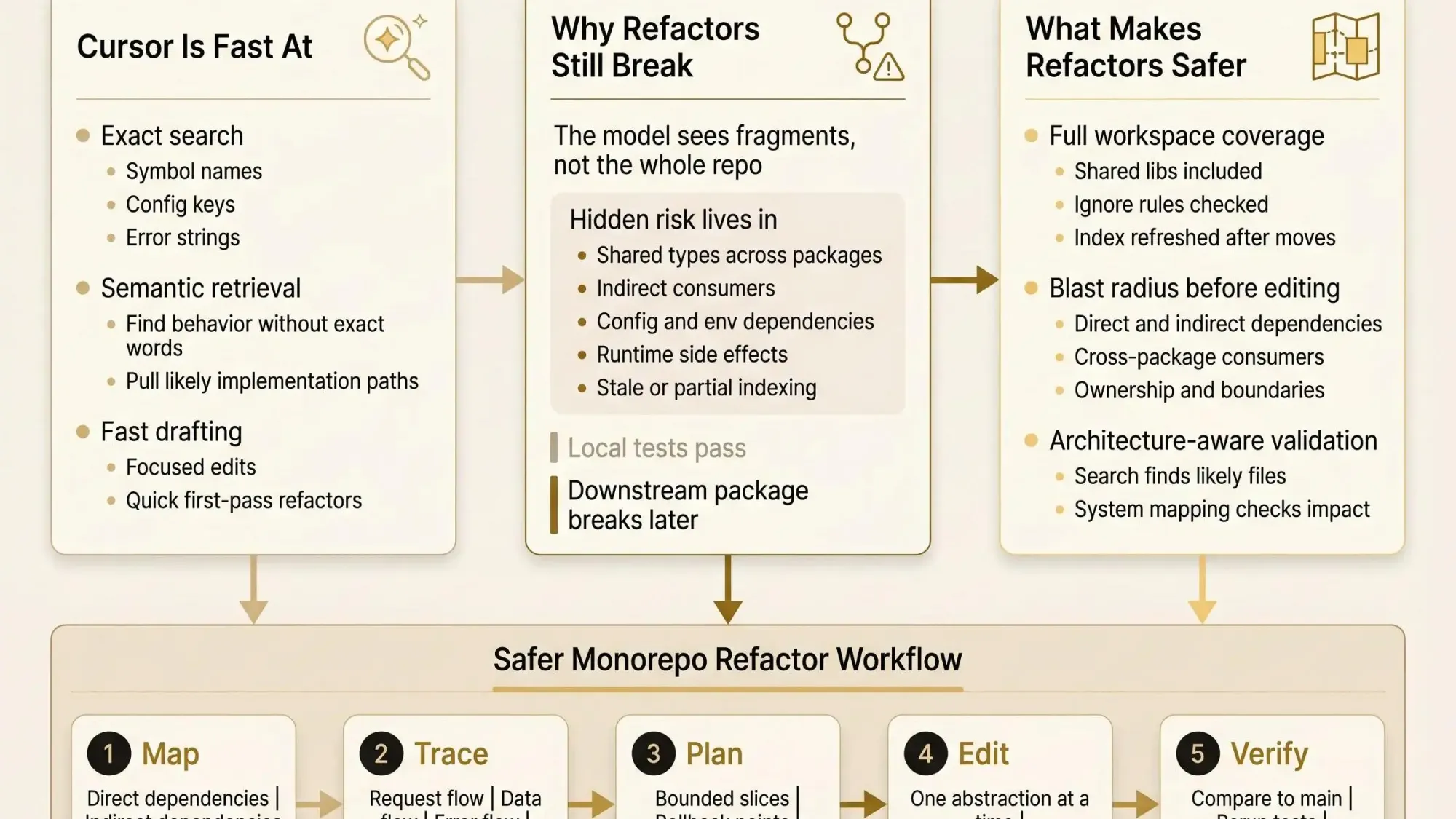
Cursor stays useful as repos grow because it does two things that matter: exact search and semantic retrieval. That combination is the reason it still saves time long after a repo stops fitting in your head.
Exact search is for the cases where you know what you're hunting:
- a symbol name
- an env var
- an error string
- a config key
- a route path
Semantic search is for the more common large-repo question: you know the behavior, not the implementation. "Where do we validate JWTs?" or "What handles payment retries?" That's where plain grep starts to miss the obvious because the code doesn't use the same words you do.
Cursor also indexes code in the background, so the assistant can pull relevant files without you opening each one first. In practice that means less manual setup during discovery. On large repos, that cuts a lot of friction.
Instant Grep matters too. It's a small detail until the repo gets big enough that recursive search speed starts shaping your workflow. Then it's not a detail.
The sweet spot looks like this:
- answering codebase questions
- finding likely implementation paths
- pulling nearby context for focused edits
- drafting changes once you've narrowed the surface area
Search quality generally improves when semantic retrieval and grep-style lookup work together rather than alone. That's not surprising. Large repos stop being text problems pretty quickly.
Still, fast retrieval isn't the same as full system understanding. That's where things get slippery.
Where Cursor Starts to Struggle in Complex Repos
The hard limit is simple: even a large context window is tiny compared with a real production repo. A mid-sized monorepo can run into millions of tokens spread across apps, packages, scripts, infra folders, and generated code. The model only sees fragments.
That matters because the dangerous relationships are often not local to the file being edited. They're in the edges:
- cross-package contracts
- indirect imports through wrappers
- hidden shared state
- singleton assumptions
- data model coupling that only shows up at runtime
This is how failures actually happen. The code in the current file looks right. The package tests pass. Then a sibling service breaks because it depended on a side effect that wasn't obvious in the files Cursor retrieved.
Fast answers can still be incomplete answers.
Vector retrieval is good at filtering. It is not proof of coverage. For exact lookups, shell tools still matter because they're exhaustive in a way semantic retrieval isn't. That's why engineers doing high-risk changes still fall back to rg, direct file reads, and manual tracing.
A practical rule helps here: use Cursor to find and draft. Use architecture-aware validation to decide if the change is safe.
How Cursor Indexing Works and Why It Matters for Monorepos
If you're working out a cursor monorepo workflow, indexing is not background trivia. It's part of refactor safety.
Cursor watches files and reindexes in the background. The index is built around semantic units like functions, classes, methods, imports, and module-level declarations, not arbitrary token chunks. That's why retrieval can map back to file path, symbol name, and line range in a way that feels useful rather than random.
The upside is real:
- better symbol-level retrieval
- stronger links between behavior questions and actual code
- more useful answers when you're tracing flows instead of filenames
But there is a common misunderstanding. Cursor indexing monorepo behavior helps the assistant retrieve code. It does not automatically create a trustworthy map of ownership, blast radius, or dead code. Those are different problems.
On larger workspaces, you'll notice a few operational realities:
- Initial indexing can take a while.
- Once built, search gets much faster.
- Memory use can spike on large workspaces.
- Stale or partial indexes create confident but wrong answers.
That last point matters more than most teams think. If key folders are ignored, recently moved packages weren't reindexed, or generated paths are crowding out signal, your assistant isn't "slightly off." It's working with a distorted map.
Reindex when you've restructured folders, changed ignore rules, or pulled a branch with wide repo movement. Check what is excluded. Recently changed files deserve suspicion until you know the index caught up.
How to Use Cursor on a Monorepo Without Losing the Plot
Here's the practical answer to how to use Cursor on a monorepo: treat the workspace like the system, not like a random folder tree. A monorepo isn't one giant blob. It's a set of boundaries with contracts between them.
Set up the workspace so those boundaries are visible:
- include all relevant packages and apps
- keep generated output and noise out of the index
- make sure shared libraries are included if anything downstream depends on them
If your system spans separate directories or even separate repos, open a multi-folder workspace. That's the sane way of using Cursor across packages when auth, shared types, config, or observability cut across service boundaries.
One useful detail: the active file's folder often becomes the primary local context for editing, while codebase search can still span the whole indexed workspace. That's a good balance. You get local focus without losing repo-wide discovery.
The best prompts in monorepo mode are concrete and flow-based. For example:
Trace how a payment request moves from the frontend package to the API package to shared validation. List files in likely execution order.Find all packages that depend on SharedUserClaims and note whether usage is type-only, runtime, or config-driven.Identify services that rely on the JWT validation path and any env vars or middleware involved.Common monorepo failures are boring but expensive:
- shared libraries excluded by ignore rules
- only one folder open when you're asking for repo-wide impact
- stale index after package moves
- package boundaries obvious to humans but not to the assistant
You don't need perfection here. You do need to stop pretending the workspace setup is incidental. It isn't.
A Practical Cursor Monorepo Workflow for Safer Refactors
This is the operating model we recommend because it matches how senior engineers already work when they don't want surprises: map first, plan second, edit third, verify last.
Phase 1: map before touching code
Start read-only. Ask Cursor for structure, not patches.
- What are the top imported modules in the target area?
- Which files are largest, and what do they actually do?
- Where does database access live?
- Where are external API calls and global state handled?
- Which modules look tightly coupled or hard to test?
By the second afternoon of a refactor sprint, this step usually pays for itself.
Phase 2: trace the path you're about to change
Follow request flow, data flow, and error flow. Ask which packages read or write the same state. Ask for hidden dependencies, not just direct imports.
A good prompt:
Trace direct and indirect dependencies for OrderSession. Include shared models, config keys, singleton assumptions, and packages outside the current app.Phase 3: make a change plan
Don't jump from discovery to editing. That's where teams get reckless.
Write the sequence first:
- low-risk prep work
- contract isolation
- rollback points
- reviewable checkpoints
A plan that touches 12 files in 3 packages is easier to trust than one that touches 46 files "because the assistant found them."
Phase 4: execute in bounded slices
Rename one abstraction at a time. Move one boundary at a time. Review diffs package by package. If a diff is too broad to review properly, it's too broad to trust.
Phase 5: verify from fresh context
Compare against main. Rerun tests and linters. Then ask the assistant to re-check impact from the perspective of untouched packages.
This is where context resets matter. Old chat assumptions can drag a refactor in the wrong direction long after the code changed.
The payoff is emotional as much as technical. This workflow turns AI from a risky autocomplete into a disciplined refactoring partner.
The Search Patterns That Work Best in Cursor for Large Codebases
Search quality depends heavily on prompt shape. On big repos, the difference between a vague question and a scoped one is often 2K tokens instead of 40K and a much better answer.
Start specific when you know the anchor:
- exact function names
- config keys
- symbols
- error messages
- route names
Start broad when you know the behavior but not the code:
- where do we handle authentication
- what happens when a user submits a payment
- which packages depend on this shared type
A search ladder works well in practice:
- Exact match first if you know the symbol.
- Semantic search second if you know the behavior.
- Package-scoped follow-ups third.
- Verification questions last.
Useful prompt patterns:
- Find all direct and indirect dependencies of
BillingConfig. - Trace checkout flow across packages and list files in execution order.
- Identify config, env vars, global state, and shared models involved in session refresh.
- Separate likely dead code from low-traffic but live paths.
Natural language can sound smart while still missing exact references. For risky changes, pair semantic discovery with grep and test validation. The assistant should help you narrow the hunt, not decide that the hunt is over.
What Makes a Refactor Fast Versus What Makes It Safe
Fast means the assistant can find likely files and propose edits quickly. Safe means you understand downstream impact before merging. Those are related. They are not the same.
In large repos, the split gets obvious:
- a quick answer can miss an internal consumer
- a broad semantic hit can surface relevant files without proving completeness
- a file-by-file edit can still break a package contract
This is where blast radius becomes the useful mental model. Ask:
- what else reads this symbol?
- what else writes this state?
- what runtime path depends on this behavior?
- what consumers live outside the package being edited?
Most teams get defensive around AI refactors because the model usually sees the code being changed, not the architecture being changed. That's a real concern, not fear of new tools.
A knowledge graph helps as a safety layer here. Pharaoh maps dependencies, existing patterns, dead code, and likely impact before changes happen. If Cursor helps you find and edit, Pharaoh helps you understand what those edits mean across the system. Different jobs.
If you're thinking about code quality more broadly, the AI Code Quality Framework covers the linting and testing side well. Architecture context and code quality checks catch different failure modes.
When to Add an Architecture Map Like Pharaoh
Search starts to feel thin at a certain threshold. You usually know it when you're in it.
The trigger points are familiar:
- multi-module refactors
- service extraction
- package migrations
- widespread renames
- unclear ownership
- repeated regressions from hidden coupling
An architecture map changes the developer experience in a very plain way. Dependencies become visible. Blast radius gets easier to reason about. Dead code is easier to spot before you waste time updating it. Existing patterns show up before somebody invents a fourth version of the same thing.
Three places where this is genuinely useful:
- Before asking Cursor for a repo-wide change, inspect which modules actually depend on the target.
- During PR review, validate whether the change crosses more boundaries than expected.
- During a refactoring sprint, identify duplicate patterns and modules that can be cleaned up with lower risk.
The point isn't more automation. It's restoring control in a codebase that has outgrown human memory.
If your team already uses Claude Code, Cursor, Codex, or another MCP client, Pharaoh can provide that context to the assistant through MCP with very little workflow change.
Refactor Patterns Where Cursor Shines and Where You Should Slow Down
Not all refactors deserve the same operating mode. File count is not the real issue. Coupling is.
For high-confidence work, Cursor is usually strong:
- localized renames with clear symbol boundaries
- repetitive code conversions inside one package
- utility extraction where callers are easy to enumerate
- structured reports about code organization before editing
For medium-risk changes, keep tighter checkpoints:
- changing shared types across packages
- moving business logic from handlers into services
- replacing old APIs with wrappers
- modernizing async flows in legacy code
For high-risk changes, slow down on purpose:
- service extraction from a monolith
- auth and session changes
- payment and checkout flows
- logging, observability, or infra changes spread across packages
Use ask mode and mapping first for low risk. Use bounded edits and frequent review points for medium risk. Use an architecture map and test-first guardrails for high risk.
A large codebase isn't defined by files. It's defined by how many assumptions are hiding between them.
Common Mistakes Teams Make With Cursor in Complex Repos
These mistakes are common because the tool feels so capable early on.
- Editing before mapping. Skipping the read-only discovery step creates avoidable regressions.
- Treating semantic search as proof. Retrieval helps. It doesn't prove completeness.
- Flattening the monorepo mentally. Package boundaries still matter even when the workspace is shared.
- Ignoring ignore rules. Excluded folders create false negatives and false confidence.
- Working from stale context. Old index state, old branches, and prior chat assumptions distort answers.
- Optimizing for elegance over compatibility. Existing weird behavior often matters more than a clean rewrite.
- Reviewing only changed lines. The dangerous part of a refactor is often outside the diff.
- Skipping rollback plans. Large changes should be staged, reversible, and observable.
A lot of this comes down to one habit: don't let the assistant set the pace for the whole change.
How to Measure Whether Your AI Refactor Workflow Is Actually Getting Safer
If you can't tell whether the workflow is getting safer, you're mostly running on vibes.
Track a few signals:
- how often repo-wide edits miss a downstream consumer
- how many files a refactor touches before and after better scoping
- how often reviewers ask for dependency clarification
- regressions tied to cross-package changes
The qualitative markers matter too. Mature teams start asking mapping questions before edit questions. PRs include impact reasoning, not just code changes. Refactor discussions start mentioning ownership, blast radius, and rollback by default.
That's when trust starts to shift. Engineers stop treating AI output as something to fear and start treating it as something they can verify.
Keep the basics in place. Linting, tests, and review still matter because they catch different classes of issues than codebase context.
A Simple Playbook You Can Try This Week
You don't need a new process doc. Run one real change differently.
- Pick one upcoming refactor that crosses package boundaries.
- In Cursor, ask for a map of direct dependencies, indirect dependencies, shared models, config keys, and likely side effects.
- Verify the workspace includes all relevant packages and that ignore rules aren't hiding important code.
- Break the work into checkpoints and compare against
mainafter each one. - If ownership is unclear or blast radius looks broad, inspect the architecture before editing. Pharaoh can supply that context to your assistant through MCP.
- Only then make the change, review the diff by boundary, and rerun validation from a fresh context.
Faster refactors are useful. Safer refactors are what earn trust.
Conclusion
Cursor for large codebases works best when you treat it as a strong discovery and editing tool, not an all-seeing architectural brain. Speed comes from retrieval. Safety comes from visible dependencies, clear boundaries, and explicit impact checks.
Pick one real monorepo change this week and run it with a map-first workflow. If your team is already using AI assistants across complex repos, adding architecture context through Pharaoh is a practical next layer, not a process overhaul. The fastest way to trust AI in a big repo is to stop asking it to work blind.