Developer MCP Servers for Safer Code Changes with AI

AI assistants can patch one file cleanly and still break the system two folders over. Developer MCP servers matter when you are using Claude Code, Cursor, or Codex on a codebase with old modules, shared contracts, and enough history to hurt you.
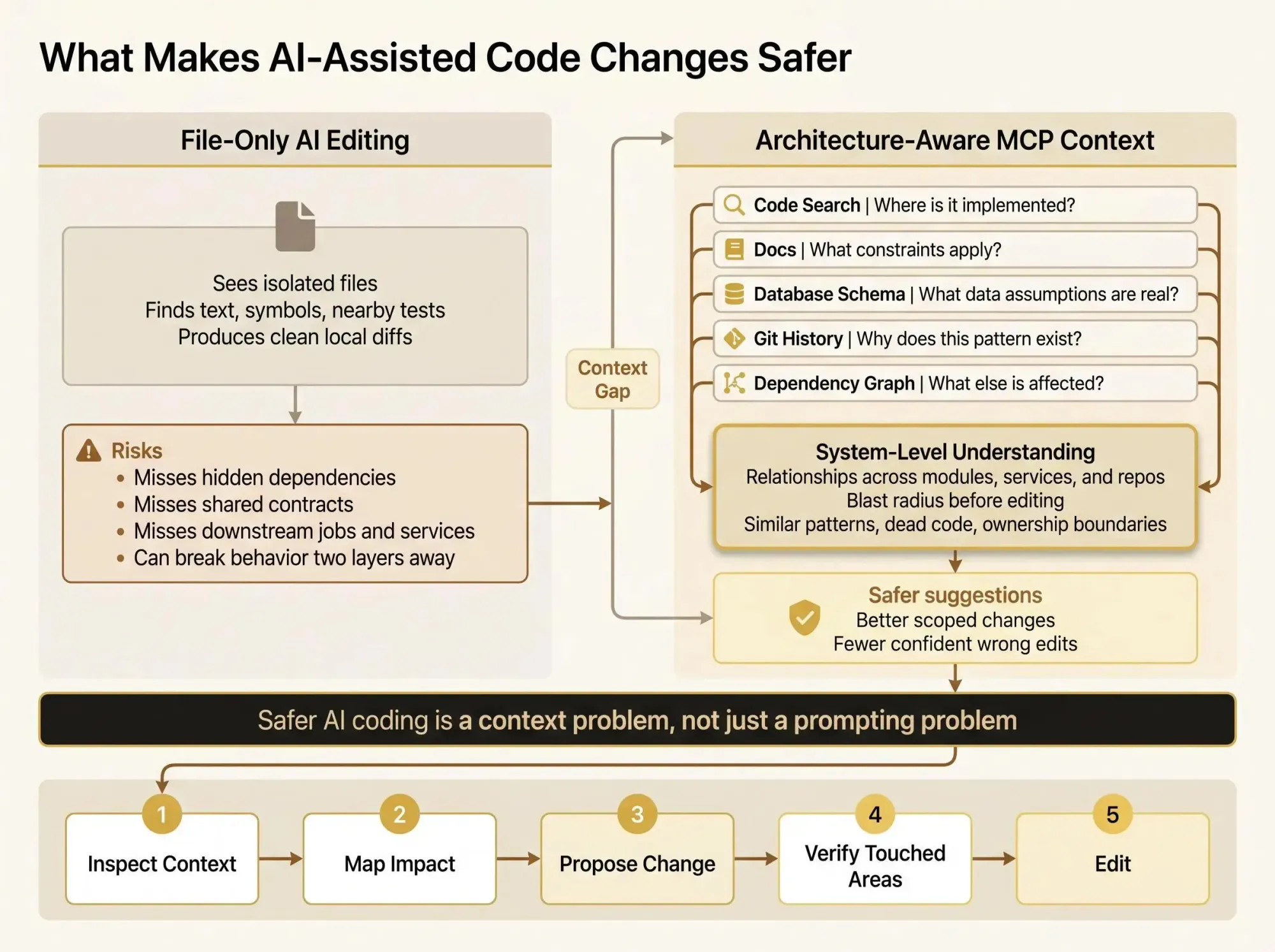
What actually keeps changes safe is not better prompting. It is context the model can use before it edits anything. What usually decides it:
- whether the server shows relationships or just finds text
- whether it can trace impact across repos instead of stopping at the current folder
- whether you can trust the output when the assistant gets confident FAST
Why AI-Assisted Edits Feel Unsafe in Real Codebases
You’ve probably seen the pattern already. The assistant updates the file you pointed at, the tests near that file pass, and the diff looks clean. Then you notice it missed the shared module, the background job, the migration, or the feature flag that makes the edit risky in the first place.
That’s the real tension with AI coding in production systems. It’s not that the model can’t write code. It’s that local correctness can still damage the system.
In a real codebase, the fear is usually one of these:
- hidden dependencies nobody remembered were still live
- unclear blast radius across modules or services
- duplicate logic spread across old and new paths
- dead code that looks active enough to fool a model
- a “correct” edit that breaks downstream behavior two layers away
Small projects hide this problem because the whole system fits in your head. A few files, one service, maybe one data store. The assistant can stumble around and still get lucky.
An 80,000-line codebase is different. Add internal tooling, layered services, two generations of patterns, and a few half-finished migrations, and file-by-file reading starts to collapse. The agent scans files until it finds something relevant, burns tokens, loses thread, and keeps making guesses with partial context.
That’s the failure mode teams feel but don’t always name. The model isn’t reasoning over the system. It’s touring fragments.
Safer AI coding is not mainly a prompting problem. It’s a context problem.
You can write a sharper prompt. You should. But if the assistant can’t see dependency direction, shared contracts, and inactive paths, better wording won’t save the edit. In larger systems, trust comes from context that reflects the shape of the codebase, not just more file content.
What Developer MCP Servers Are and What They Are Not
Let’s keep this plain. Developer MCP servers are tool servers that let AI assistants query real systems instead of guessing from raw text alone.
The mental model is simple:
- the host is the AI-connected app you use, like Claude Code, Cursor, or another MCP-aware environment
- the client manages one connection to one server
- the server exposes capabilities the assistant can call
Under the hood, MCP standardizes a JSON-RPC style conversation between client and server. It also defines typed primitives like tools, resources, and prompts. Some setups also support server-driven sampling now, which matters when the server needs to shape how the assistant explores a task.
What MCP does not standardize is just as important:
- transport choice
- authentication model
- deployment pattern
- agent behavior
That last one trips people up. MCP doesn’t make the agent smart. It gives the agent a structured way to ask for help.
The practical value for engineers is pretty obvious once you’ve integrated tools the old way. Before MCP, every host needed its own integration with every tool. That’s an N x M mess. MCP reduces that to N + M. Build one useful server, and it can work across multiple coding environments that speak MCP.
That’s nice, but it’s not the reason developers care. For safer code changes, the key question isn’t whether a server exists. It’s whether that server gives the assistant architecture-level understanding before it edits anything.
A server that can fetch files is useful. A server that can explain which services depend on a package you’re changing is much more useful.
Where Generic MCP Servers Stop Short
A lot of first-generation MCP setups are helpful and still not enough. That’s normal. Access to data is not the same as the right shape of understanding.
Generic code search is a good example. Search can find strings, symbols, references, and filenames quickly. That’s a real improvement over an agent wandering through random files. It answers “where does this happen?” pretty well.
It often struggles with harder questions:
- which components depend on this module in practice
- whether a change crosses ownership boundaries
- which downstream jobs or consumers are affected
- whether two similar implementations are actually equivalent
- whether a path is active, legacy, or dead
That gap matters. A file, a search hit, or a doc page is local evidence. Useful, but local. System reasoning is different. System reasoning is knowing how parts relate, which patterns are established, and what breaks if one node changes.
Many MCP servers start narrow and that’s fine. One server might read a database schema. Another might search internal docs. Another might expose a single deployment command. Those are good tools when the need is narrow.
Safer AI edits need a second layer beyond retrieval:
- graph-like relationships
- architectural boundaries
- change impact awareness
That’s the hinge point for this whole category. The best developer MCP servers for safer changes are not just retrieval tools. They’re codebase context MCP systems that help the assistant reason about the codebase as a system, not a folder tree.
The Developer MCP Server Categories That Matter Most
If you’re evaluating servers for engineering work, the categories are pretty practical. You’re not buying “AI capability.” You’re deciding what kind of context the agent can get fast enough to be useful.
Code search servers
These are the first tool we’d add in most environments. They help the assistant locate symbols, references, and relevant files without blind scanning.
They’re strong at:
- finding where something is implemented
- narrowing the reading set
- resolving names and references
They’re weaker at explaining what else breaks if you change the result.
Documentation servers
Docs servers are useful when internal docs, runbooks, ADRs, or API references carry important constraints. They’re especially valuable when the docs stay local and don’t need some outside indexing path.
They help with policy, process, and operational context. They usually don’t tell you dependency impact.
Database and schema servers
These ground migrations and data assumptions in something real. Read-only defaults matter here. An assistant that can inspect schema safely is useful. An assistant that can write to production because nobody thought through scopes is a bad week waiting to happen.
Git and history servers
History explains intent. You can see why a pattern exists, whether a refactor already failed once, and who touched the boundary last. That can save hours of confident nonsense from the model.
Platform-specific or domain-specific servers
Narrow servers often beat generic ones when the domain is weird or high-friction. One precise platform docs server can outperform ten vague tools. Same for a focused development server with one carefully designed tool.
Architecture and dependency graph servers
This is the category that matters most for safer edits. These servers expose service boundaries, import relationships, call paths, ownership zones, and blast radius.
This is the bridge between raw code access and software dependency MCP reasoning. Without it, the assistant can read code. With it, the assistant can start to understand the system.
Why Architecture Context Changes the Quality of AI Suggestions
Architecture-aware context changes the unit of reasoning. The assistant stops seeing isolated files and starts seeing a living graph of relationships.
That shift sounds subtle until you use it in a real session. Then it’s hard to go back.
Before suggesting or applying a change, an architecture-aware assistant can do things like:
- identify upstream and downstream dependencies
- find similar patterns already used elsewhere
- tell whether a module is central or isolated
- spot dead or unused paths that probably don’t need updates
- avoid introducing a pattern that fights the rest of the system
That’s what codebase context MCP is for. It turns search results into reasoning.
Software dependency MCP makes blast radius visible. AI coding architecture integrations carry that context into real editing workflows instead of leaving it in a dashboard nobody checks mid-session.
The trust shift is real. The assistant stops feeling like risky autocomplete and starts feeling like a collaborator that understands the shape of the codebase before it touches it.
Most code review tools catch issues after the change exists. For AI-assisted work, that’s backwards.
If the assistant can inspect architecture first, a lot of bad edits never happen. That’s the point. Prevention beats cleanup, especially when the model can produce ten plausible wrong paths in a minute.

What the Best MCP Tools for Software Architecture Have in Common
The best MCP tools for software architecture are not the ones with the longest tool menus. They’re the ones that help the assistant reason reliably before editing.
We’d judge them on a short list of capabilities:
- dependency mapping across modules, packages, services, or repos
- blast radius analysis for likely downstream effects
- pattern discovery across repeated implementations
- dead code or low-signal path detection
- context retrieval that favors the most relevant nodes instead of dumping everything
Design quality matters just as much as raw capability. Agents do better with:
- predictable output structures
- clear tool descriptions
- narrow, well-scoped tool surfaces
- outputs that separate primary findings from supporting context
Predictability sounds boring. It isn’t. It’s the difference between an agent that selects the right tool and one that keeps grabbing the wrong one because three tools almost overlap and all return fuzzy blobs.
Clever output often causes bad edits.
When you compare mcp architecture tools, ask direct questions:
- Does it map relationships or just search text?
- Can it reason across repos or service boundaries?
- Can it identify affected areas before edits are made?
- Does it expose enough context without flooding the model?
- Does it fit your approval and security model?
A useful result might be 2K tokens with the right nodes and edges, not 40K tokens of surrounding files. Bigger context is not better context. That mistake shows up fast in long sessions.
How Safer Change Workflows Look in Practice
The pattern is simple: retrieve system context first, edit second, verify blast radius before accepting the change. That’s what mature AI-assisted workflows look like.
PR review
Ask the assistant which components are affected by the proposed diff. Then ask which consumers, tests, or jobs were not touched.
That catches missing updates early. Before review comments become rework.
Refactoring sprint
This is where architecture-aware servers earn their keep. You can identify duplicate patterns across modules before standardizing them, find call sites that rely on old behavior, and separate dead code from code that only looks unused.
We’ve seen teams find double-digit duplicate implementations across a handful of modules by the second afternoon. Search helps locate them. Graph context helps prove which ones still matter.
Monorepo migration
Before moving packages, map imports, shared contracts, and service boundaries. Hidden coupling usually doesn’t show up in the plan. It shows up after the move, when a consumer in an odd corner starts failing.
That’s an expensive way to learn what the graph already knew.
Bug fix workflow
When behavior fails across layers, don’t let the assistant guess from a stack trace and one file. Use docs, schema, code search, and architecture context together to narrow where the behavior starts and which modules can actually influence it.
Feature work in AI pair programming
Have the assistant inspect existing patterns before generating code. Ask where the feature should live, not just how to write it. Those are different questions. One produces code. The other protects the system.
How to Combine Code Search, Docs, Database, Git, and Architecture MCPs
One server rarely solves the full problem. A good stack gives different kinds of truth to the assistant.
Here’s the practical split:
- code search for file-level discovery
- docs for operational and policy context
- database access for schema truth
- git history for intent and precedent
- architecture graph for relationships and impact
Each layer answers a different question.
Search tells the assistant where to look. Architecture tells it what matters. Docs explain why. Database servers confirm data assumptions. Git history shows what the team already learned, including mistakes nobody documented anywhere else.
A common mistake is installing a bunch of MCP servers and never defining which server should answer which class of question. Then the assistant sprays calls across overlapping tools and the session gets noisy fast.
Use a simple rule:
- if the question is about location, use search
- if it’s about impact, use architecture
- if it’s about policy or process, use docs
- if it’s about schema truth, use database access
- if it’s about historical intent, use git
Fewer, sharper tools usually beat a huge menu. Teams often think they have a context problem when they really have a tool selection problem.
The Production Details That Matter More Than the Demo
The demo is easy. The daily workflow is where most MCP setups start to creak.
Transport matters. Local stdio is often the simplest place to start. Many teams later move to SSE or streamable HTTP based on environment and scale. That choice affects reliability, hosting, and auth complexity more than people expect.
Authentication and access control are not solved by MCP itself. Use narrow scopes. Prefer read-only defaults. Respect the host’s approval model for anything sensitive.
A few details matter a lot in practice:
- servers should survive repeated calls and bursty usage
- coding sessions can trigger heavy parallelism, including around 80 concurrent requests in some flows
- too many overlapping tools confuse agents
- long descriptions and vague schemas lead to bad tool selection
- logs should stay away from stdout so protocol output stays clean
- indexing and graph building need to avoid freezing the interaction loop
If the server is flaky, developers stop trusting the workflow. And once trust drops, nobody cares how nice the protocol diagram looked.
There’s no prize for exposing twenty tools if the agent only uses three of them correctly. A smaller surface with stable output usually wins.
Where Pharaoh Fits in a Safer AI Coding Stack
Pharaoh sits in the architecture-aware part of the developer MCP servers category. That’s the gap we think matters most once basic search is already in place.
We map software architecture into a knowledge graph so AI coding assistants can understand dependencies, blast radius, existing code, and dead code before changes are made. If your issue is architectural blindness rather than lack of raw file access, this is the kind of MCP to evaluate.
The fit is pretty specific:
- multi-module codebases
- multi-repo environments
- refactors with uncertain impact
- teams trying to make Claude Code, Cursor, or Codex safer in daily use
Search can find code. Architecture mapping helps the assistant understand how that code relates.
That’s where Pharaoh fits. We’re not trying to replace code search, docs, or schema access. We’re filling the missing layer between raw retrieval and system reasoning. Pharaoh does this automatically via MCP.
If you’re working on code quality more broadly, the open source AI Code Quality Framework covers the linting and testing side well. That’s adjacent to this problem, not the same problem.
Common Mistakes Teams Make With Developer MCP Servers
Most teams don’t fail because MCP is a bad idea. They fail because they flatten different context problems into one bucket and hope the assistant sorts it out.
The mistakes are pretty consistent:
- treating all developer MCP servers as interchangeable
- assuming more tools always means better results
- giving write access too early instead of starting read-only
- using search results as a stand-in for architectural understanding
- ignoring transport, auth, and reliability until the server is already in daily use
- designing tools for human readers instead of agent decision-making
- expecting the assistant to infer dependency impact from files alone
- skipping a pre-edit workflow
- never measuring whether suggestions improved after adding architecture context
That pre-edit workflow matters more than people think. Keep it simple:
- inspect context
- map impact
- propose change
- verify touched areas
- edit
If you skip straight to edit, the model will happily comply. That’s the problem.
Conclusion
The shift is simple but important. Safer AI-assisted coding comes from giving the model a map of the system, not just access to more files.
Developer MCP servers are most useful when they reduce guessing. Architecture-aware tools are what turn fast edits into informed edits. The strongest setups combine search, docs, database truth, history, and dependency context so the assistant can answer the right question with the right source.
If you want a practical next step, pick one risky workflow this week. A refactor. A PR review. A migration plan. Look at where the assistant lacked context. Then add the MCP server type that fills that gap. If hidden dependencies are the real problem, start with an architecture-aware option.
That’s usually where trust starts to come back.