MCP Developer Tools: Safer AI Coding Without Guesswork

MCP developer tools look great until Cursor or Claude Code edits the wrong shared dependency. Teams don't miss syntax; they miss context.
What matters is simple: blast radius, existing code, and dead paths before the assistant starts typing. That is where most stacks wobble.
Check these first:
- who else calls this module, including the repo you forgot about
- whether that new helper already exists in another package
- what a cleanup silently breaks before it turns into a rollback
The Moment AI Coding Starts to Feel Risky
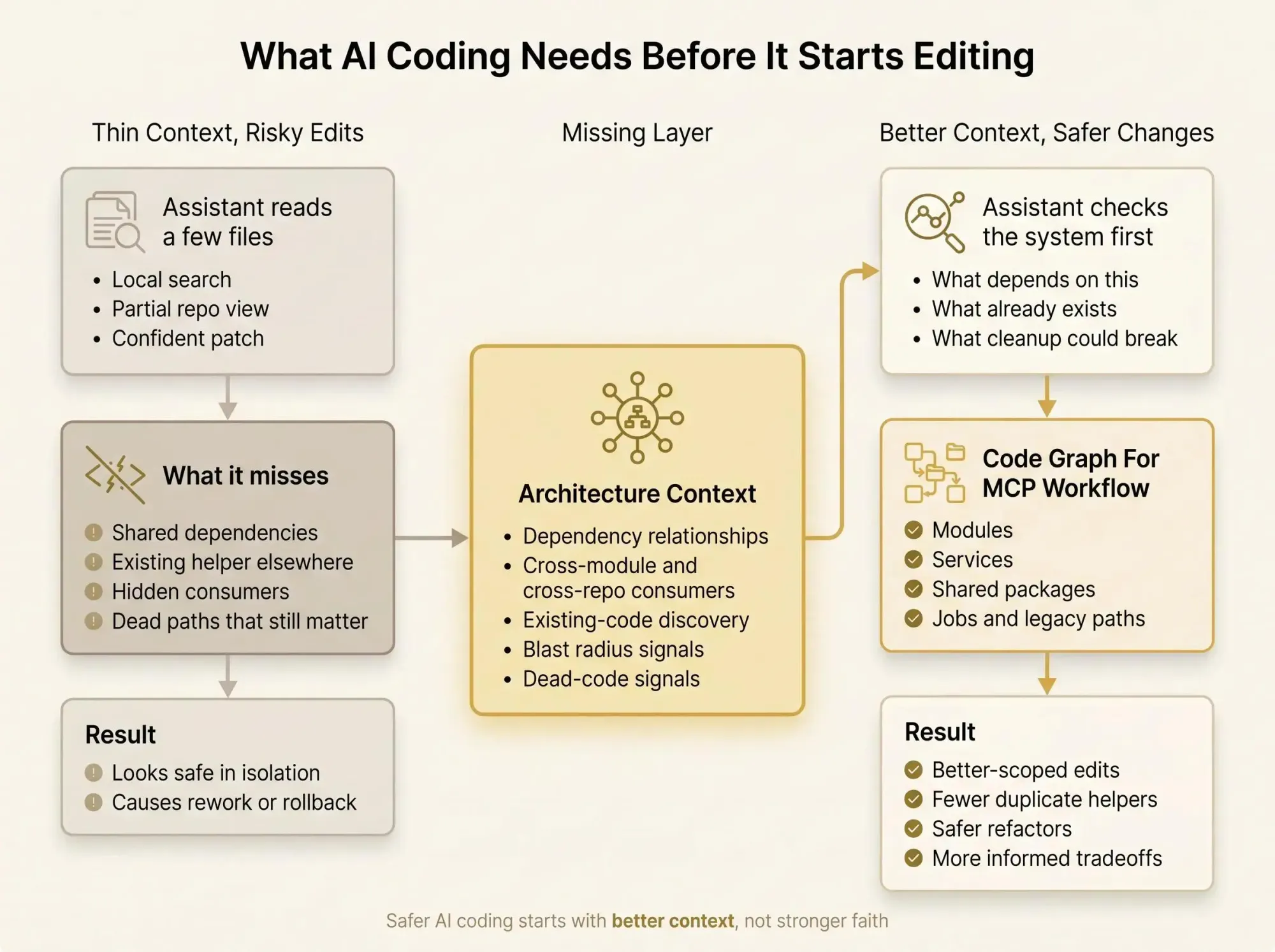
You know the session. You ask Claude Code or Cursor for a small change. It reads six files, maybe twelve if you push it, then comes back with a neat patch and a confident explanation. The patch looks reasonable. The confidence is the problem.
In a real codebase, "small change" is often a lie. A helper in one package feeds a job in another. A service boundary got blurred during a migration eight months ago. An old integration still calls the path everybody assumes is unused. The model doesn't know that unless you give it a way to know it.
That's the tension behind AI-assisted development on larger systems:
- the assistant sounds sure even when it's seen a thin slice of the system
- dependencies hide across modules, repos, jobs, queues, and shared packages
- dead code and half-finished migrations make local fixes look safer than they are
Most experienced engineers land in the same place. Curious about the speed. Skeptical once the repo gets messy. Tired of the rework after a change looked right in isolation but wrong in context.
The fix isn't mainly "smarter model." That's too vague, and usually too late.
Safer AI coding starts with better context, not stronger faith.
This is where mcp developer tools matter. They help assistants access tools, inspect systems, and run actions. But capability alone isn't enough. The missing layer is architecture context for MCP clients - a way to expose how the codebase is wired, not just where files live. Once a code graph for MCP assistants is in the loop, the assistant stops guessing from fragments and starts reasoning from relationships.
What MCP Developer Tools Actually Are
Let's keep this practical. MCP developer tools are the servers, proxies, CLIs, and resources that expose capabilities and context to AI clients through the Model Context Protocol.
MCP itself is just the interface. It defines how a client and server talk. In practice, that usually means:
- the client connects over stdio or HTTP
- it initializes and discovers tools or resources
- it calls them with structured arguments
- some setups report progress for longer tasks
That part is important because people often blur the protocol with the product. MCP is not the tool. It's the contract. The useful part is what you put behind it.
When engineers search for mcp developer tools, they're usually looking for one of four things:
- server scaffolding so they can expose internal APIs or scripts quickly
- debugging and inspection tools to see tool calls, payloads, latency, and failures
- access servers for filesystems, databases, APIs, shell commands, or docs
- context servers that help an assistant understand a codebase
That last category is where the conversation gets thinner than it should.
There's a simple split worth keeping in your head:
- execution tools answer what the assistant can do
- context tools answer what the assistant should understand before doing it
A lot of stacks are strong on the first and weak on the second. That's how you end up with an assistant that can edit, run, and commit before it actually sees the shape of the system.
The MCP Tooling Landscape Is Growing Fast, but It Solves Different Problems
The ecosystem is filling in quickly. That's good news, but it also means teams lump very different tools together and expect one server to solve everything.
Scaffolding and server generation
Some tools generate MCP servers from YAML or OpenAPI specs. They're useful when you want to wrap internal APIs or standard utilities without hand-writing every server.
Good fit:
- internal API wrappers
- repeatable admin actions
- standard CRUD-style services
Less useful for code understanding. They expose capabilities, not judgment.
Debugging and observability
Other tools proxy MCP traffic and show JSON-RPC calls, arguments, responses, latency, and failures. If you're using stdio, you don't get a built-in network panel. Without inspection, debugging tool behavior becomes its own guessing game.
By the second afternoon of connecting multiple servers, you usually want answers to basic questions:
- which server handled that call
- what arguments the client passed
- why the tool timed out
- whether the failure was transport, auth, or bad input
That sounds boring until an assistant silently falls back to a weaker path and nobody notices.
Swiss-army CLIs and proxy layers
Some tools support stdio and HTTP, interactive shells, mock servers, proxy mode, and guard mode. These are strong for local testing and connection management across clients.
They help you validate plumbing. That's real value. But plumbing isn't architecture.
Unified developer tool servers
A lot of teams like all-in-one servers that bundle search, web fetch, package docs, GitHub access, filesystem reads, command execution, database queries, and sometimes memory or prompt resources. Some add auth, audit logs, plugins, or caching.
These are useful because they reduce setup friction. They also create a trap: the assistant now has many ways to act on the codebase, but not necessarily a true model context protocol for codebases.
Many current tools expose operations on code. Fewer expose structural understanding of how the code fits together.
That's the tradeoff. Strong capability access. Thin system awareness.
Why Existing MCP Devtools Still Leave a Blind Spot in Large Codebases
Most assistants still learn your repo the same way a rushed engineer would. Search, open files, infer from local evidence, repeat. In a small repo, that can be enough. In a monorepo or service-heavy system, it gets shaky fast.
The file-by-file trap isn't subtle. It just hides well.
Generic tool access often can't answer the questions that matter before a change:
- If we change this module, what's the blast radius?
- Does equivalent code already exist in another package?
- Which dependency edges make this refactor riskier than it looks?
- What code is probably dead after the service split, and what only looks dead?
Filesystem access can read files. Search can find strings. Shell access can run tests. None of that automatically creates architecture context for MCP clients.
A grep hit is not a dependency model. A passing test run is not proof that the assistant understood the system.
Most code review tools catch problems after they ship. That's backwards for AI-assisted editing.
What teams actually need are mcp tools for software architecture context. Not just more file access. Not just faster search. Context that shows relationships:
- which modules depend on which
- where code patterns are already reused
- what still references a path slated for deletion
- which edges cross service or repo boundaries
Without that layer, the assistant is still making local optimizations inside a global system.
What Architecture Context Looks Like Inside an MCP Workflow
For engineers, architecture context shouldn't be hand-wavy. It should answer concrete questions about dependencies, call paths, module boundaries, reused patterns, likely blast radius, and code that looks disconnected or unused.
A graph fits this better than a flat file view because software is a network of relationships. Services call packages. Files define symbols. Modules import shared code. Jobs trigger paths that don't show up in normal request flow. A graph can represent those nodes and edges directly.
That structure is easier for humans to reason about, and easier for assistants to query before editing.
What a code graph changes
A code graph for MCP assistants helps shift the first question from "what files mention this?" to "what depends on this?"
Before editing, the assistant can ask:
- what downstream consumers rely on this component
- whether a similar implementation already exists elsewhere
- what still points to code marked for cleanup
Those are better questions. Better questions produce better patches.
Here's the practical shape of it:
Target: packages/auth/session.tsDepends on: packages/config, packages/cryptoUsed by: web-app, admin-api, background-jobsCross-module consumers: 7Likely blast radius: medium-highSimilar helper found: packages/shared/security/session_utils.tsDead-code signal: legacy/session_v1.ts has 0 strong inbound refsThat output won't write the fix for you. It does something more important. It changes the scope of the decision.
At Pharaoh, we've built this approach by mapping software architecture into a knowledge graph so AI coding assistants can understand dependencies, blast radius, existing code, and dead code before making changes. That's one practical way to provide architecture context through MCP, especially in codebases that have outgrown local file reasoning. Pharaoh does this automatically via MCP at pharaoh.so.
Three cases come up all the time:
- a refactor looks isolated until the graph shows downstream consumers in another module
- an assistant proposes a new helper until the graph reveals an existing implementation already used elsewhere
- a cleanup task gets safer once disconnected or likely dead code is visible up front
This is the difference between reading code and seeing the system.

How a Better Map Changes Real Developer Workflows
This gets real when it hits normal team workflows. Not lab demos. PRs, refactors, migrations, and cleanup.
In PR review, architecture-aware context changes what you review. Instead of asking only whether the diff compiles and the tests pass, you ask what the changed code touches outside the visible patch. Reviewers stop spending all their attention on line edits and start looking for hidden side effects.
Refactoring sprints are another good example. Assistants are good at mechanical edits. Renames, signature updates, repetitive replacements. They get less reliable when shared dependencies and legacy seams are invisible. A graph helps scope the refactor before the bulk edit starts. That's a cheaper point to discover risk.
Monorepo migrations expose the same issue in a louder way. One team moves shared code. Another team consumes it indirectly through a wrapper or internal package. Search catches some of it. Architecture context catches more of it earlier.
Multi-repo environments are worse. Even strong search falls apart when the relevant dependency lives outside the current working tree. Model context protocol for codebases works much better when the assistant can see cross-repo relationships instead of pretending the open folder is the whole system.
Then there's existing-code discovery. This is one of the most expensive AI mistakes because it looks productive at first. The assistant generates net-new code for a use case the company already solved three times. A month later you find four variants of the same logic across six modules. Architecture context helps the assistant reuse patterns instead of multiplying them.
Dead-code cleanup benefits too. Deleting unused code always feels easy until an obscure script or scheduled job still depends on it. A graph won't make the call for you, but it gives you a better starting point than "we couldn't find references."
What Good MCP Developer Tools Should Help You Answer Before Any Code Change
If you're evaluating mcp developer tools, don't start with the feature list. Start with the questions your stack should answer before the assistant edits code.
A useful stack should tell you:
| Question | Needed layer || --- | --- || What tools can the assistant use? | Access layer || What codebase scope is visible? | Access layer || What dependencies connect this change to other modules or services? | Architecture layer || Where does similar code already exist? | Architecture layer || What's the likely blast radius? | Architecture layer || What code may be dead or weakly connected? | Architecture layer || What tests or checks should run after the change? | Quality layer |
That leads to four distinct capability layers:
- access layer - files, search, shell, APIs, databases, docs
- observability layer - tracing MCP calls, failures, latency, and server behavior
- architecture layer - dependency and relationship awareness
- quality layer - linting, tests, and policy checks
If your stack has the first two but not the third, your assistant can act confidently without actually seeing the system clearly. That's the dangerous middle state.
When comparing tools, use a simple checklist:
- transport support - stdio, HTTP, or both
- debugging visibility - can you inspect traffic and failures
- safety controls - auth, guard rails, audit logs
- codebase understanding depth - files only, or relationships too
- fit for monorepos or multi-repo environments
- support for reusable architecture context across sessions
Pharaoh fits at the architecture layer. Other MCP tools often cover scaffolding, transport, proxying, or general developer actions. You usually need both.
How to Add Architecture Context for MCP Clients Without Rebuilding Your Stack
This doesn't need to be a rip-and-replace move. Usually it shouldn't be.
Start with the MCP client your team already uses - Claude Code, Cursor, or a Codex-style workflow. Inventory what the assistant can already access: files, search, shell, database, web, package docs, memory. Then look at the mistakes your team actually sees.
Not theoretical mistakes. The repeat offenders.
- duplicate code where an existing implementation was missed
- dependency surprises after a "safe" refactor
- deletions that broke an obscure path
- migrations that missed indirect consumers
Those mistakes usually point to one thing: the assistant lacked relationship context it couldn't infer from local reads.
Prompt the workflow differently
Once you add an architecture layer, your prompts should change too. Ask for analysis before edits.
Use patterns like:
- map the dependencies around this module before suggesting edits
- show existing code paths that already handle this use case
- identify likely dead code related to this migration
- list downstream consumers before proposing a refactor
That's a small behavior change with a big effect. You stop asking the assistant to jump straight to implementation.
For teams working across modules or repos, one practical option is exposing a code graph to the MCP client through Pharaoh at pharaoh.so. The point isn't the brand. The point is giving the assistant relationship data it can't reliably reconstruct on its own.
This still doesn't replace tests, reviews, or engineering judgment. It improves the quality of context shaping those decisions.
Common Mistakes That Keep AI Coding Stuck in Guess Mode
Most teams don't fail because they picked the wrong model. They fail because they confuse more retrieval with more understanding.
A few mistakes show up again and again:
- Trusting retrieval depth over system understanding
Reading 40K tokens instead of 2K doesn't mean the assistant sees the wiring. - Treating search hits as architecture
String matches and symbol matches miss indirect dependencies, runtime coupling, and legacy paths. - Granting write and execution power too early
Speed without structure raises the cost of bad edits. - Assuming one general-purpose devtools server is enough
It's useful, just incomplete. General tool servers often don't answer architecture questions out of the box. - Ignoring observability
If you can't see which MCP server was called, with what arguments, and what failed, debugging agent behavior becomes guesswork too. - Waiting until PR review to discover blast radius
By then the assistant has already shaped the solution around a partial map.
The goal isn't to remove AI risk entirely. That's not realistic.
The goal is to move from opaque guesses to informed tradeoffs.
That's a much better operating mode.
A Practical Stack for Safer AI Coding
A sane stack has layers. Not because layering is elegant, but because different failures happen at different points.
- Protocol and transport
MCP over stdio or HTTP, based on your local setup and team needs. - General developer capabilities
Filesystem, search, shell, database, API, package-doc, and GitHub tools where they make sense. - Observability and control
Proxying, traffic inspection, auth, audit logs, guard rails, mock modes, test modes. - Architecture context
Code graph access for dependencies, blast radius, existing-code discovery, and dead-code signals. - Quality checks
Linting, tests, and policy checks after reasoning and implementation.
Each layer solves a different problem:
- general MCP devtools help the assistant act
- architecture context helps it choose better actions
- quality tooling helps verify the result
If you're thinking about code quality more broadly, the open source AI Code Quality Framework covers the linting and testing side at github.com/0xUXDesign/ai-code-quality-framework. That's complementary to architecture-aware context, not a substitute for it.
A lot of teams already have layers one, two, and five. The weak spot is usually layer four.
Conclusion
Safer AI coding doesn't come from trusting the model harder. It comes from giving the model a truer map of the system it's changing.
MCP developer tools are useful for transport, tool access, and debugging. That's real progress. But large codebases also need mcp tools for software architecture context. Without that layer, the assistant can read and act without actually seeing the system clearly.
A code graph for MCP assistants helps surface dependencies, blast radius, existing code, and dead code before changes land. That's the shift - from local guesswork to better-scoped decisions.
Here's a good next step: pick one recent AI-generated change that caused rework. Look at what context was missing before the first edit. Not after the PR. Before the first edit.
Then add that missing context to your MCP workflow, whether through internal graph-based tooling or an approach like Pharaoh. Once the assistant can see the shape of the system, the conversation changes. So do the edits.