Monorepo Dependency Graph for Safer AI-Assisted Code Changes

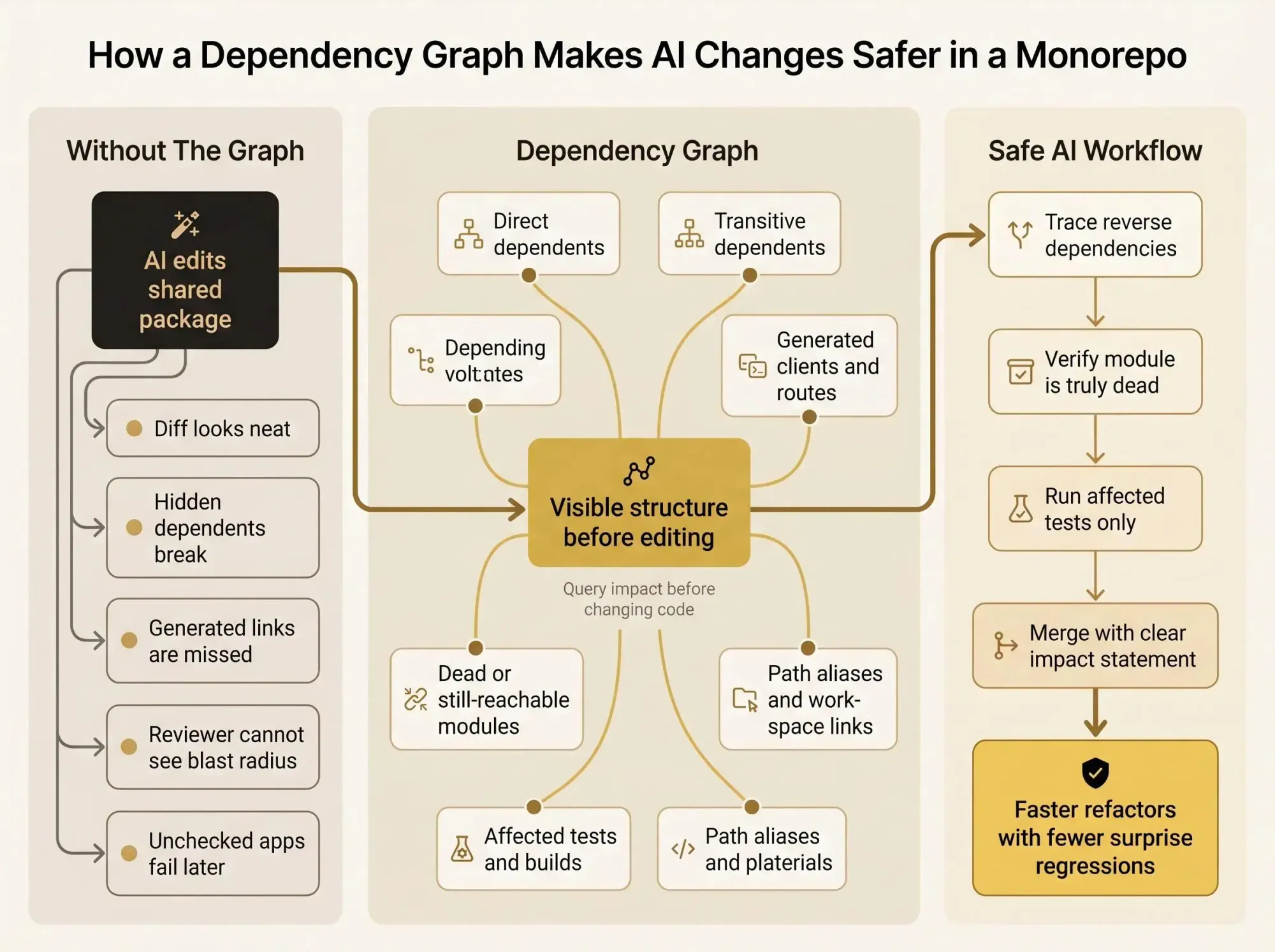
Without a monorepo dependency graph, Claude Code or Cursor can refactor one shared package and quietly light up half your repo. The diff looks neat. The fallout shows up in apps nobody checked.
What matters is simple. You don't need better prompting first. You need a map of direct and transitive dependents, generated links, and the tests that actually move.
Start here.
- Trace reverse dependencies before editing shared utils or schemas.
- Verify that a module is truly dead, not just reached through routes, codegen, or path aliases.
- Run affected tests from the graph so the change lands clean.
Why AI-Assisted Changes Feel Risky in a Monorepo
You've seen this one. Someone asks Claude Code, Cursor, or Codex to clean up a shared utility. The patch looks reasonable. Then three apps fail, one generated client starts throwing type errors, and the reviewer is stuck asking the same old question: did the assistant find real dead code, or did it break a dependency nobody remembered?
That tension is normal. Teams want AI to speed up refactors, migrations, and cleanup. But monorepos hide coupling in places raw code search doesn't catch - shared packages, path aliases, build rules, generated code, framework conventions, even docs-driven contracts.
As repos grow, local knowledge gets trapped in a few people's heads. Boundaries blur. A small edit in a leaf package can quietly hit a production app two layers up. The model isn't the whole problem. The invisible structure is.
Safe automation starts with visible structure, not blind trust in the model.
That's where a monorepo dependency graph matters. It sits between grep and guesswork. It gives you a way to see blast radius before the edit, not after the rollback.
If you're trying to ship faster PRs, reduce surprise regressions, run narrower tests, or stop asking who owns what, this is the missing layer.
What a Monorepo Dependency Graph Actually Is
A monorepo dependency graph is a map of how projects, packages, files, or build actions depend on each other inside one shared codebase. Simple definition. Very practical consequences.
The graph can exist at a few levels:
- Package or project level - which apps depend on which libraries
- File or module level - which imports and code paths connect lower-level pieces
- Action level - which build, test, or deploy steps depend on other steps
Those levels matter because they answer different questions. A package dependency visualization might tell you that web-app depends on auth-lib. A richer monorepo architecture graph might also tell you which routes call it, which generated clients feed it, who owns it, and whether part of it looks unused.
That difference is easy to miss.
A basic graph shows declared relationships. A better large repo dependency map also captures observed usage and architectural context. That's where monorepo relationship mapping becomes more than a pretty diagram. It starts answering real change questions:
- Which projects depend on this shared library?
- If we edit this file, what is likely affected?
- Is this module actually unused, or just referenced indirectly?
- Where are the cycles and forbidden edges?
The most useful code graph for monorepos is queryable, not just visual. If the graph only looks nice in a browser but can't answer targeted questions, you'll stop trusting it by the second afternoon.
What the Graph Needs to Show for AI-Assisted Changes to Be Safe
For AI-assisted changes, the graph has to answer a minimum set of questions before you merge anything.
At a bare minimum:
- What depends on this package or file?
- What does this package or file depend on?
- Is the relationship direct or transitive?
- Which tests, builds, or deployable apps are likely affected?
- Is the target active, duplicated, or dead?
Blast radius matters more than raw dependency count. A package with three dependents can be riskier than one with twenty if those three sit on a critical production path.
There's also a big difference between "imported somewhere" and "used on a hot path across several apps." Engineers know this instinctively. AI tools don't, unless you give them structure.
Useful graphs also need context beyond imports when the repo depends on it:
- framework routes
- generated clients
- shared schemas
- service boundaries
- workspace package links
A good graph helps humans and machines answer decision questions. It doesn't decorate a dashboard. At Pharaoh, we treat this as a knowledge graph problem so assistants can query architectural context before making changes - blast radius, existing patterns, dead code signals, dependency paths. That's one approach, and it's the part most teams are missing. If you want that exposed to MCP clients, Pharaoh does this through pharaoh.so.
How Monorepo Dependency Graphs Are Built in Practice
Most teams build the graph from several inputs, not one. If you only read manifests, you miss reality. If you only read imports, you miss structure.
Common sources look like this:
- workspace package manifests
- source imports and requires
- TypeScript path aliases
- project config files
- build metadata
- framework-specific conventions
Nx is a useful concrete example because it combines workspace package dependency data with JavaScript and TypeScript import analysis. You can visualize that with its project graph tooling, and when edges look wrong, the first places to check are usually import paths and tsconfig path mappings. That's not theory. That's where the bugs usually live.
A practical limitation: not every language gets inferred from imports the same way. In mixed-language repos, some tools need manual dependency declarations or implicit project relationships. If you skip that, the graph can look clean while being wrong. That's worse than no graph.
Package manifests alone aren't enough because:
- internal links may happen through aliases
- developers may import files directly
- runtime or generated relationships may never appear in package metadata
Source analysis alone isn't enough because it can miss:
- workspace linking rules
- ownership boundaries
- build relationships
- generated artifacts
Multi-language repos make this sharper. Some analyzers now work across TypeScript, JavaScript, Python, PHP, Go, Rust, Java, OpenAPI, GraphQL, and Markdown. That matters because full-stack monorepos rarely keep all critical relationships in one language. Your frontend may depend on a schema, which drives a generated client, which shapes backend behavior. Miss one layer and the dependency map lies.
One more detail that catches teams off guard: package manager resolution rules. Some setups validate dependencies from the consuming package entry point. Others validate against the nearest package, which matters in stricter layouts like pnpm isolation. Same code, different edge validity. That can change what your graph should show.
Project Graph, Package Graph, and Action Graph Are Not the Same Thing
A lot of teams blur these together. They shouldn't.
A project graph shows relationships between apps and libraries. A package graph focuses on workspace packages and their internal dependency edges. An action graph goes deeper and models build and test steps.
Those are related, but they're not interchangeable.
Where each one helps
- Project graph - onboarding, architecture reviews, "what talks to what?"
- Package dependency visualization - dependency hygiene, internal release planning, shared library impact
- Action graph - build optimization, CI scheduling, task-level change impact
Nx and Turborepo usually operate around project or package graph levels, with Nx also analyzing imports. Bazel-style systems go deeper into action-level relationships.
For AI-assisted coding, the right level depends on risk. If the model is editing a shared package API, package-level blast radius may be enough. If it's changing build logic, code generation, or task wiring, action context starts to matter.
Choose graph granularity based on the change, not just repo size. Most unsafe AI edits don't fail because the graph wasn't pretty enough. They fail because the graph stopped one layer too early.
Why a Visible Dependency Graph Changes How AI Works in Your Repo
Once the assistant can query the graph before editing, the workflow changes. Quietly, but in a way reviewers feel immediately.
Instead of editing from local similarity, the assistant can:
- identify dependents first
- inspect boundary violations
- check if a module is actually unused
- propose focused tests for affected projects
That's a different class of behavior.
A naive assistant sees code near the target and predicts likely edits. A graph-aware assistant can reason about upstream and downstream relationships, affected apps, and whether the change crosses a boundary it shouldn't touch.
Reviewers care about that. They care less about how elegant the patch looks and more about whether the assistant understood impact.
This shows up in very ordinary work:
- refactoring a shared component
- upgrading a cross-cutting library
- deleting stale code
- tracing who still uses an old API
- planning a migration across packages
The payoff isn't hype. It's fewer surprise rollbacks, narrower test runs you can actually defend, and less dependence on tribal knowledge. Architectural understanding isn't extra credit. It's the entry fee for responsible automation.
The Core Use Cases a Monorepo Dependency Graph Should Support
If your graph can't support these use cases, it won't help much when the repo gets tense.
Blast radius analysis
Start from the changed file or package and ask the reverse question: what depends on this? That's how affected work is discovered in practice. Forward edges tell you what the node uses. Reverse edges tell you who is about to feel your change.
Affected builds and test selection
Selective CI depends on intersecting code changes with affected projects. This isn't just a nice developer feature. It's how fast monorepo CI stays sane as the workspace grows.
Dead code detection
You need to separate:
- unimported code
- unreachable code
- code referenced through generated or framework-driven paths
AI tools often mislabel low-visibility modules as safe to delete. That's how teams end up removing something only used by route registration or generated clients.
Architectural rule enforcement
Cycles, forbidden layer crossings, accidental app-to-app coupling. These aren't cosmetic problems. They shape how safe future edits will be.
Onboarding and code search acceleration
Raw grep across 400 directories is not understanding. A graph helps both engineers and assistants find the right module faster and with less noise.
Refactoring and migration planning
Good migrations happen in waves defined by dependent clusters. Bad migrations happen in arbitrary package order and create cleanup debt for weeks.
PR review and change explanation
A small diff sometimes deserves broad testing. A larger diff can still have narrow impact. The graph gives you a way to explain that without hand-waving.
How to Inspect and Debug a Dependency Graph in a Real Workspace
You don't need a giant platform rollout to get value. Start by inspecting what your workspace already knows.
With Nx, a practical workflow looks like this:
nx show projects[nx graph](https://nx.dev/docs/reference/nx-commands#nx-graph)nx show project shared-auth --jsonThat gives you three useful views:
- the projects present in the workspace
- the visual project graph
- machine-readable details for one project when you want to script or feed context into tools
When the graph looks wrong, look for boring causes first. Boring causes break more graphs than fancy ones.
Check for:
- bad import paths
tsconfigalias mismatches- manifest entries that don't match actual usage
- manually declared dependencies that drifted after refactors
Scope matters too. Root-level rules answer cross-monorepo questions. Per-package rules are better for local checks and app-level dead code analysis. Teams often mash those together and wonder why the results feel noisy.
These are useful prompts for a developer or AI assistant:
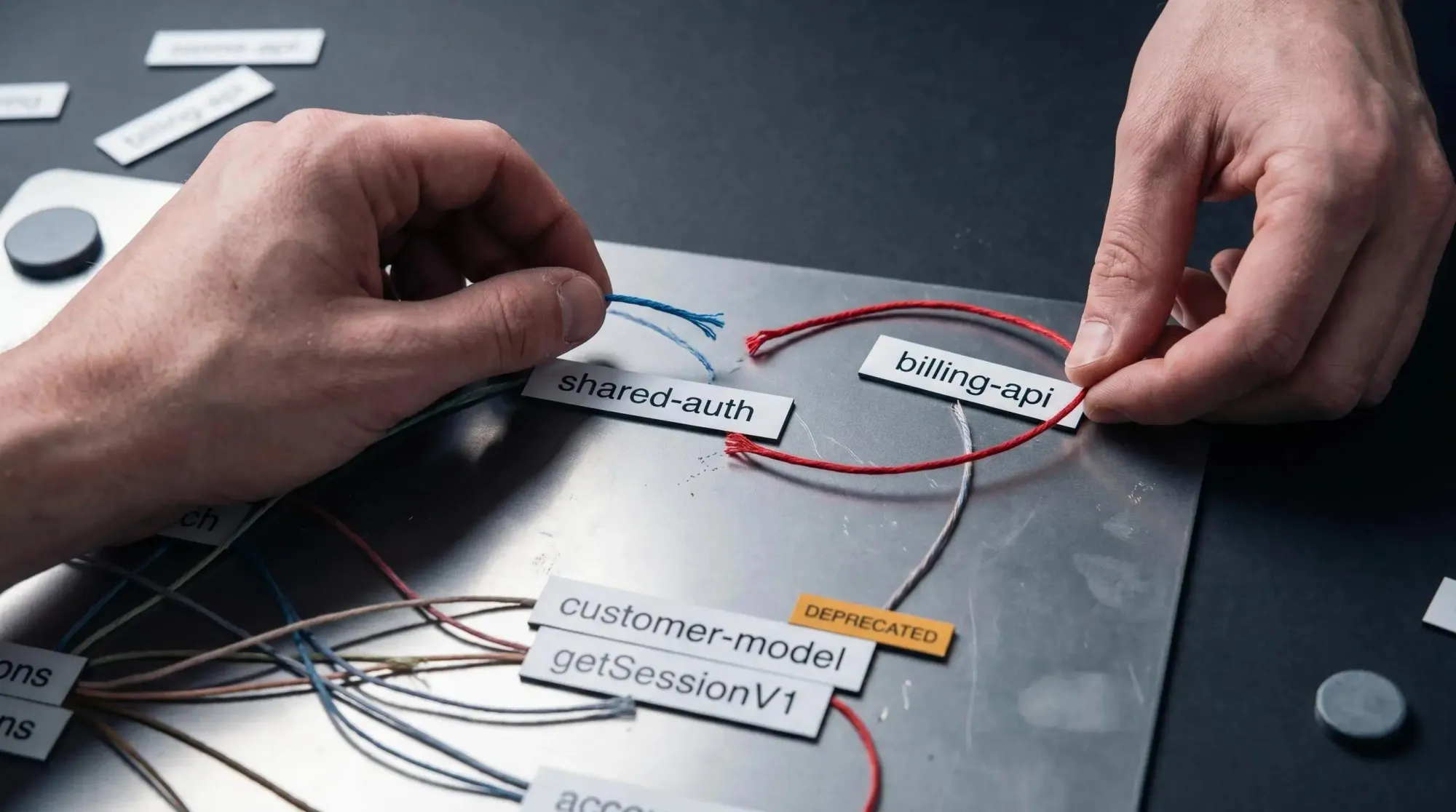
- Show all apps affected by changes to
shared-auth - Find reverse dependencies of
customer-model - Identify cycles involving
billing-api - List projects importing deprecated
getSessionV1
If your graph can't answer those quickly, it's not ready to guide AI-assisted changes.
Common Failure Modes That Make the Graph Less Trustworthy
Trust drops fast when the graph misses one important edge.
The usual failure modes are predictable:
- reading only package manifests and ignoring imports
- reading only imports and ignoring workspace links, build config, or generated code
- assuming single-language tooling is enough in a mixed repo
- missing package manager boundary rules in stricter workspaces
- letting the graph drift after codegen or custom build script changes
- relying on visuals without query support
- confusing direct dependencies with transitive impact
- treating dead code detection as purely syntactic
- ignoring task-level effects when code changes trigger broader build behavior
Here's the operator version: a graph is only useful if you know where it's weak.
Good systems expose confidence gaps clearly. Manual edges should look manual. Unsupported language areas should be obvious. Hidden uncertainty creates false confidence, and false confidence is how narrow test scopes become production incidents.
Periodic validation helps. Treat the graph like operational infrastructure, not a one-time architecture artifact.
Choosing the Right Approach for Your Team
Start with your environment, not the tool category.
If you're in a JS or TS workspace with fairly standard package boundaries, workspace-native graphing may be enough for visibility and task ordering. Nx is especially strong here because it combines workspace exploration with import-aware dependency detection.
If your repo is CI-heavy, and affected builds are the main problem, action- or task-oriented analysis matters more. If the repo spans frontend, backend, generated clients, APIs, and docs-driven contracts, multi-language analysis becomes hard to avoid.
If the main issue is AI-assisted development, the context has to be machine-usable. Not just visible to humans in a graph viewer.
A practical way to evaluate options:
- Language coverage - does it see the whole repo or just one runtime?
- Graph granularity - project, package, file, or action?
- Query support - can tools ask it questions or only render it?
- CI integration - does it support affected builds cleanly?
- AI workflow fit - can assistants access the graph directly?
- Edge debugging - can you explain missing or surprising relationships?
- Dead code and impact analysis - does it go beyond declared dependencies?
Turborepo-style graphing is useful for workspace package relationships. Bazel-style action graphs help when build-step precision matters. Rev-dep-style analysis matters when reverse dependency accuracy and rule scoping are the real concern. For AI-readable context across architecture, usage, blast radius, and dead code, knowledge graph approaches fit better. That's where Pharaoh tends to be a practical choice for teams using assistants inside large codebases - pharaoh.so.
How to Bring a Dependency Graph Into Daily AI-Assisted Workflows
This doesn't need to become ceremony. It just needs to become habit.
Use the graph at the points where uncertainty is highest:
- before prompting the assistant
- during a refactor
- while selecting tests
- during PR review
- during migration work
A simple pre-change checklist works well for both humans and AI:
- identify the touched package or module
- inspect direct and transitive dependents
- check for cycles or architectural rule violations
- confirm whether the target is active or dead
- run affected tasks instead of guessing
Useful prompts are straightforward:
- Before changing this shared component, list all internal consumers and likely affected apps.
- Before deleting this module, verify whether it is truly unused across the workspace.
- Before merging this refactor, identify packages that need focused validation.
This reduces review friction because the patch arrives with an impact statement. Reviewers spend less time reconstructing context by hand. Teams can trust narrow test scopes when the graph is sound.
If you're already using Claude Code or another MCP client, Pharaoh can surface this context through MCP so the assistant can query the graph directly. The bigger point is the workflow principle: shared structural context should be available to both humans and machines.
What a Good Monorepo Dependency Graph Looks Like Over Time
The best graph isn't the fanciest. It's the one your team still trusts six months later.
A good monorepo dependency graph:
- stays current as the repo changes
- combines declared relationships with observed usage where possible
- supports reverse dependency analysis, not just forward links
- works in both visual and machine-readable forms
- answers architecture, CI, and code quality questions from the same underlying map
- scales from onboarding to migrations to AI-assisted edits
- exposes confidence gaps instead of hiding them
It also becomes part of team habits. People reference it in planning. Reviewers use it in PRs. Engineers check it during migrations and before broad cleanup work.
That's the real threshold. Once the graph becomes normal working infrastructure, small changes stop feeling like blind bets.
Conclusion
AI-assisted coding in a monorepo gets safer when changes are grounded in a dependable monorepo dependency graph, not tribal knowledge and not guesswork.
A solid monorepo architecture graph gives you clearer blast radius, better affected builds, more credible dead code decisions, and stronger PR review context. It helps the assistant act less like a fast autocomplete engine and more like a tool operating inside real constraints.
A practical next step is simple:
- inspect your current graph tooling
- verify that it captures real imports and workspace links
- test one AI-assisted change against affected dependents before merging
If your team is already using Claude Code or another MCP client, adding a codebase graph is one practical way to make that context available to both humans and machines. Pharaoh does this automatically via MCP at pharaoh.so. For the linting and testing side of AI-assisted quality, the open source AI Code Quality Framework is also worth keeping nearby at github.com/0xUXDesign/ai-code-quality-framework.