15 Software Architecture Graph Tips Every Developer Needs
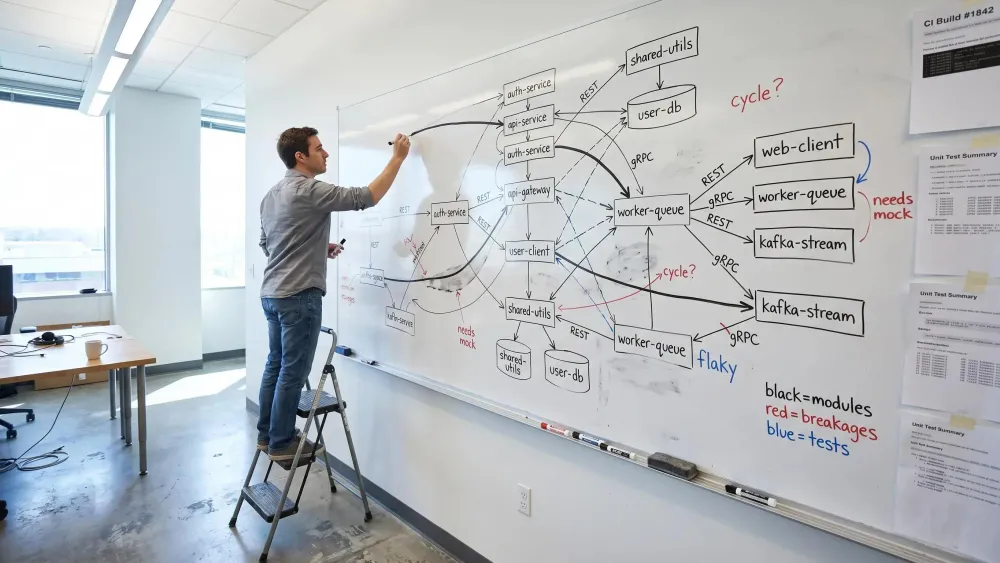
A software architecture graph matters most when your repo is big enough that one small edit can quietly break six other things. If you're using Cursor, Claude Code, or Codex on a multi repo codebase, guessing from imports isn't enough.
What matters is whether the graph shows dependencies, blast radius, tests, and dead code before you touch a file. Get that right, and you ship changes with fewer surprises.
What Should a Dependency Graph Show?
Most dependency graphs are too small for the job developers actually need done. If you're about to change a shared module, imports alone won't tell you enough to move with confidence.
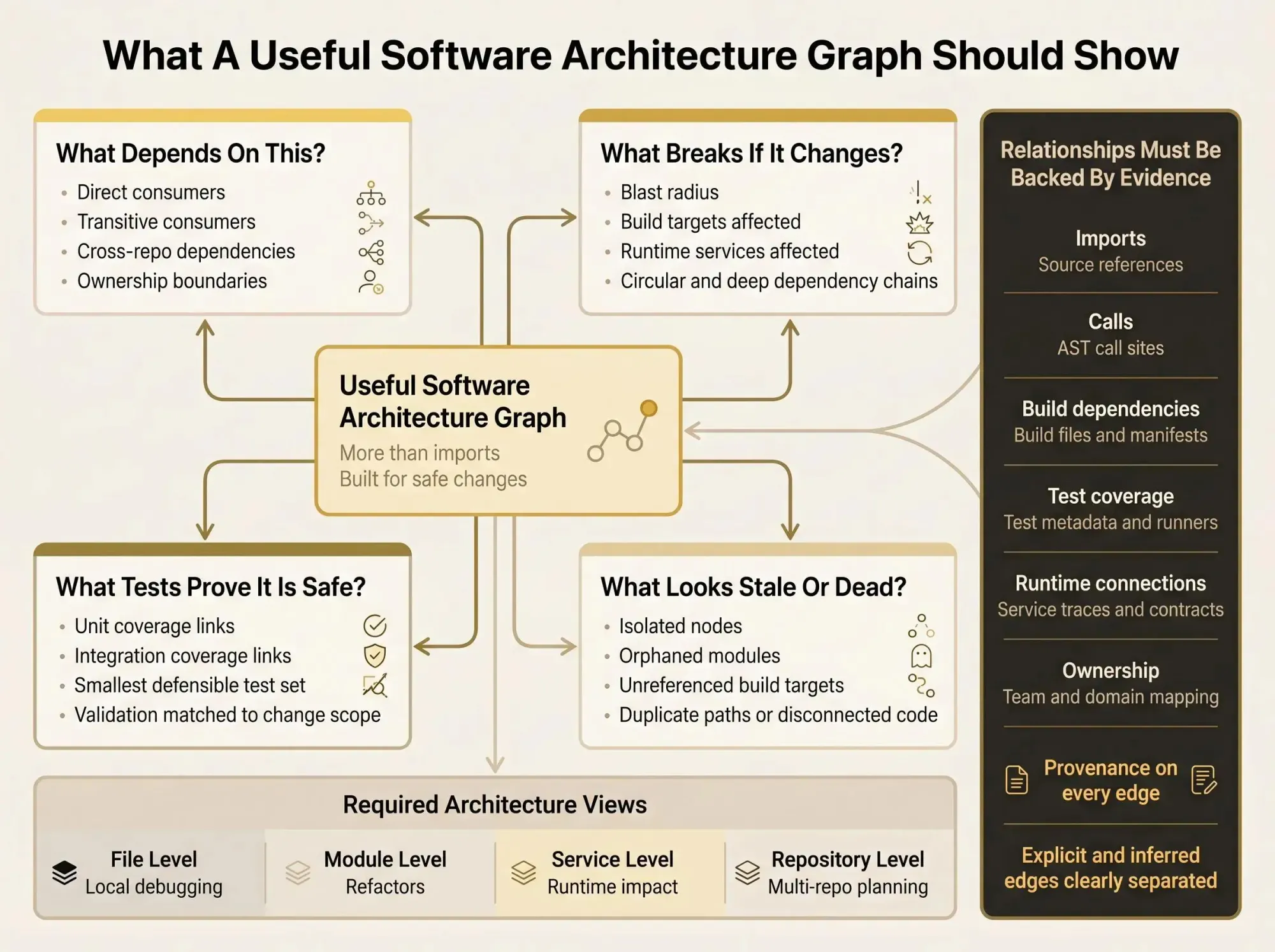
A real software architecture graph should answer four questions fast:
- What depends on this?
- What breaks if I change it?
- What tests prove it's still safe?
- What code looks disconnected, stale, or dead?
That means you need more than a file graph. You need views at different levels:
- File-level for local debugging
- Module-level for refactors
- Service-level for runtime impact
- Repository-level for multi-repo planning
Teams often confuse those. That's how you end up with a graph that looks busy but can't support a risky PR.
The minimum relationship set is pretty stable across most codebases:
- imports
- calls
- inheritance and composition
- build dependencies
- test coverage links
- runtime service connections
- ownership boundaries
Those ownership edges matter more than people admit. If a change crosses from one team boundary into three others, that's architecture, not project management noise.
The useful codebase relationships to map are simple to state: source-to-source, source-to-build target, target-to-package, test-to-target, service-to-service, and team-to-domain ownership. If an edge can't be traced back to real evidence in code, config, build files, or test metadata, don't trust it yet.
That's the standard for the rest of this article. We're not building pretty diagrams. We're building a software architecture graph that can survive refactoring, PR review, AI coding sessions, and monorepo change planning.
How to Design an Architecture Graph Schema That Stays Useful
Your architecture graph schema is the part nobody wants to think about until the graph becomes useless. Then it's the only thing that matters.
A workable schema needs four things:
- node types
- edge types
- properties
- provenance rules
Generic schemas fail in practice. When every node is just "file" and every edge is "depends on," the graph turns into static. You can't ask precise questions because the model threw away the meaning.
Start smaller than you want. A practical software graph data model usually begins with nodes like components, build targets, aggregators, runners, tests, external packages, and package managers. Add services, domains, and repos when your workflows need them.
Your first edge set should stay concrete:
- imports
- calls
- extends
- implements
- contains
- builds
- links
- covers
- depends on
- publishes to
- consumes from
- owns
A call edge and a test coverage edge are not interchangeable. Flatten them and your queries get dumb fast.
Provenance should be first-class. Store where each relationship came from: static analysis, build metadata, package manifests, CTest output, runtime traces. If some edges are inferred, add confidence or evidence type fields. Developers don't mind uncertainty. They mind uncertainty pretending to be fact.
This is also where MCP matters. Tools like Pharaoh can expose an MCP-friendly graph so assistants reason from repository structure instead of guessing from scattered files and half-read configs.
1. Start With the Change Questions You Actually Need to Answer
Anchor the graph in live workflows. Not architecture theater.
The core questions are predictable: what depends on this module, what tests should run, which services sit in the blast radius, and does similar code already exist somewhere else? If your graph can't answer those, it won't last past the second sprint.
AI assistants make this more obvious. Claude Code, Cursor, and Codex do better when they can ask graph-shaped questions before editing anything. Otherwise they fall back to file proximity and naming guesses, which is how you get "helpful" changes that miss half the system.
Take a shared API client rename in a multi-module repo. You need direct consumers, transitive consumers, and the tests covering the integration path. An import-only graph gives you one-third of that. A useful graph lowers anxiety at the point of change. That's the whole point.
2. Model More Than Imports if You Want Real Architectural Clarity
Import graphs are helpful. They're also incomplete.
Important dependencies live in build files, package manifests, test runners, deployment config, and generated artifacts. Repository-aware agents often miss build and test structure, especially in multilingual codebases. Human reviewers miss it too, just with more confidence.
Here's the difference:
- Import edge: who references this module
- Build edge: what compiles or packages with it
- Coverage edge: what must still pass after a change
- Service edge: what talks to it at runtime
If your goal is safe edits, that's what should a dependency graph show. Not just syntax relationships.
The non-obvious risk shows up in cross-language repos. A module can look isolated in source and still be tightly coupled through CMake, npm workspaces, protobuf generation, or packaging steps. We've seen teams call code "unused" because they only graphed imports. That cleanup usually gets expensive.
3. Choose the Right Nodes and Edges in Code Graphs
Nodes and edges in code graphs are just entities and relationships. The hard part is choosing the right level of detail.
Use function nodes for local impact analysis. Use classes for design issues. Use modules for team-scale refactors. Use services or repos for system work. One granularity for every task is lazy modeling.
A layered model works better:
- functions roll up into files
- files roll up into modules
- modules roll up into services or domains
That lets you zoom in without rebuilding the graph every time a new question comes up.
The edge types that usually earn their keep are imports, calls, inheritance, composition, association, build dependency, test coverage, ownership, and runtime communication. Different edges carry different signals. A call path can show execution risk. An ownership edge can show review pain before the code even changes.
A good graph lets you pivot between code entities and architecture entities without changing tools or mental models. That's where it starts to feel calm.
4. Keep Provenance for Every Relationship
Trust is the bottleneck. Not storage. Not visualization.
Every edge should carry evidence. Parsed import. AST call site. Build system declaration. Package manifest entry. Test metadata. Runtime trace. Inferred semantic similarity. If the graph claims two things are related, you should be able to inspect why in seconds.
If a relationship can't explain itself, developers stop believing it.
This changes review behavior. Instead of arguing whether a module really depends on another, you inspect the source of truth and move on. That's especially important with AI-assisted work. The assistant shouldn't just say what depends on a component. It should say how it knows.
5. Separate Explicit Dependencies From Inferred Ones
Structural dependencies and inferred relationships are not the same class of truth. Treating them the same is a quiet mistake.
Explicit edges come from code, build files, manifests, and test definitions. Inferred edges come from naming, folder layout, semantic similarity, or architecture patterns. Both are useful. They do different jobs.
Store them separately, or at least tag them clearly in your software graph data model. Then developers can use explicit edges for safe edits and inferred edges for exploration, clustering, and finding undocumented boundaries.
Guesses are fine. Unlabeled guesses are not.
Use inferred edges to ask better questions. Don't use them to approve risky refactors.
6. Map Build and Test Structure, Not Just Source Structure
A software architecture graph is weak if it can't answer what builds together and what tests make a change safe.
Research on deterministic repository graphs found that modeling components, aggregators, runners, tests, external packages, and package managers improved agent accuracy by 12.2% and reduced completion time by 53.9%. The gains were larger in multilingual repositories. That should get your attention.
For human developers, the value is simpler. Build and test topology is usually the missing layer in blast radius estimates.
Useful edges here include:
- target builds target
- runner executes test
- test covers component
- package manager resolves package
- package depends on external package
Treat test coverage links as architecture data, not just CI leftovers. They describe the safety net around the system. That's operationally important.
7. Build for Blast Radius Analysis From Day One
Most teams discover impact after they change code. That's backwards.
Blast radius is the direct and transitive set of components, targets, tests, services, and external dependencies affected by a proposed change. Your graph should make that query cheap. Cache neighborhoods for frequently changed modules if you need to. Store coupling counts and transitive reachability where it helps.
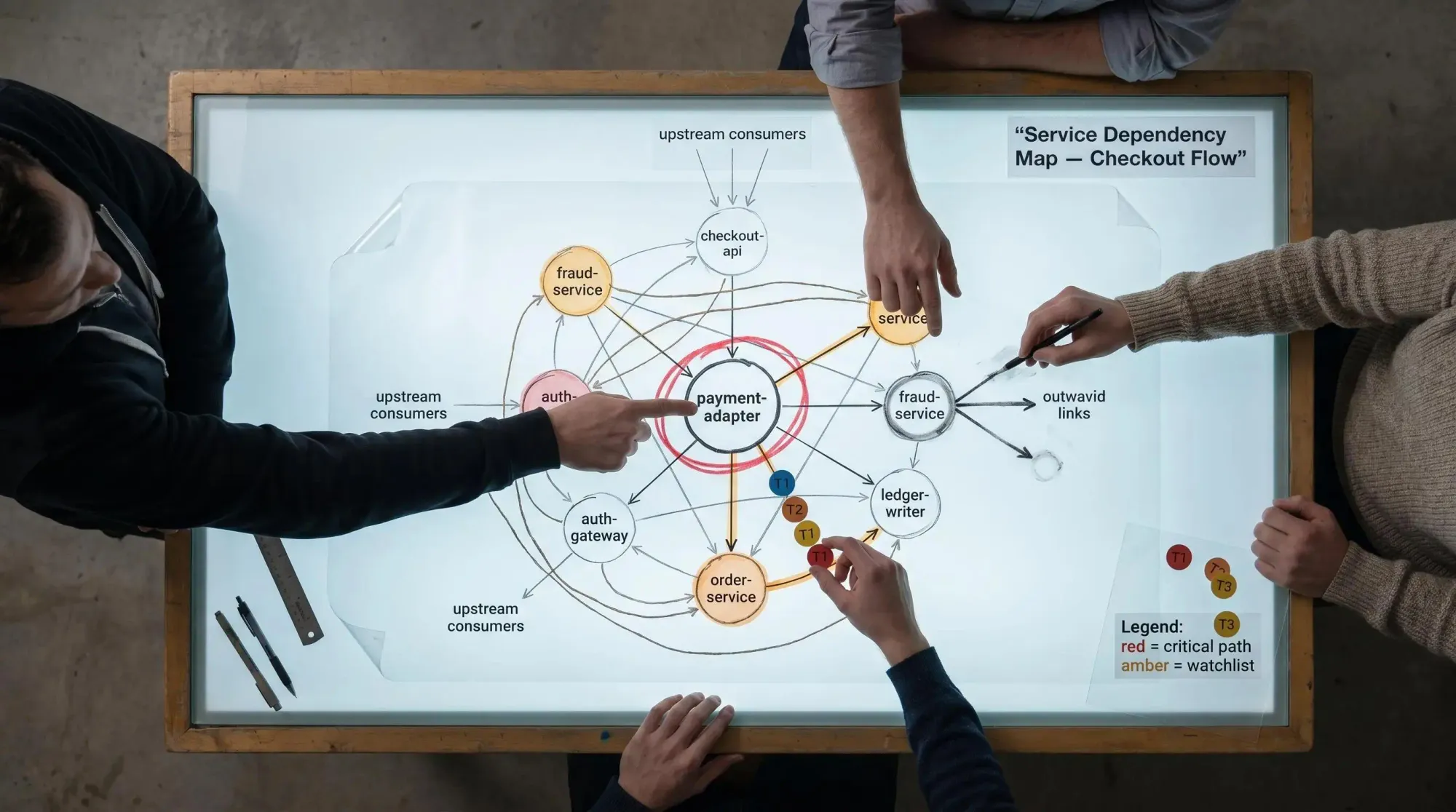
Before touching a shared payment adapter, we want upstream consumers, downstream services, packages, and high-value tests. Not after the first failing deploy. Before.
Circular dependencies and long transitive chains are risk multipliers. They increase review time, test pain, and rollback cost. Static diagrams won't keep up with that. A living graph will.
8. Treat Multilingual and Multi-Repo Boundaries as First-Class Architecture
A lot of teams graph each repo in isolation and miss the actual delivery path. That's a modeling failure, not a tooling quirk.
Graph support helps even more in multilingual repositories because the dependencies are harder to recover. They're spread across build systems, generators, package managers, and service contracts. Folder structure won't save you.
Add nodes for:
- repo
- language
- package manager
- interface boundary
- generated artifact path
Generated code needs explicit treatment. If one language produces artifacts consumed by another, model that path directly. This matters in monorepo migrations, platform teams, and API-heavy systems where the real boundary is not the folder tree.
9. Add Test Coverage Edges So the Graph Can Guide Safe Changes
Developers don't just need dependency answers. They need proof answers.
Link tests to targets, modules, services, or user flows they cover. Keep direct unit coverage separate from indirect integration coverage so the graph reflects confidence honestly.
In AI coding sessions, this pays off quickly. Instead of "run everything," you can ask for the smallest defensible test set for a graph-defined blast radius. That's a better prompt and a better workflow.
It also sharpens PR review. Reviewers can compare the proposed validation to the actual change scope. If the change touches a shared path and only local unit tests ran, the graph will make that mismatch obvious.
10. Use Layered Views Instead of One Giant Hairball
Developers know the feeling. You open the graph and it's just spaghetti with zoom controls.
The fix is not better colors. It's layered views.
Use system, domain, service, module, file, and function views. Support rollups in the architecture graph schema so lower-level nodes aggregate into components or bounded contexts. Then add filters by team, repo, runtime path, dependency type, changed files, or test ownership.
Exploration views help you learn the codebase. Decision views help you approve a PR or plan a refactor. Those are different jobs. Clarity comes from selective visibility, not from showing every edge at once.
11. Track Dead Code and Duplicate Paths as Graph Problems
Dead code detection is a graph question: which nodes have no meaningful inbound paths from active entry points, builds, or runtime routes?
This matters because large teams keep adding code when they can't see what already exists. Stale implementations confuse humans and confuse AI assistants even faster.
Look for:
- isolated nodes
- orphaned modules
- unreferenced build targets
- tests with no live target
- duplicate components serving the same neighborhood
Be careful. Orphan detection has to consider real entry points and dynamic behavior, or you'll delete code that only appears through runtime config. Still, this is one of the fastest ways to cut noise before a migration or cleanup sprint. It's also squarely in Pharaoh's lane: seeing existing code and dead code before making changes is often more valuable than writing new code faster.
12. Measure Hotspots With Graph Metrics That Match Maintenance Pain
Skip vanity metrics. Use the ones that predict pain.
Good starting metrics include inbound coupling, outbound coupling, cycle count, dependency depth, test coverage density, centrality of shared modules, and the ratio of explicit to inferred edges. These show where one small change spreads too far.
A component with high inbound coupling and weak test coverage should make you uneasy. A service with shallow direct dependencies but deep transitive ones will keep surprising reviewers. Those are the patterns that slow delivery.
Use metrics for triage during refactoring sprints. Not for blaming teams. The graph should expose where maintenance cost is accumulating before it turns into ritualized caution.
13. Make the Graph Queryable by Humans and AI Assistants
If you can't ask the graph a plain-English change question, it's not helping enough.
Start with a short query set:
- what depends on this module?
- what tests cover this path?
- what code duplicates this behavior?
- what is the shortest path between service A and package B?
- which cycles include this component?
Structured output matters for MCP clients and coding assistants. They need machine-readable context, not raw file dumps and hope. An LLM-friendly JSON view is a good benchmark.
If your team uses Claude Code or another MCP client, exposing a queryable graph there is one of the fastest upgrades you can make. Pharaoh does this through MCP, so the assistant can reason from real architecture instead of reconstructing the repo from fragments. For linting and testing discipline around those changes, the open source AI Code Quality Framework is a useful companion.
14. Refresh the Graph Continuously or It Stops Being Trusted
Stale architecture data is worse than no data. No data makes people cautious. Stale data makes them wrong.
Update the graph on merge to main, build file changes, package manifest changes, test suite changes, and service contract changes. Keep extraction deterministic where possible so graph diffs reflect repository diffs, not randomness.
There is a real tradeoff between deep offline analysis and fast local feedback. That's fine. Just don't pretend a quarterly snapshot is a living system map.
Store graph snapshots or diffs. Architectural drift is easier to discuss when you can point to a change in structure instead of vague unease in code review.
15. Let the Graph Shape Decisions Before Code Is Written
This is the mindset shift. The graph is not documentation. It's pre-change decision support.
Use it before opening a refactor branch, before approving a risky PR, before asking Claude Code to implement a change, before splitting a monolith module, before deprecating a shared package. Ask graph-first questions:
- Do we already have this behavior somewhere else?
- What's the cheapest safe insertion point?
- What tests should gate the change?
- Who owns the affected boundaries?
One graph-backed step at the start of a task can save hours of backtracking later. Better code changes start with better structural visibility. Not better guesswork.
Common Mistakes Teams Make When Building a Software Architecture Graph
Most failures are predictable. Teams treat the graph as a one-time documentation project, model only source files, pick one granularity for everything, flatten all edges into "depends on," mix inferred and explicit relationships, ignore multilingual or cross-repo links, build something visual but not queryable, measure size instead of usefulness, fail to refresh it, and never connect it to real workflows.
That's the pattern. The graph becomes a side artifact instead of part of development. Then nobody misses it when it dies.
A Practical Rollout Plan for Your Team
Keep the rollout light. This is not a new architecture committee.
Start with one painful workflow, like blast radius checks for shared modules or test selection for risky changes. Use a small schema first: modules, build targets, tests, external packages, and a handful of edge types. Extract explicit dependencies before inferred ones so the graph earns trust. Add provenance from day one.
Then stand up three to five default queries your team will actually run in reviews and planning. Pilot it in one repo or bounded context. Measure practical outcomes:
- fewer surprise breakages
- faster impact analysis
- tighter test selection
- less duplicate code creation
If you're already working with MCP clients, expose the graph there so assistants can reason from structure before they suggest edits. That's usually a two-minute improvement with a much longer tail.

Conclusion
A software architecture graph becomes valuable when it reflects real codebase relationships to map, not diagram-friendly abstractions. The strongest graphs separate node and edge types, carry provenance, include build and test structure, and stay current enough to guide live changes.
For developers and AI-assisted workflows, the shift is simple but important: stop guessing at hidden structure and start asking direct questions about dependencies, blast radius, existing code, and dead code. Pick one recent change that felt riskier than it should have. Sketch the nodes, edges, and evidence you wish you had before touching the code.
If you want that graph available to MCP-based coding assistants, Pharaoh is one practical way to surface architecture as a living knowledge graph instead of relying on tribal memory and folder names.