Best Sourcegraph Cody Alternatives for Small Teams

Finding a Sourcegraph Cody alternative for small teams gets messy fast. Most teams compare demos and autocomplete, then miss the stuff that actually hurts later: multi-file edits, repo context, and whether the tool still feels usable by week 2.
We've cut this list down to the options that held up in real team workflows. The picks here earned a spot because they reduce friction, fit smaller budgets, or handle codebase-level work better than the usual shiny tools.
These are the ones worth your attention.
1. Cursor
1Cursor Cursor Best Choice 2026

Pros
- AI-native editor feels cohesive
- Strong multi-file editing workflows
- Polished in-editor agent experience
- Fast for standardized small teams
- Good codebase-aware change planning
Cons
- Requires switching editor workflows
- Less ideal for JetBrains shops
- Can create migration friction
9.4Excellent VISIT SITE »
For a lot of small teams, Cursor is the first serious answer when you're looking for a sourcegraph cody alternative for small teams. The reason is simple: it changes the center of gravity from "AI as plugin" to "AI as the place where coding happens."
If your team does a lot of multi-file edits, fast iteration, and planning changes across a few modules at once, Cursor tends to feel natural quickly. Not on day one for everyone, but usually by the second afternoon the speed difference is obvious. You're not bouncing between a chat panel, a diff tool, and your editor. The workflow is the editor.
That matters more than people admit. A plugin can be good and still feel bolted on.
Cursor is especially relevant for small teams that can standardize fast. Three to eight engineers can usually agree on one editor workflow without dragging it through six months of internal politics. In that setup, the gain isn't just faster edits. It's shared habits around how AI is used for planning, applying, and reviewing code changes.
Compared with other picks here:
- It's more editor-centric than GitHub Copilot
- It feels more polished for in-editor agent workflows than a terminal-first tool like Aider
- It makes less sense if your team is firmly committed to JetBrains across the board
The tradeoff is real. You're buying into a separate editor experience. If half your team likes to tune every corner of their IDE and the other half refuses to switch, you'll feel that friction immediately.
Cursor is strong when the team wants one fast lane, not six personalized lanes.
If you're a startup or product team trying to move quickly, that's often fine. If you're a mixed environment team with established IDE preferences, it can become its own migration project.

2. GitHub Copilot
2GitHub Copilot GitHub

Pros
- Broad IDE support eases rollout
- Familiar GitHub-centered workflow
- Minimal retraining for mixed teams
- Strong for everyday chat and completions
- Low-drama adoption across existing setups
Cons
- Less AI-native than editor-first tools
- Weaker for complex multi-file reasoning
- Less suited to agent-heavy workflows
8.8Good VISIT SITE »
GitHub Copilot is the safe default for small teams that want to replace Cody without changing how everyone already works. That's not glamorous. It is useful.
Most small teams don't fail tool rollouts because the model is weak. They fail because the workflow change is bigger than expected. Copilot avoids a lot of that. Broad IDE support and a familiar GitHub-centered buying motion make it easy to justify, easy to pilot, and easy to keep.
For mixed-skill teams, that matters.
Copilot works well when your team already lives in repositories, pull requests, and standard editors. You can keep your existing setup and layer AI assistance into everyday completions and chat. No major retraining. No editor migration. No need to convince the one senior engineer who still treats any new tool like a security incident.
A few places where it fits especially well:
- Teams split across VS Code, JetBrains, and a few stragglers
- Engineering managers who need a low-drama purchase
- Teams that want consistency more than a brand-new way of coding
It's less AI-native than Cursor or Windsurf. You feel that when the work shifts from "help me write this" to "help me reason through a change across many files." Copilot can support that workflow, but it doesn't define the workflow the way AI-first editors do.
If your main goal is adoption speed, it belongs near the top of the list. If your main goal is agent-heavy coding inside one opinionated environment, there are better fits.
3. Windsurf
3Windsurf Codeium

Pros
- AI-first editor workflow
- Strong agentic coding support
- Fast daily coding assistance
- Lower enterprise overhead feel
- Good for experimental small teams
Cons
- Requires adopting a new editor
- Less ideal for entrenched IDEs
- Workflow shift may slow adoption
8.5Good VISIT SITE »
Windsurf sits in the part of the market that small teams care about: fast AI help, less enterprise baggage, and a workflow built around active coding sessions instead of passive suggestions. If you're comparing a sourcegraph cody alternative for small teams and cost sensitivity is part of the story, Windsurf will usually make the shortlist.
It has more in common with Cursor than with Copilot. That's the right mental model. You're looking at an AI-first coding environment with agentic workflows, not just an assistant attached to an existing editor.
Why teams pick it:
- They want aggressive AI help during daily coding
- They want an editor-led workflow instead of terminal orchestration
- They don't want enterprise-heavy packaging wrapped around the product
This tends to appeal to smaller teams willing to experiment. The teams that do well with Windsurf are usually comfortable changing habits if it buys speed. The teams that struggle are the ones trying to preserve every existing convention while also expecting an AI-first tool to reshape their workflow. You can't have both.
There is always a hidden question with tools like this: does the team actually want a new operating model, or do they just want better autocomplete? Windsurf is for the first case.
If your group is comfortable adopting a new editor and wants lower perceived overhead than enterprise-oriented tooling, it's a credible option. If continuity with existing IDE standards is the top priority, it will feel like too much change for not enough political cover.
4. Tabnine
4Tabnine Tabnine

Pros
- Strong privacy-first team positioning
- Self-hosted path for control
- Good fit for security reviews
- Commercial option with less setup
Cons
- Less AI-native than editor rivals
- Not built for workflow reinvention
- Value depends on governance needs
7.9Solid VISIT SITE »
Tabnine matters for a different reason. It's not trying to win the "most exciting AI editor" argument. It's relevant because some small teams need AI help and data control at the same time, and most comparison pages treat that like an afterthought.
It isn't.
Agencies, B2B SaaS teams, and regulated startups often run into security review early. Not after Series B. Early. If customer code sensitivity or internal review changes what you're allowed to adopt, Tabnine earns its place because team options and self-hosted paths are central to the decision, not a footnote.
Here's where it stands apart:
- More privacy and deployment focused than Cursor, Windsurf, or Copilot
- More turnkey as a commercial option than an open source path like Tabby
- Better suited to governance-driven buying than to editor-reinvention
That last point matters. Tabnine may not feel as workflow-defining as the AI-native editor tools. For some teams, that's a limitation. For others, it's exactly the point. They don't want a new way to code. They want an acceptable way to introduce AI under security constraints.
A low seat price means very little if procurement blocks the rollout. Small teams learn that the hard way.
So if governance matters as much as coding assistance, Tabnine is one of the more practical choices in this category.
5. Aider
5Aider Aider

Pros
- Open source and affordable
- Terminal-first for CLI-heavy teams
- Keeps git-centric workflows intact
- Flexible, hackable team setup
Cons
- Rougher than polished AI editors
- Less ideal for GUI-first teams
- Requires strong terminal habits
8.1Good VISIT SITE »
Aider is for teams that already live in the terminal and don't need a glossy editor experience to feel productive. Senior-heavy backend teams usually understand it fast. Product teams with lighter CLI habits usually don't.
That's not a criticism. It's fit.
Aider is open source, terminal-based, and affordable. Those three facts make it unusually attractive to small engineering teams that want flexibility without committing to a proprietary editor. You stay close to git, file-level changes stay explicit, and the workflow is easy to bend if your team likes assembling its own toolchain.
The appeal is pretty direct:
- You keep working where you already work
- The adoption cost is low
- You can shape the workflow instead of waiting for a product team to approve your use case
That said, polish matters too. Aider is less guided than Cursor, Windsurf, or JetBrains AI Assistant. If your team wants hand-holding, rich UI affordances, or a more packaged experience, it will feel rough around the edges.
Some teams want an assistant. Some want a tool they can steer with one hand while rebasing with the other.
Aider is the second kind.
It's a strong match for infrastructure-heavy teams, backend shops, and anyone who prefers explicit changes over editor magic. If your team already shares strong CLI habits, it can be one of the highest-signal options on this list.
6. JetBrains AI Assistant
6JetBrains AI Assistant by JetBrains

Pros
- Native inside JetBrains IDEs
- Low migration and rollout friction
- Strong fit for mixed languages
- Preserves existing team workflows
Cons
- Best only for JetBrains teams
- Less useful for VS Code shops
- Not ideal for terminal-first workflows
8.1Good VISIT SITE »
If your team is already standardized on JetBrains, the smartest move is often the least dramatic one. JetBrains AI Assistant exists for that exact case.
A lot of small teams underestimate migration cost. They compare features and forget the cost of moving six developers off a setup they've refined for years. If your team builds across languages inside IntelliJ-based tools, native AI inside that environment is usually the practical answer.
JetBrains AI Assistant is a fit when:
- The team already pays for and depends on JetBrains
- Mixed-language development is common
- Nobody wants to introduce a second editor just to get stronger AI help
Against the other options, it's more natural than Cursor or Windsurf for JetBrains-first teams, and more IDE-specific than GitHub Copilot. That's both the strength and the limitation. It works because it respects the workflow you already have. It doesn't try to replace it.
For VS Code-heavy teams, that advantage disappears. For terminal-first teams, it may not matter at all.
Still, if JetBrains is your standard stack, this is the kind of choice that saves time twice: once during rollout, and again every week after because nobody had to rebuild muscle memory.
7. Amazon Q Developer
7Amazon Q Developer AWS

Pros
- Strong fit for AWS-first teams
- Official AWS ecosystem alignment
- Useful code generation and chat
- Can reduce vendor decision friction
Cons
- Less compelling outside AWS workflows
- Not a broad default choice
- Ecosystem fit matters heavily
7.7Solid VISIT SITE »
Amazon Q Developer is not the universal answer for small teams. It doesn't need to be. It's the right kind of shortlist candidate for AWS-first teams that prefer buying from existing infrastructure vendors when that makes sense.
If your development work is deeply tied to AWS, having an official AWS coding assistant in the mix can reduce friction. Code generation and chat features matter, but the bigger story is ecosystem alignment. Some teams would rather keep one more tool decision inside the vendor surface they already trust.
That tends to work best for:
- AWS-first startups
- Small platform teams
- Teams where cloud context matters as much as editor ergonomics
It's more ecosystem-specific than Cursor or Copilot, and less broadly appealing for teams without a strong AWS center of gravity. That's fine. Not every tool needs to be the default.
The mistake is treating it like a general-purpose winner if your team doesn't actually live in AWS day to day. If the cloud platform is central to how you build and operate, Q Developer deserves a serious look. If not, it can feel like buying around a vendor relationship rather than around your actual workflow.
8. Tabby
8Tabby TabbyML

Pros
- Self-hosted for full control
- Open source avoids lock-in
- Choose where code lives
- Supports long-term internal AI stack
Cons
- More setup and maintenance
- Less convenient than SaaS tools
- Not ideal for quick rollout
7.8Solid VISIT SITE »
Tabby is the clear control-first option on this list. If your small team wants a self-hosted, open source AI coding assistant and wants control over where code and models live, Tabby is one of the most direct paths.
That comes with responsibility. It should.
Tabby is more infrastructure-involved than SaaS tools and more setup-heavy than commercial options with managed self-hosting paths. But for teams that see infrastructure ownership as a feature, not overhead, that's the attraction.
It makes sense when you care about:
- Avoiding vendor lock-in early
- Controlling both code location and model usage
- Building AI assistance into your internal platform over time
Compared with mainstream commercial tools, Tabby gives you more control and less convenience. Compared with Tabnine, it asks for more ownership. That's the trade. No mystery there.
Security-sensitive teams with enough engineering maturity tend to appreciate that clarity. You're not renting a default workflow. You're building one.
If your team expects AI usage to become a durable internal capability, Tabby can be the right long-term bet. If you just want something working by Friday with minimal setup, look elsewhere.
How to Choose the Right Sourcegraph Cody Alternative for a Small Team
Most teams aren't really asking, "Which assistant is best?" They're asking why Cody stopped fitting. Price? Workflow friction? Enterprise packaging? Poor fit for a smaller team? Start there, or you'll compare the wrong things.
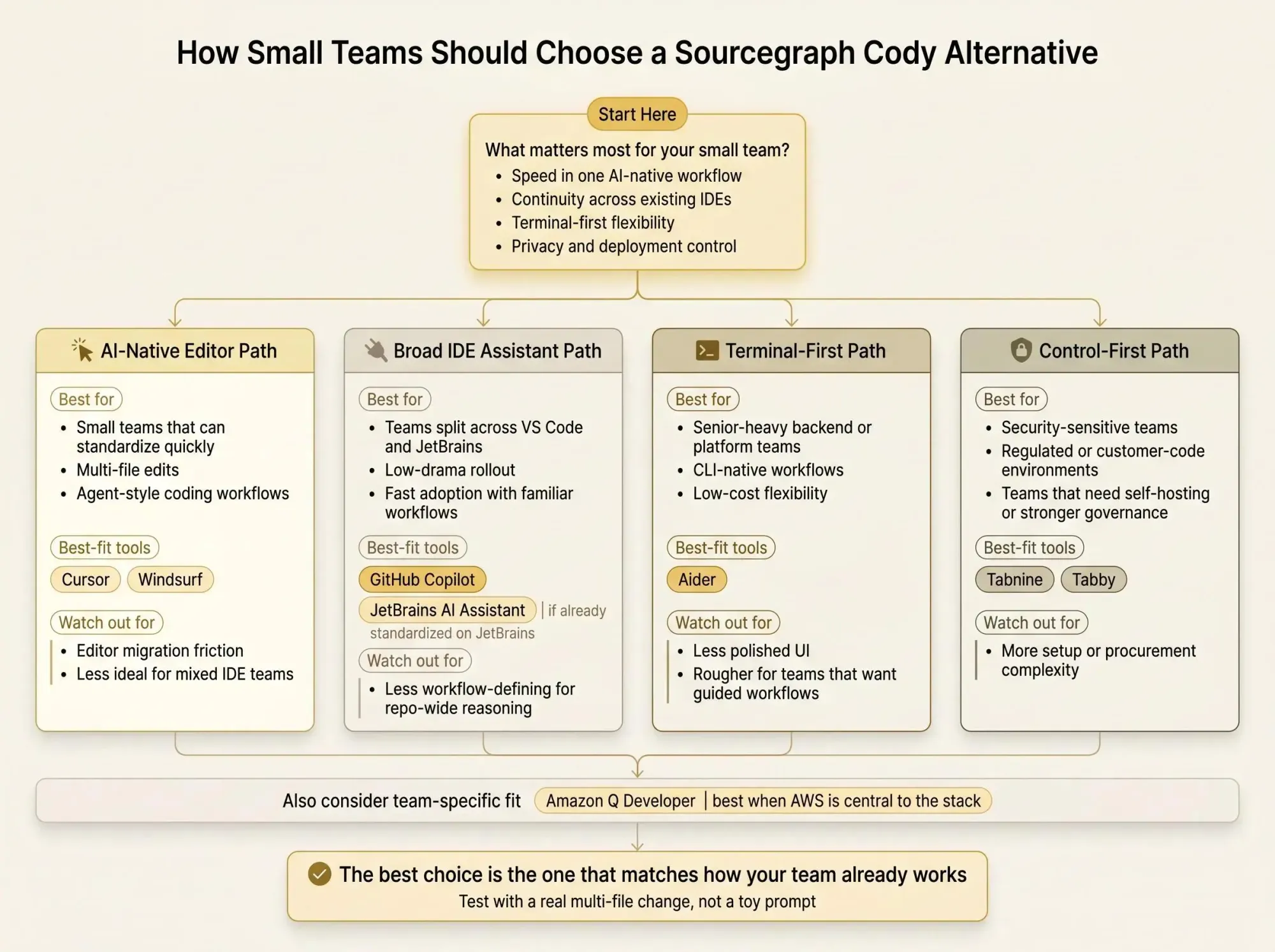
There are four clean paths:
1. Choose an AI-native editor
Pick Cursor or Windsurf if speed, multi-file execution, and agent-style workflows matter most. This is the right move for a 3-person startup shipping quickly where standardization is easy and coding velocity matters more than preserving everyone's editor preferences.
2. Choose a broad IDE assistant
Pick GitHub Copilot if the team is split across tools and you need low-friction rollout. An 8-person product team split between VS Code and JetBrains usually lands here first because workflow continuity beats novelty.
3. Choose a terminal-first tool
Pick Aider if the team is senior, CLI-heavy, and cost-aware. This is common on backend and platform teams where terminal workflows are already the default.
4. Choose a self-hosted option
Pick Tabnine or Tabby if data control is non-negotiable. A security-conscious team handling customer code or regulated data shouldn't pretend this is a secondary concern.
A few filters help cut through the noise:
- Editor lock-in versus continuity
- Team size and how fast you can standardize
- Security and deployment requirements
- Agentic coding versus everyday completions
- Budget sensitivity and vendor complexity
Small teams don't need a perfect answer. They need the least wrong answer for how they actually work.
What Small Teams Usually Miss When Comparing AI Coding Assistants
Most comparisons stop at autocomplete quality. That's shallow. The harder problem is whether the assistant understands change impact across modules, services, and shared code.
A tool can be very good at writing code and still be weak at architecture awareness. We see this constantly in refactors.
Consider three common cases:
- Refactoring a shared auth module across multiple packages
- Updating a data model used by several services
- Cleaning dead code that still has hidden reachability
Agentic workflows help with execution, but not always with dependency understanding. Those are different jobs. One gets code written. The other keeps you from breaking unrelated systems on a Thursday night.
Low seat price can hide workflow cost. If every AI-generated change needs extra manual review because nobody trusts the blast radius, the tool isn't cheap. It's just cheap to buy.
This is also where mixed-team support gets overvalued sometimes. Broad IDE support matters if your team is mixed and staying mixed. It matters much less if five engineers can standardize in a week.
If you're already using Cursor, Copilot, Codex, Claude Code, or another MCP client, a codebase graph layer like Pharaoh can help the assistant understand dependencies, blast radius, existing code, and dead code before changes are made. That's a different layer of the stack, and for small teams doing real refactors, it's often the layer that removes review anxiety.
When an AI Coding Assistant Is Not Enough on Its Own
Small teams usually buy an assistant for speed, then hit the wall during refactors, migrations, and repo-wide changes. The issue isn't that the model can't edit code. The issue is that it doesn't have a reliable architecture map.
Editors and assistants help generate and edit code. Architecture context layers help the model reason about what a change touches. Don't mix those up.
This gap shows up fast in real work:
- Monorepo cleanup where one "unused" package is still imported through a strange internal path
- Multi-module refactoring sprints where the same concept appears under six names
- Reachability checks before deleting old paths
- Blast radius checks before letting an agent edit across files
Here's the operator version: fast code generation without dependency context just moves the review burden downstream.
For teams using AI heavily, Pharaoh can sit alongside the coding assistant and provide a knowledge-graph view of existing code, dependencies, and dead code so changes happen with better context. It doesn't replace your editor or assistant. It gives them a map.
If you're also tightening quality gates around AI-generated changes, the open source AI Code Quality Framework covers the linting, testing, and review side well.
Small teams do not always need a bigger assistant. They often need a better context layer around the assistant they already prefer.
Conclusion
The best sourcegraph cody alternative for small teams depends less on brand popularity and more on workflow fit. That's the whole game.
Cursor and Windsurf make the strongest case for AI-native editor workflows. GitHub Copilot is the safest broad default for mixed teams. Tabnine and Tabby stand out when privacy and deployment control matter. Aider fits terminal-heavy teams. JetBrains AI Assistant fits JetBrains-standardized shops. Amazon Q Developer fits AWS-first teams.
The practical move is simple:
- Shortlist two tools based on your current editor setup and security needs
- Test both on one real task, not a toy prompt
- Use something messy, like a multi-file refactor or shared-module change
- Watch review overhead, not just generation speed
If the assistant writes code quickly but your team still has to manually reconstruct dependencies after every change, you don't have a coding problem. You have a context problem.
If you're using Claude Code or another MCP client, you can add a codebase graph via Pharaoh in about two minutes. For a lot of small teams, that's the difference between "AI helped write this" and "we can actually trust this change."