Best Architecture Analysis Software for Engineering Teams

Architecture analysis software gets messy fast when you are working across multiple repos and an AI assistant is about to touch code it barely understands. Most teams overrate pretty maps and underrate dependency truth.
What matters is whether a tool can show blast radius, dead code, and how modules actually connect before you let Claude Code or Cursor loose (that is the real test).
We cut this list down to three options worth your time.
1. Pharaoh
1Pharaoh Pharaoh Best Choice 2026

Pros
- Knowledge graph maps real dependencies
- Helps AI make safer edits
- Clear blast-radius before changes
- Surfaces dead code for cleanup
- Fits active multi-repo workflows
Cons
- Less suited to legacy reconstruction
- Not built for system risk studies
- Value depends on active usage
9.4Excellent VISIT SITE »
When teams start editing a large codebase without architecture context, the failure mode is usually boring and expensive. A small change lands, tests pass, and two services break a day later because nobody saw the dependency chain. AI coding assistants make this sharper, not easier. They move fast, but they don't know your system unless you give them structure.
Pharaoh is built for that exact gap. We map software architecture into a knowledge graph so developers and AI tools can reason about the codebase before they touch it.
What matters here isn't "documentation." It's operational context.
Where Pharaoh fits best
Pharaoh is a strong fit when your team is working inside a living system and needs answers during normal delivery work:
- multi-module applications with unclear cross-service dependencies
- multi-repo environments where one change can ripple across ownership boundaries
- refactoring sprints where dead code and duplicate paths need to be identified early
- AI-assisted workflows in Claude Code, Cursor, Codex, or other MCP clients
If your team keeps asking questions like these, you're in the right category:
- What depends on this module?
- If we change this interface, what's the blast radius?
- Do we already have code that does this?
- Is this path still live, or is it dead code nobody removed?
Those are not architecture-team questions. They're shipping questions.
What makes it different
Most architecture analysis software still behaves like a diagramming exercise. Useful for review decks, weak during a real edit session.
Pharaoh takes a different position:
Architecture only matters if it helps you make a safer change today.
The knowledge graph model matters because it preserves relationships, not just shapes. That gives you software dependency mapping that can answer actual change-impact questions instead of showing a static picture that gets stale by next sprint.
That shows up in a few practical ways:
- Dependency awareness: You can inspect how modules, services, and code paths connect before changing a file.
- Blast-radius visibility: You don't need to guess whether a "simple cleanup" crosses into three other domains.
- Existing code context: AI assistants can work from what already exists instead of inventing a parallel pattern.
- Dead code discovery: This gets surprisingly important before migrations and large cleanup efforts. Noise hides risk.
A lot of teams don't need prettier diagrams. They need fewer accidental edits.
Compared with the other options here
Pharaoh is closer to day-to-day development than the other tools in this list.
ArchAgent is more about recovering architecture when the system has drifted and current structure is unclear. SMART sits even further away from developer workflow. It's for system-level risk analysis, not source-level code understanding.
So the deciding question is simple: are you trying to understand a repository well enough to change it safely this week?
If yes, Pharaoh is the better fit.
If you're using Claude Code, adding a codebase graph through MCP takes about two minutes. Pharaoh does that automatically via MCP at pharaoh.so.
A practical example
Here's the kind of question teams actually ask in a session:
Before changing billing/invoice_service.py:- show upstream callers- show downstream dependencies- identify related implementations in other modules- flag dead paths connected to invoice exportThat is much more useful than "generate an architecture diagram."
One gives you decision support. The other gives you a screenshot.
2. ArchAgent
2ArchAgent Research architecture recovery framework
Pros
- Strong for legacy architecture recovery
- Handles cross-repository structure well
- Combines static and LLM analysis
- Adaptive segmentation aids scale
Cons
- Not a polished commercial platform
- Setup may require research comfort
- Less suited to daily workflows
7.8Solid VISIT SITE »
Some systems don't need live architecture intelligence first. They need archaeology. If the docs are wrong, the original owners are gone, and the code has spread across repositories, your first problem is recovering the structure that exists now.
That's where ArchAgent becomes relevant.
It is framed as an LLM-assisted architecture recovery approach for large legacy software. That distinction matters. This isn't mainly about helping a developer review a PR faster. It's about reconstructing architecture when the system itself has become hard to explain.
Why teams look at it
ArchAgent fits a narrower but very real problem set:
- legacy software with architecture drift
- cross-repository systems where current boundaries are unclear
- modernization work that starts with "what is this thing now?"
- migration planning where inherited assumptions are risky
A lot of engineering teams discover too late that modernization fails before code changes start. It fails in the understanding phase.
ArchAgent's focus on recovery is useful because it combines static analysis with LLM-assisted synthesis, then works around model context limits with adaptive code segmentation. For large codebases, that design choice isn't academic. It's necessary.
What stands out in practice
The valuable part isn't just that it extracts relationships. It's trying to reconstruct multiview architecture from the codebase itself, including cross-repository structure. That matters when the architecture has drifted far enough that a single dependency graph doesn't tell the full story.
There are a few signals that this approach is the right one:
- Your documentation is old enough to be misleading.
- Ownership has rotated so many times that nobody trusts the original boundaries.
- The code spans enough repositories that manual reconstruction becomes a month-long side quest.
That last one gets expensive fast.
How it differs from Pharaoh and SMART
Relative to Pharaoh, ArchAgent is less about continuous architecture visibility during active delivery. It's more of a recovery-first approach. You'd pick it when the main question is:
What is the architecture of this legacy system now?
Not:
Can our developers and AI tools make safer edits inside it this sprint?
Relative to SMART, ArchAgent is still codebase-centered. It is trying to recover application architecture from source code, not run system trade studies or mission reliability analysis.
The tradeoff people miss
Research-oriented frameworks can be powerful and still be awkward to adopt.
ArchAgent is presented as a framework and research-driven approach, not a standard commercial developer platform. That's not a flaw by itself. It just changes the adoption story. Teams need enough internal comfort with experimental tooling, setup effort, and interpretation.
That makes it a good option for recovery programs, architecture reconstruction work, and legacy assessment. It's a weaker fit if you need architecture visibility embedded into daily developer workflow by next Tuesday.
Different job. Different tool.
3. SMART
3SMART NASA software tool

Pros
- Supports system-level trade studies
- Quantifies mission success probability
- Models correlated redundancy effects
- Tests sensitivity to component reliability
Cons
- Not built for source-code analysis
- Weak fit for developer workflows
- Limited value for monorepos
6.4Average VISIT SITE »
SMART belongs in this list for one reason: it shows how wide the phrase "architecture analysis software" can stretch. Not every architecture tool is trying to help engineers understand source code.
SMART is aimed at architecture and risk analysis in a systems-engineering sense. If you're evaluating software dependency mapping tools for application code, this is usually not where you land. If you're doing mission planning, reliability analysis, or trade studies, the category changes completely.
What SMART is actually for
SMART focuses on high-level system questions such as:
- probability of mission success
- effects of correlated redundancies
- sensitivity to component reliability
- system architecture trade study decisions
That's a real and useful form of analysis. It's just a different layer.
A lot of bad tool evaluations start when teams hear "architecture analysis" and stop there. They compare tools with completely different jobs and then wonder why none of them feels right.
Why it's the weakest fit for codebase understanding
If your engineers are trying to untangle service dependencies in a monorepo, SMART is too far from the code. It isn't trying to explain how application modules connect or what files an AI assistant should inspect before editing a shared interface.
That means it is much less aligned with:
- architecture visibility tools for developers
- codebase intelligence platforms used in PR review
- tools for understanding large codebases during refactors
You wouldn't reach for SMART to answer "what depends on this package?" Any team that does will waste time in the evaluation cycle.
Still worth including
There is value in seeing the contrast.
SMART is a useful reminder that some tools treat architecture as part of system design and risk evaluation, not repository insight. For the right institution or program, that may be the correct lens. For most software teams shipping application code, it isn't.
That's not a close call.
How to Choose Between Architecture Visibility Tools, Codebase Intelligence Platforms, and Architecture Recovery Approaches
Most teams make this harder than it needs to be. Start with the job, not the label. "Architecture analysis software" is too broad to be useful on its own.
A cleaner decision frame looks like this.
Match the category to the pain
If your team is shipping code daily and using AI assistants, you need architecture visibility tied to the edit path. Dependency and blast-radius questions come first.
If your problem is legacy software with drifted or missing documentation, recovery comes first.
If your work revolves around system reliability, tradeoffs, and mission success, then risk analysis is the correct category.
Here's the practical map:
- Unsafe edits across modules or repos: choose a codebase intelligence platform
- Missing docs and unclear current structure: choose an architecture recovery approach
- System-level reliability planning: choose a risk-analysis tool
People often buy for the wrong moment in the lifecycle. That's the mistake.
A simple shortlist
Use this if you want the short version:
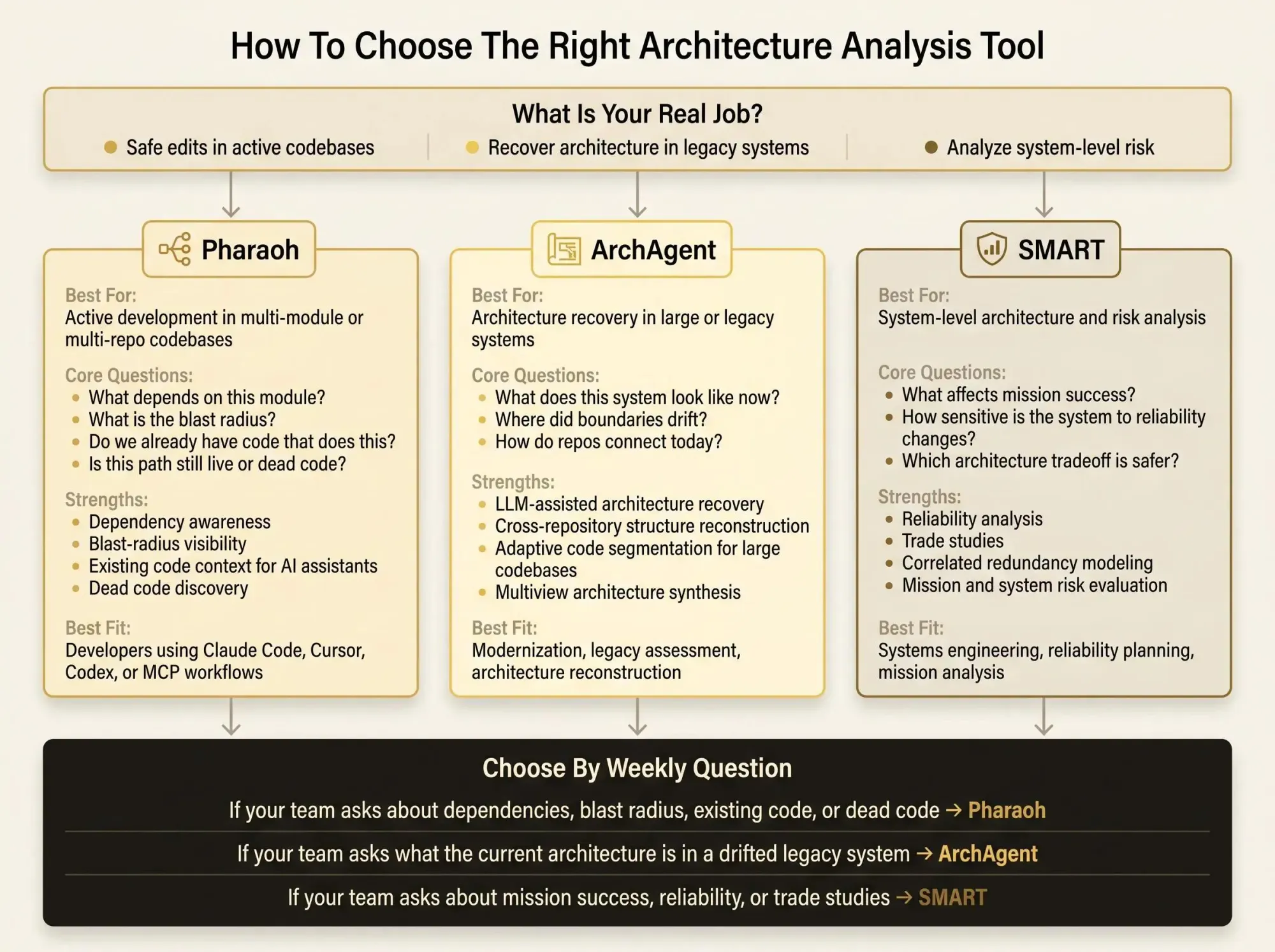
- Choose Pharaoh when developers and AI assistants need architecture-aware code understanding during active development.
- Choose ArchAgent when the main job is reconstructing architecture from large or legacy codebases.
- Choose SMART when the work is high-level architecture and risk analysis outside normal repository workflows.
If two categories both sound right, look at the first weekly question your team asks. That usually exposes the real need.
What Matters Most in Software Dependency Mapping Tools for AI-Assisted Development
AI-assisted development changed the bar. A tool that was "good enough" for human-only navigation often falls apart once an assistant starts proposing changes across files it hasn't truly understood.
That's why architecture analysis software now has to do more than surface structure.
The graph has to answer something
A dependency graph by itself is not the outcome. The outcome is a faster, safer decision.
Good software dependency mapping tools should help answer questions like:
- what code paths are downstream from this change?
- where are the duplicate implementations?
- which module owns this behavior?
- what can be removed before the refactor starts?
If the graph can't support those questions, it's decoration.
A map that doesn't change a decision is just UI.
Scale changes everything
Small projects can get away with lightweight architecture views. Large systems can't.
Once you're dealing with multiple modules, shared libraries, service boundaries, and cross-repo coupling, local file context stops being enough. AI tools especially struggle here because they infer from slices of the codebase, not from the full structure.
That is why codebase intelligence platforms matter more as the repository grows. In a small service, 2K tokens of context might be enough. In a mature monorepo, the real dependency story may be spread across 40K tokens and six ownership boundaries.
Humans paper over that with experience. AI doesn't.
Recovery and live intelligence are different products
This gets confused all the time.
Architecture recovery tools help when you no longer trust your understanding of the system. Architecture intelligence tools help when you do understand the system broadly but need precise structural context to operate safely inside it.
They can look similar from a distance. They are not the same buy.
If you're also tightening code quality around these workflows, the open source AI Code Quality Framework covers the linting and testing side. That's adjacent to this problem, not the same problem.

Common Mistakes When Evaluating Architecture Analysis Software
A lot of tool evaluations fail before the demo ends. Not because the tools are bad, but because teams ask the wrong questions.
Here are the mistakes we see most often.
Confusing diagrams with decision support
A visual map is nice. It feels concrete. It can also be almost useless.
If the tool doesn't help with impact analysis, dependency tracing, or code understanding, the diagram won't change engineering behavior. Teams end up with architecture artifacts that look good in review meetings and disappear from daily work.
That pattern is older than AI. AI just exposes it faster.
Buying for the wrong lifecycle stage
Some teams pick a recovery framework when what they really need is daily architecture visibility for active development. Others evaluate a high-level risk tool when their actual pain is untangling application dependencies.
A powerful tool in the wrong category is still the wrong tool.
Try this test: ask whether the tool helps before a developer edits code, during a modernization effort, or during system trade studies. If you can't place it clearly, you're probably mixing categories.
Ignoring the AI workflow
Once engineers are using Claude Code, Cursor, or Codex in normal work, architecture context becomes part of the toolchain. Not an extra artifact. Not a side document.
Teams that ignore this end up with tools that can describe structure but can't feed useful context into the moment where changes are proposed. That's backwards. Most code review tools catch problems after the change exists. We think that's too late.
Missing the real signs of drift
Architecture drift rarely announces itself as "drift."
It shows up as:
- duplicated logic across modules
- unclear ownership around shared code
- dependency chains nobody can explain quickly
- refactors that feel dangerous even when the code looks simple
Those are the conditions your evaluation should target. Not whether the demo has a nice graph layout.
Conclusion
The three tools here solve different problems, and that's the main point.
Pharaoh is the strongest fit when your team needs codebase intelligence and architecture visibility during active development, especially in AI-assisted workflows. ArchAgent stands out when the job is recovering architecture from large or legacy codebases where documentation has drifted. SMART only makes sense when "architecture analysis" means system-level risk and trade study work, not software repository insight.
If you want a useful next step, don't start with vendors. Start with your weekly questions.
Write down the top two architecture questions your team asks all the time. Usually it's something like "what depends on this?" or "what is the current structure of this service?" Then match those questions to the tool category first. That one step cuts through a lot of bad evaluation work.
If your answers are mostly about dependencies, blast radius, existing code, and dead code in active repositories, you're looking for architecture visibility and codebase intelligence. That's where Pharaoh fits. If your problem is reconstruction, pick for reconstruction. If it's mission risk, pick for that.
The tool choice gets easier once the job is stated plainly.